Hotel smart lock integration connects your locks to the PMS so room keys activate at check-in. See how the API, middleware, and failover actually work.




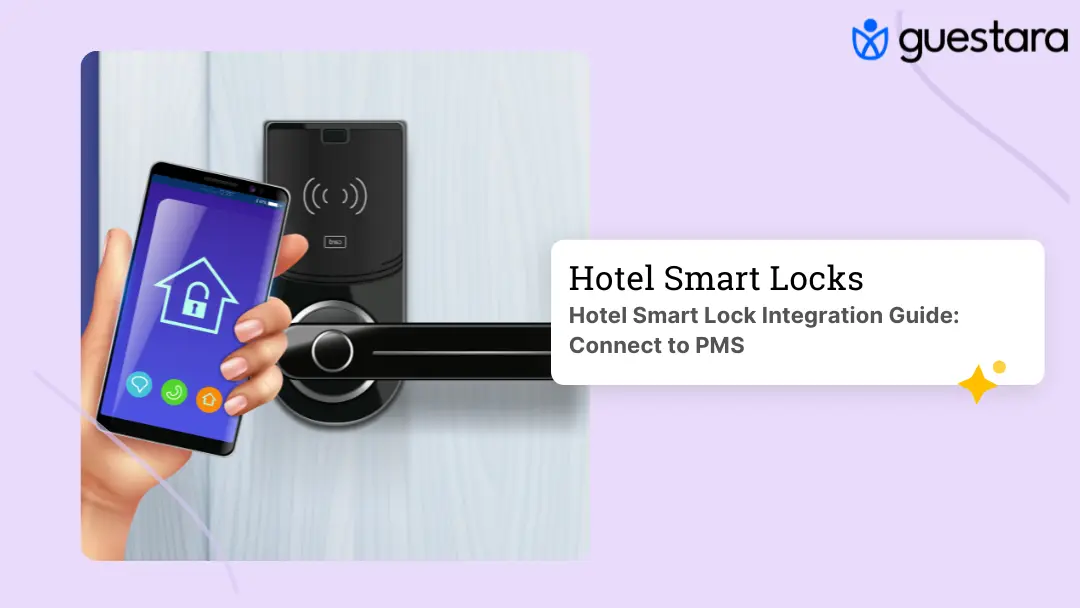
Hotel smart lock integration is what connects your door locks to your property management system, so a guest's key works the instant they check in. Without it, the lock and the booking never talk, and someone at the desk has to bridge the gap by hand.
Here is the moment it exists to fix. A guest finishes check-in on their phone, walks to the door, and the key does not work. The lock never heard about the reservation. The guest calls the front desk, a staff member reissues access, and the contactless arrival you paid for just became a phone call and a wait.
That failure is almost always an integration problem, not a lock problem. The lock works. The PMS works. The link between them does not. This guide breaks down how that link is built, the three ways locks connect to a PMS, which lock types integrate, what happens when the connection fails, and how to check integration depth before you buy.
Hotel smart lock integration is the data connection between your smart locks and your property management system that lets the two share reservation and access events automatically.
When a booking changes in the PMS, the integration passes that change to the lock. A check-in issues a key. A checkout revokes it. A room move updates access on both doors. None of it needs a staff member to encode a card or type a code.
Think of the PMS as the source of truth for who is staying where, and the lock as the thing that enforces it at the door. Integration is the wire between them. The stronger that wire, the less manual work at the desk and the fewer guests standing outside a room that will not open.
This is the layer that turns a smart lock from a nicer keypad into part of an automated arrival. A digital key that reaches the guest's phone only works if the lock knows the reservation exists, and that knowledge comes from the integration.
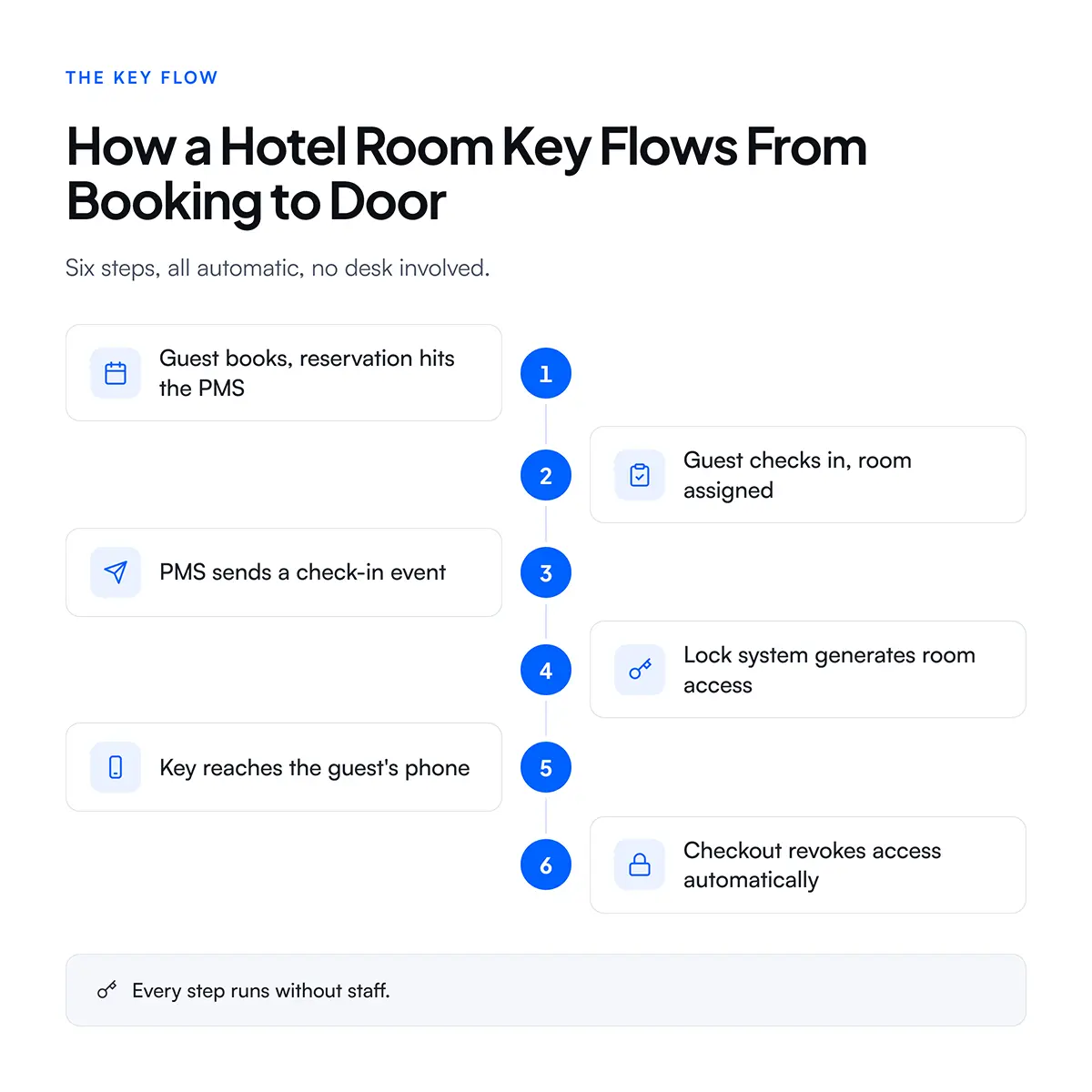
Smart lock integration works by passing reservation events from the PMS to the lock system in real time, so each booking action triggers a matching access action at the door.
Here is the sequence for a typical stay:
The whole loop runs in the background. On Guestara's platform, contactless check-in completes in 30 seconds through an AI ID scan, and the moment it finishes, the key fires to the lock without anyone touching the front desk. The guest walks from the elevator to a door that already knows they are coming.
The speed and reliability of that loop depend entirely on how the two systems are connected, which is the next question.
Smart locks connect to a PMS in three ways, and the method decides how fast and how dependable the key delivery is.
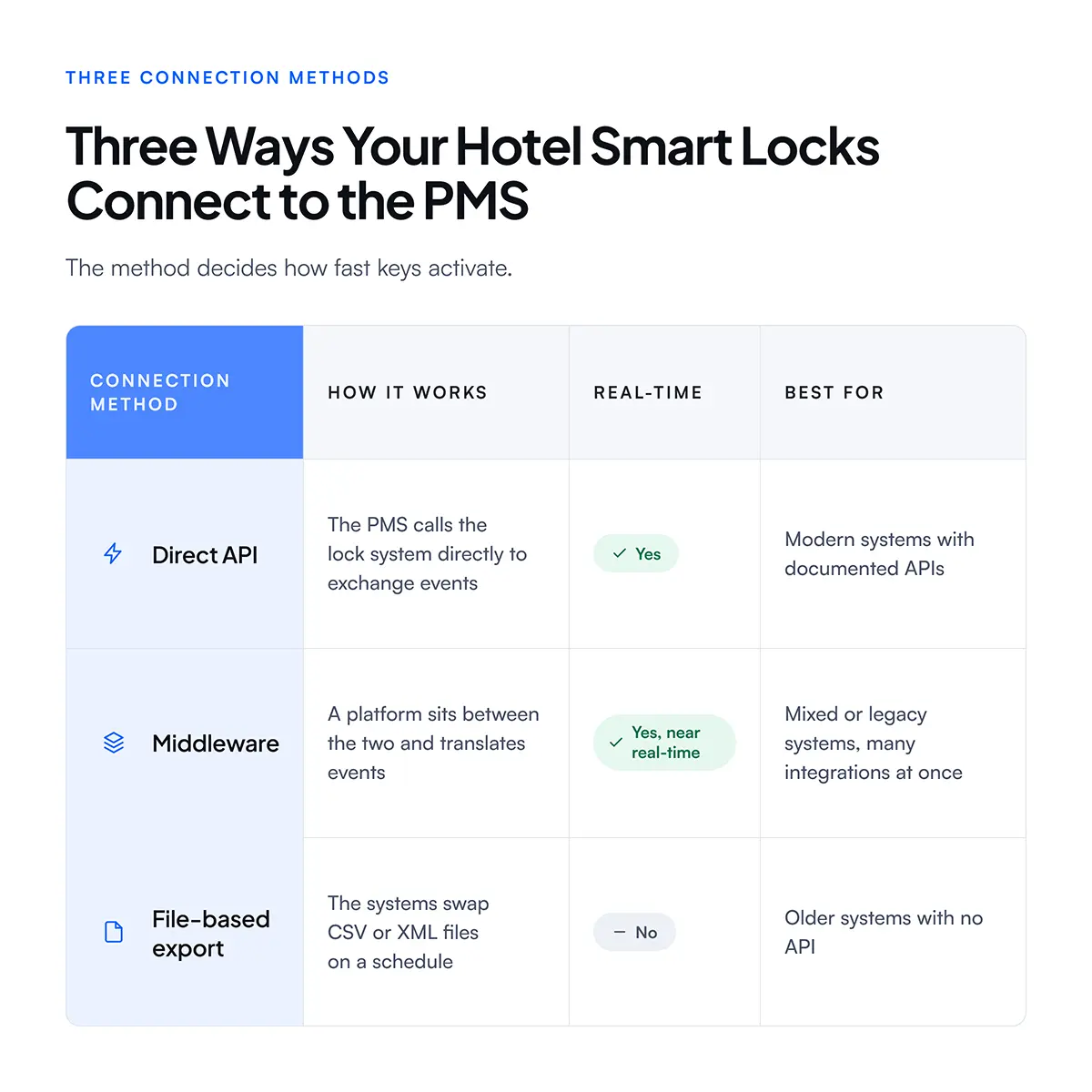
A direct API is the cleanest link. The PMS makes a call, the lock system responds, and the key activates in seconds. It depends on both systems offering a well-documented interface.
Middleware sits in the middle when a direct link is not available or when many systems need the same event at once. This is where a platform like Guestara earns its place, since it can speak to dozens of different lock systems and translate a single check-in event into whatever each lock expects.
Middleware also absorbs change better than a direct link. When a lock vendor updates its interface, the middleware layer adapts once, and every property on it keeps working. A hotel that wired its PMS straight to one lock brand has to rebuild that connection itself each time either side changes. This is the quiet reason large operators lean on a platform in the middle rather than a stack of one-to-one links.
File-based export is the legacy fallback. The systems trade files on a timer, so a key can take minutes to activate rather than seconds. It works, but it is the option to avoid if real-time arrival matters to you.
Most modern hotel locks can integrate with a PMS, but they split into two connectivity models that behave very differently.
Online or networked locks stay connected to the property network and receive access changes in real time. When the PMS revokes a key, the door knows immediately. These suit hotels that want instant updates and live audit logs on every door.
Offline or standalone locks are not wired to the network. They validate access from an encrypted credential the guest carries, usually a code or a mobile key, rather than checking with a server at the moment of entry. They cost less to install and work where running network to every door is impractical, which is common in vacation rentals and older buildings.
Both models integrate, but they deliver the key differently:
The lock hardware itself spans several brands common in hospitality, including Mosler, ASSA ABLOY and its VingCard line, Dormakaba and Saflok, Salto, Yale, Onity, and Schlage. Each handles connectivity a little differently, which is why a platform that speaks to many of them beats one tied to a single vendor. The point of a broad integration platform is that you are not forced to pick your lock based on what your software supports. For the full breakdown of lock hardware and how to choose it, the guide to choosing and integrating hotel smart locks goes deeper on the hardware side.
Integration works because the industry agreed on shared standards that let a PMS and a lock system speak the same language, rather than every pair needing a custom build.
The main ones to know:
You do not need to memorize the acronyms. What matters is asking a vendor whether their integration uses a documented, standards-based interface, or a one-off connection that breaks the next time either system updates. A platform built on shared standards ages better and survives version changes that would snap a custom link.
Guestara integrates with major PMS platforms on these standards, including Cloudbeds, Hotelogix, Ezee Absolute, Apaleo, Beds24, SiteMinder, Little Hotelier, and Oracle, so the check-in event that fires a key reaches the lock the same way regardless of which PMS a property runs.
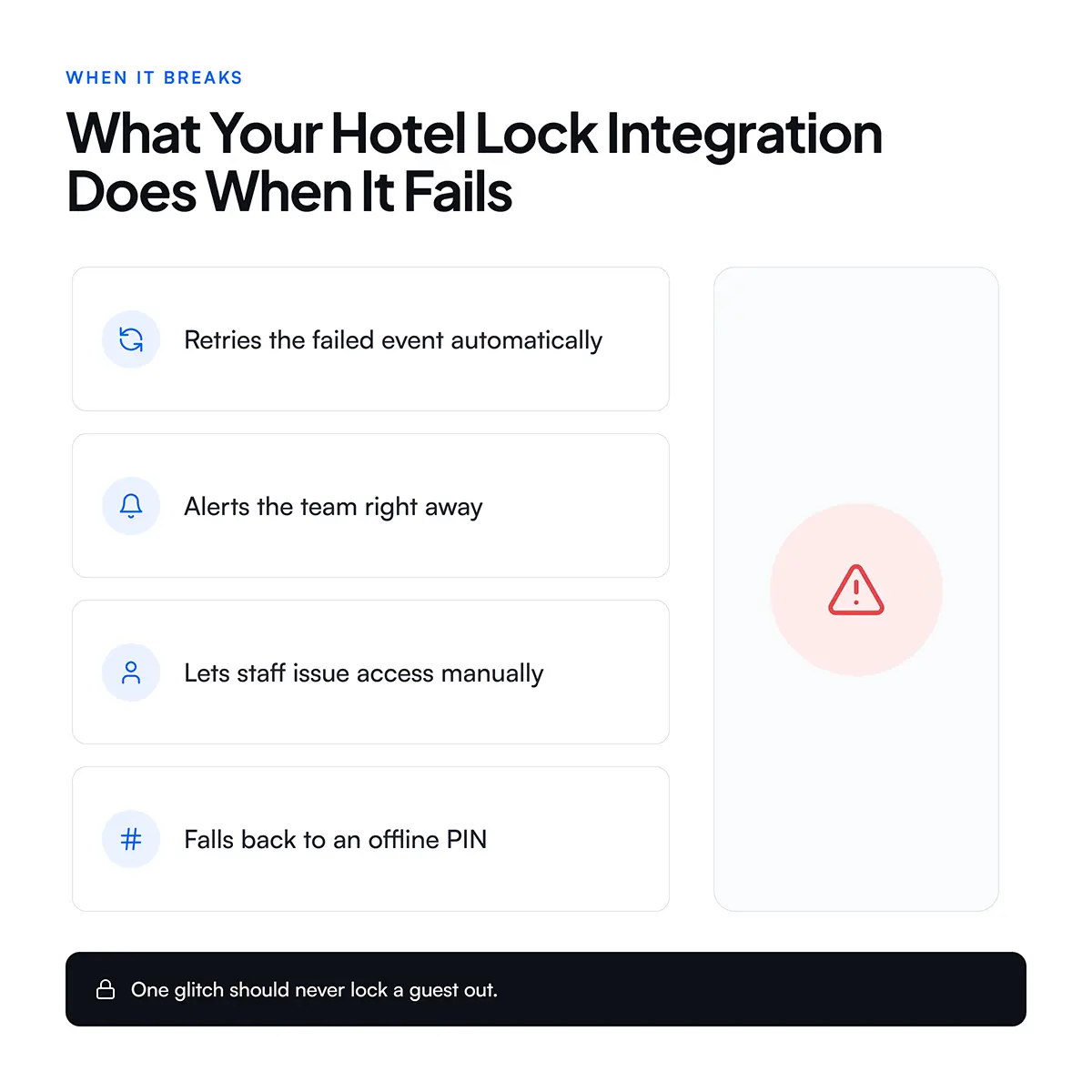
When integration fails, a well-built system degrades gracefully instead of leaving a guest locked out, and that failure handling is the difference between a minor blip and a lobby full of complaints.
The failures are usually one of these:
The integrations worth buying plan for all of these. Good failure handling includes:
This is why an offline code backup matters even at a fully networked property. If the network drops, a guest with a PIN still gets into the room, and the front desk is not fielding calls.
The cost of skipping failure handling is easy to underrate. One broken sync during a busy check-in window does not stay one problem. It becomes a queue at the desk, a cluster of guests waiting outside rooms, and a run of one-star reviews that all mention the same thing. The integration that quietly retries and alerts is the one that keeps a single glitch from turning into a bad night. For the broader view of what shifts for staff and guests when locks go digital, what changes operationally with smart locks and digital keys covers the day-to-day side.
The more lock systems a platform integrates with, the more freedom you have to pick the right lock for your property instead of the right lock for your software. Breadth of integration is a buying advantage, not a technical footnote.
A platform that supports only one or two lock brands forces a trade-off. Either you buy the lock that vendor supports, even if it is not the best fit or price for your property, or you run a second system to bridge the gap. Both cost money and add failure points.
Guestara connects to more than 50 smart lock systems. That breadth means:
For a hotel group with five properties on five different lock brands, this is the difference between one audit trail and five, and one vendor relationship instead of five. Onboarding across the check-in and lock stack typically takes about one week, including the PMS and lock integration.
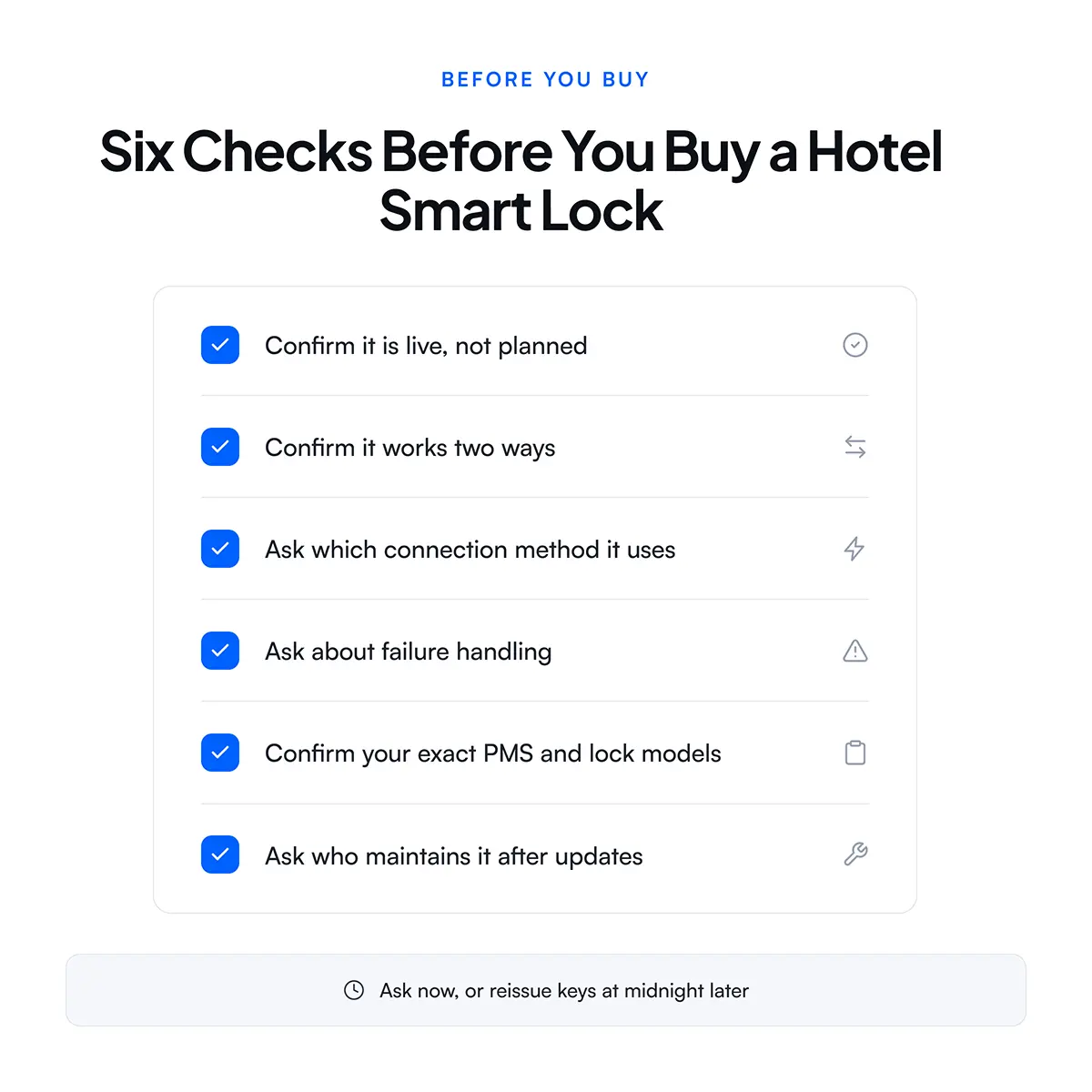
Before you sign with any smart lock or guest-experience vendor, confirm the integration is real, current, and built to survive updates. A logo on a partner page is not the same as a working, maintained integration.
Run through this checklist with the vendor:
The technical depth here is exactly what separates a vendor who will still be integrated a year from now from one whose connection breaks at the first update. For a wider look at getting arrival right end to end, the full contactless check-in guide and the self check-in benefits and technology guide both connect the lock layer to the rest of the arrival, and cutting the desk queue is where the payoff shows up first, as covered in how self check-in cuts wait times. For the lock hardware itself, the smart locks overview lays out the options.


Hotel smart lock integration connects your locks to the PMS so room keys activate at check-in. See how the API, middleware, and failover actually work.
Hotel smart lock integration is what connects your door locks to your property management system, so a guest's key works the instant they check in. Without it, the lock and the booking never talk, and someone at the desk has to bridge the gap by hand.
Here is the moment it exists to fix. A guest finishes check-in on their phone, walks to the door, and the key does not work. The lock never heard about the reservation. The guest calls the front desk, a staff member reissues access, and the contactless arrival you paid for just became a phone call and a wait.
That failure is almost always an integration problem, not a lock problem. The lock works. The PMS works. The link between them does not. This guide breaks down how that link is built, the three ways locks connect to a PMS, which lock types integrate, what happens when the connection fails, and how to check integration depth before you buy.
Hotel smart lock integration is the data connection between your smart locks and your property management system that lets the two share reservation and access events automatically.
When a booking changes in the PMS, the integration passes that change to the lock. A check-in issues a key. A checkout revokes it. A room move updates access on both doors. None of it needs a staff member to encode a card or type a code.
Think of the PMS as the source of truth for who is staying where, and the lock as the thing that enforces it at the door. Integration is the wire between them. The stronger that wire, the less manual work at the desk and the fewer guests standing outside a room that will not open.
This is the layer that turns a smart lock from a nicer keypad into part of an automated arrival. A digital key that reaches the guest's phone only works if the lock knows the reservation exists, and that knowledge comes from the integration.
Smart lock integration works by passing reservation events from the PMS to the lock system in real time, so each booking action triggers a matching access action at the door.
Here is the sequence for a typical stay:
The whole loop runs in the background. On Guestara's platform, contactless check-in completes in 30 seconds through an AI ID scan, and the moment it finishes, the key fires to the lock without anyone touching the front desk. The guest walks from the elevator to a door that already knows they are coming.
The speed and reliability of that loop depend entirely on how the two systems are connected, which is the next question.
Smart locks connect to a PMS in three ways, and the method decides how fast and how dependable the key delivery is.
A direct API is the cleanest link. The PMS makes a call, the lock system responds, and the key activates in seconds. It depends on both systems offering a well-documented interface.
Middleware sits in the middle when a direct link is not available or when many systems need the same event at once. This is where a platform like Guestara earns its place, since it can speak to dozens of different lock systems and translate a single check-in event into whatever each lock expects.
Middleware also absorbs change better than a direct link. When a lock vendor updates its interface, the middleware layer adapts once, and every property on it keeps working. A hotel that wired its PMS straight to one lock brand has to rebuild that connection itself each time either side changes. This is the quiet reason large operators lean on a platform in the middle rather than a stack of one-to-one links.
File-based export is the legacy fallback. The systems trade files on a timer, so a key can take minutes to activate rather than seconds. It works, but it is the option to avoid if real-time arrival matters to you.
Most modern hotel locks can integrate with a PMS, but they split into two connectivity models that behave very differently.
Online or networked locks stay connected to the property network and receive access changes in real time. When the PMS revokes a key, the door knows immediately. These suit hotels that want instant updates and live audit logs on every door.
Offline or standalone locks are not wired to the network. They validate access from an encrypted credential the guest carries, usually a code or a mobile key, rather than checking with a server at the moment of entry. They cost less to install and work where running network to every door is impractical, which is common in vacation rentals and older buildings.
Both models integrate, but they deliver the key differently:
The lock hardware itself spans several brands common in hospitality, including Mosler, ASSA ABLOY and its VingCard line, Dormakaba and Saflok, Salto, Yale, Onity, and Schlage. Each handles connectivity a little differently, which is why a platform that speaks to many of them beats one tied to a single vendor. The point of a broad integration platform is that you are not forced to pick your lock based on what your software supports. For the full breakdown of lock hardware and how to choose it, the guide to choosing and integrating hotel smart locks goes deeper on the hardware side.
Integration works because the industry agreed on shared standards that let a PMS and a lock system speak the same language, rather than every pair needing a custom build.
The main ones to know:
You do not need to memorize the acronyms. What matters is asking a vendor whether their integration uses a documented, standards-based interface, or a one-off connection that breaks the next time either system updates. A platform built on shared standards ages better and survives version changes that would snap a custom link.
Guestara integrates with major PMS platforms on these standards, including Cloudbeds, Hotelogix, Ezee Absolute, Apaleo, Beds24, SiteMinder, Little Hotelier, and Oracle, so the check-in event that fires a key reaches the lock the same way regardless of which PMS a property runs.
When integration fails, a well-built system degrades gracefully instead of leaving a guest locked out, and that failure handling is the difference between a minor blip and a lobby full of complaints.
The failures are usually one of these:
The integrations worth buying plan for all of these. Good failure handling includes:
This is why an offline code backup matters even at a fully networked property. If the network drops, a guest with a PIN still gets into the room, and the front desk is not fielding calls.
The cost of skipping failure handling is easy to underrate. One broken sync during a busy check-in window does not stay one problem. It becomes a queue at the desk, a cluster of guests waiting outside rooms, and a run of one-star reviews that all mention the same thing. The integration that quietly retries and alerts is the one that keeps a single glitch from turning into a bad night. For the broader view of what shifts for staff and guests when locks go digital, what changes operationally with smart locks and digital keys covers the day-to-day side.
The more lock systems a platform integrates with, the more freedom you have to pick the right lock for your property instead of the right lock for your software. Breadth of integration is a buying advantage, not a technical footnote.
A platform that supports only one or two lock brands forces a trade-off. Either you buy the lock that vendor supports, even if it is not the best fit or price for your property, or you run a second system to bridge the gap. Both cost money and add failure points.
Guestara connects to more than 50 smart lock systems. That breadth means:
For a hotel group with five properties on five different lock brands, this is the difference between one audit trail and five, and one vendor relationship instead of five. Onboarding across the check-in and lock stack typically takes about one week, including the PMS and lock integration.
Before you sign with any smart lock or guest-experience vendor, confirm the integration is real, current, and built to survive updates. A logo on a partner page is not the same as a working, maintained integration.
Run through this checklist with the vendor:
The technical depth here is exactly what separates a vendor who will still be integrated a year from now from one whose connection breaks at the first update. For a wider look at getting arrival right end to end, the full contactless check-in guide and the self check-in benefits and technology guide both connect the lock layer to the rest of the arrival, and cutting the desk queue is where the payoff shows up first, as covered in how self check-in cuts wait times. For the lock hardware itself, the smart locks overview lays out the options.
Most modern smart locks can integrate with a PMS, but not every lock integrates with every PMS. Integration depends on whether both the lock system and the PMS expose a compatible interface, usually an API or a supported middleware connection. Before buying, confirm the specific lock model and PMS version are supported together, since a brand being listed as compatible does not guarantee your exact configuration is.
Integration timelines depend on the platform and how modern your systems are. A standards-based integration on documented APIs can be configured as part of a one-week onboarding, while a custom link to a legacy system takes longer. The bigger variable is usually the lock hardware installation itself, not the software connection, since wiring or fitting locks across every door is the slower part of the project.
A well-designed integration keeps guests moving even when the connection fails. It queues failed events to replay once the link is restored, lets staff issue access manually at the desk, and alerts the team the moment something breaks. This is also why many properties keep an offline PIN option, so a guest can still enter a room if the network drops at the wrong moment.
Yes, a platform with broad lock integration can manage access across several properties from one dashboard, even when those properties run different lock brands. This gives a hotel group a single audit trail, one vendor relationship, and consistent key delivery across sites. It also means adding or switching lock hardware at one property does not require replacing the guest-experience platform everywhere.
Smart lock integration is secure when it uses encrypted, standards-based interfaces and revokes access automatically at checkout. The access credential is tied to a specific reservation and room, and every issue and revoke event is logged, which creates an audit trail for any dispute. The main risk is not the integration concept but poor maintenance, so choosing a platform that keeps its integrations current as systems update is what keeps it secure over time.
We work closely with the industry leaders to offer seamless solutions




We’re here to help your whole team stay ahead of the curve as you grow.

Get up and running quickly with a personalized onboarding plan

Connect with real people who really get it, 24/7

Checkout our vast library of free resources, templates and more
There's only so much we can say — so let us show you! Schedule a demo today and reach your business goals.


.png)