Hotel smart locks change what your front desk, housekeeping and night shift do every day. Here is the operational shift, the new failures, and the SOPs to rewrite.




The locks go in over a weekend. On Monday morning your front desk has nothing to hand out and nobody has told them what to do instead. The housekeeper on floor three cannot open 312 because her old card was never reissued. The night manager still has a drawer of blank keycards and no idea whether they still work.
What changes when a hotel fits smart locks is not the door. It is the daily routine of every person who used to touch a key.
Most guides stop at the purchase. This one starts the morning after. Here is what actually shifts for your front desk, your housekeepers, your maintenance team, your night shift and your guests, plus the new failures you will meet and the procedures you need to rewrite before go-live.
Three things change the moment hotel smart locks go live, and all three change on the same day whether you are ready or not.
Key issuance moves off the front desk and into your software. Access becomes time-bound, so it starts and stops on its own. And every door starts producing a record of who opened it and when.
The hardware goes in over a weekend. The operating routine takes six to eight weeks to settle. Hotels that budget for the first and not the second are the ones where staff quietly build workarounds.
Encoding a card for every arrival. Cutting a replacement when a guest loses a key. Re-keying a room after a guest is moved. Collecting cards at checkout and running them through a sanitiser. Chasing the guest who walked off with a key at 6am.
That is real work, and it disappears in week one.
Rooms still need cleaning. Guests still complain. Somebody still has to greet the family arriving at 4pm with three suitcases and a booking under the wrong surname.
The front desk does not vanish. It stops being a key counter and becomes an exception desk. That distinction is the whole story of this post.
Your front desk stops issuing keys and starts handling exceptions. The volume of guest interactions does not fall as much as operators expect. What falls is the amount of time each one takes.
US hotel labour data supports this. Across roughly 5,000 properties, guest service representatives cut their minutes per occupied room from 12.03 to 10.49 between January and September 2025, a 12.7 percent improvement, while total headcount across those hotels grew 4 percent over the same period. The report attributes the gain partly to greater use of digital tools and self-service.
Read that twice. Hotels did not cut people. They restructured what those people spend their time on.
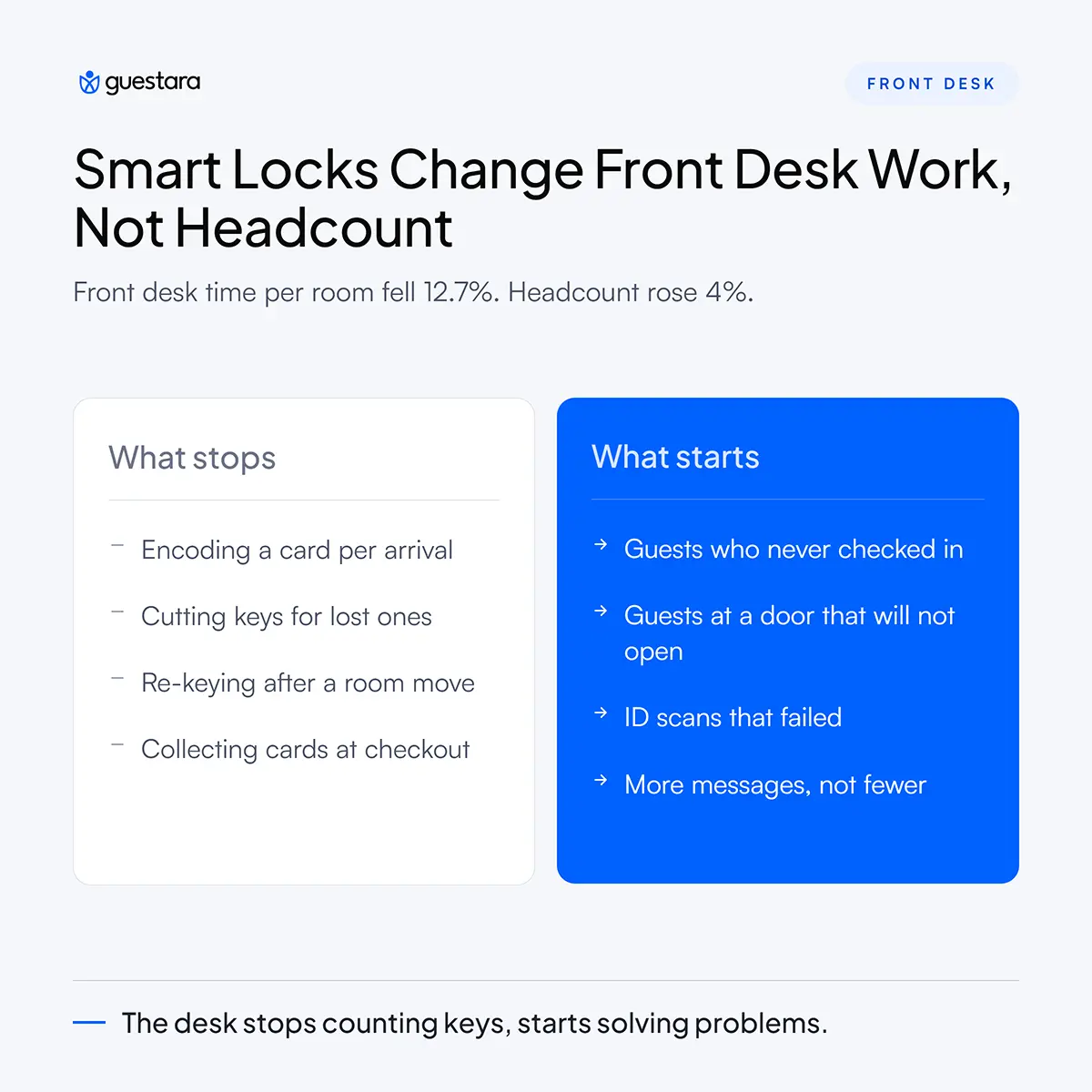
Key encoding, card replacement, room-move re-keying and lost key incidents all go. So does the queue that formed behind them at 3pm on a Friday. Our peak-hour playbook covers how that arrival spike reshapes once keys are no longer handed over one at a time.
Guests who never completed check-in. Guests standing at a door that will not open. ID scans that failed. Bookings where the name does not match the passport. Message volume, which usually goes up rather than down.
These are harder problems than encoding a card. They need a person who can decide, not a person who can operate a machine. Budget for that in your hiring and your training.
Once nobody needs to collect anything, the counter stops being the right place to stand. The stronger pattern is a staff member on the lobby floor with a tablet, intercepting the guest who looks lost before they join a line that no longer exists.
Guests want this. In a 2022 Oracle Hospitality and Skift study of 5,266 consumers and 633 hotel executives across nine markets, only 38 percent said they wanted a fully self-service model with staff available on request. The majority still want a person in the room. They just do not want to queue for one.
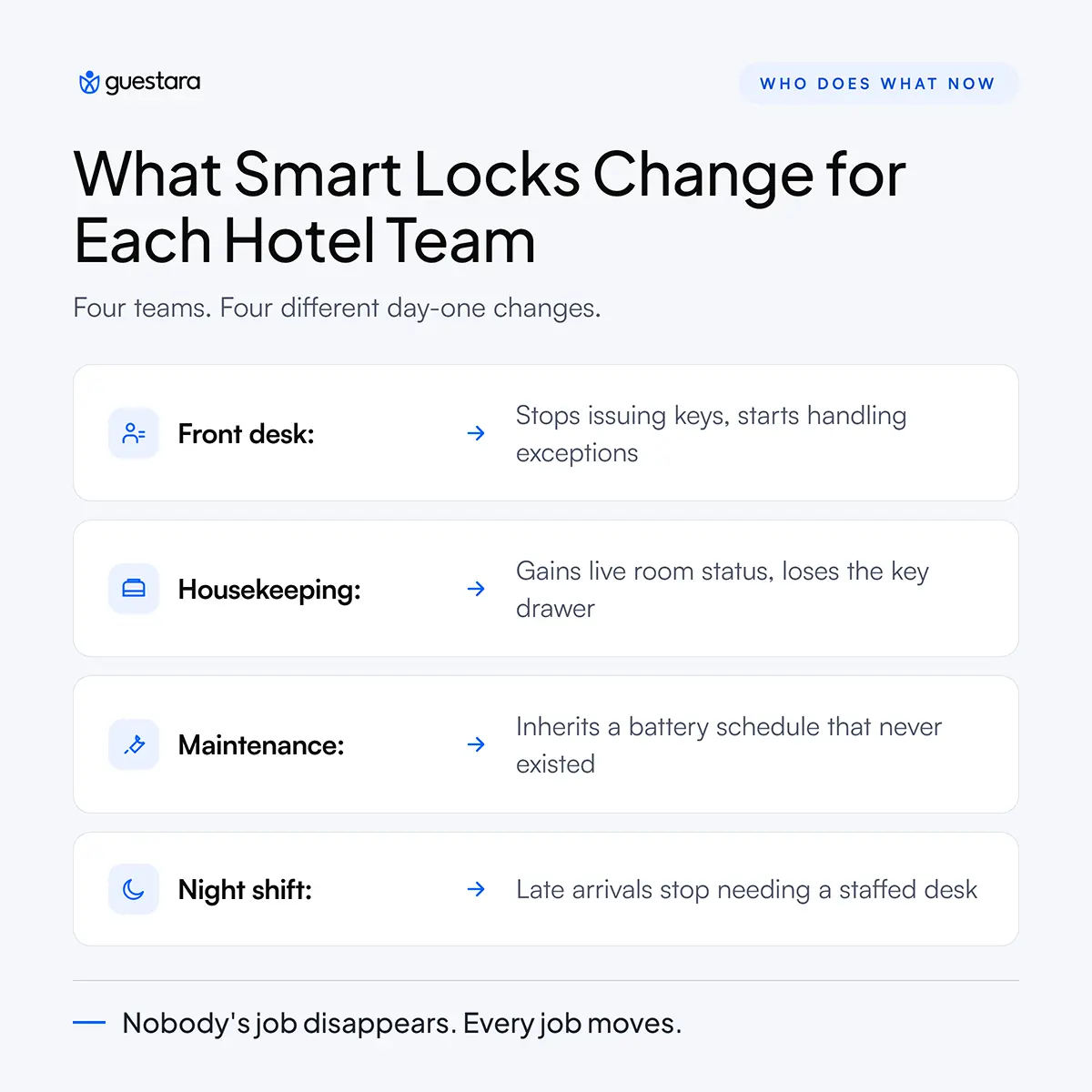
Housekeeping gains live room status and loses the key drawer. Maintenance inherits a battery schedule that did not exist before. Both changes are larger than most operators plan for.
Every housekeeper needs a working credential every shift, and that credential has to cover the right floors and no others. This sounds trivial until a floater covers an unfamiliar section and finds half their rooms locked.
Build a five minute pre-shift check into the daily routine. The supervisor confirms every attendant can open one room on their assigned floor before the shift starts. It catches the problem in the corridor instead of in a guest complaint.
Every lock runs on batteries. Nobody owns them on day one because nobody owned them before.
Assign the batteries to maintenance, not housekeeping, and put them on a fixed cycle rather than waiting for warnings. A dead lock at 11pm is a guest incident. A scheduled battery change at 10am is a task. Our post on room readiness covers how these routine tasks slot into the wider housekeeping flow.
The bigger operational gain sits at checkout. When a guest completes checkout on their phone, housekeeping is notified the same second rather than waiting for the desk to call the floor.
That removes a handover that used to cost twenty to forty minutes per room on a busy departure day. Over a full turnover it is the single clearest return on the whole project.
Late arrivals stop being a reason to staff a desk overnight. That is the most direct roster change hotel smart locks produce, and it is worth planning deliberately rather than discovering by accident.
A guest arriving at 1am who already has a working room key does not need anyone awake. They need the lobby door to open and the lift to work.
The audit does not disappear. It changes shape. Overnight the duty person should confirm that every arrival due tomorrow has a credential generated, that no lock is flagged low on battery, and that no staff credential is active for someone who has left the business.
Three checks, roughly ten minutes, and they prevent almost every morning surprise.
This is the one thing you must build before go-live, not after. A guest at a door that will not open at 2am needs a route to a human in under two minutes.
The pattern that works is an automated assistant that answers instantly, tries the obvious fixes such as resending the code, and escalates to a named on-call phone when it cannot resolve. What fails is a chatbot with no exit, which turns a five minute problem into a one-star review.
Guests notice two things. There is no queue, and there is a message on their phone. Almost everything else about the change is invisible to them, which is the point.
What they also do is talk to you more, not less. Hilton's 2026 Trends Report, based on an Ipsos survey of more than 14,000 travellers across 14 countries, found that 27 percent of travellers are communicating with hotels more than they used to, favouring technology that gives quick responses.
Plan for message volume to rise. If your inbox is spread across WhatsApp, email and three OTA portals, that rise will hurt.
Couples and families need two keys, and with a digital key the second one costs nothing and requires no trip to the desk. Between January and August 2024, Hilton recorded more than 870,000 digital keys shared with travel companions, alongside roughly 100 tons of plastic saved each year by not issuing cards.
Decide your sharing policy before launch. Most properties allow a second key on the same booking and cap it there.
Some guests will not read the check-in link. They will arrive expecting a desk, and your process has to absorb that without friction.
Keep a tablet at the desk for on-the-spot registration, and keep at least one non-phone credential available for every room. A guest with a flat battery or an older handset should never be a problem you have to solve creatively.
Older guests, first-time visitors and anyone travelling in an unfamiliar country often prefer to be walked through it once. That is not a failure of the technology. It is a normal share of your guest mix. Our guide to digital check-in for older guests has the assisted flows and lobby scripts for exactly this.
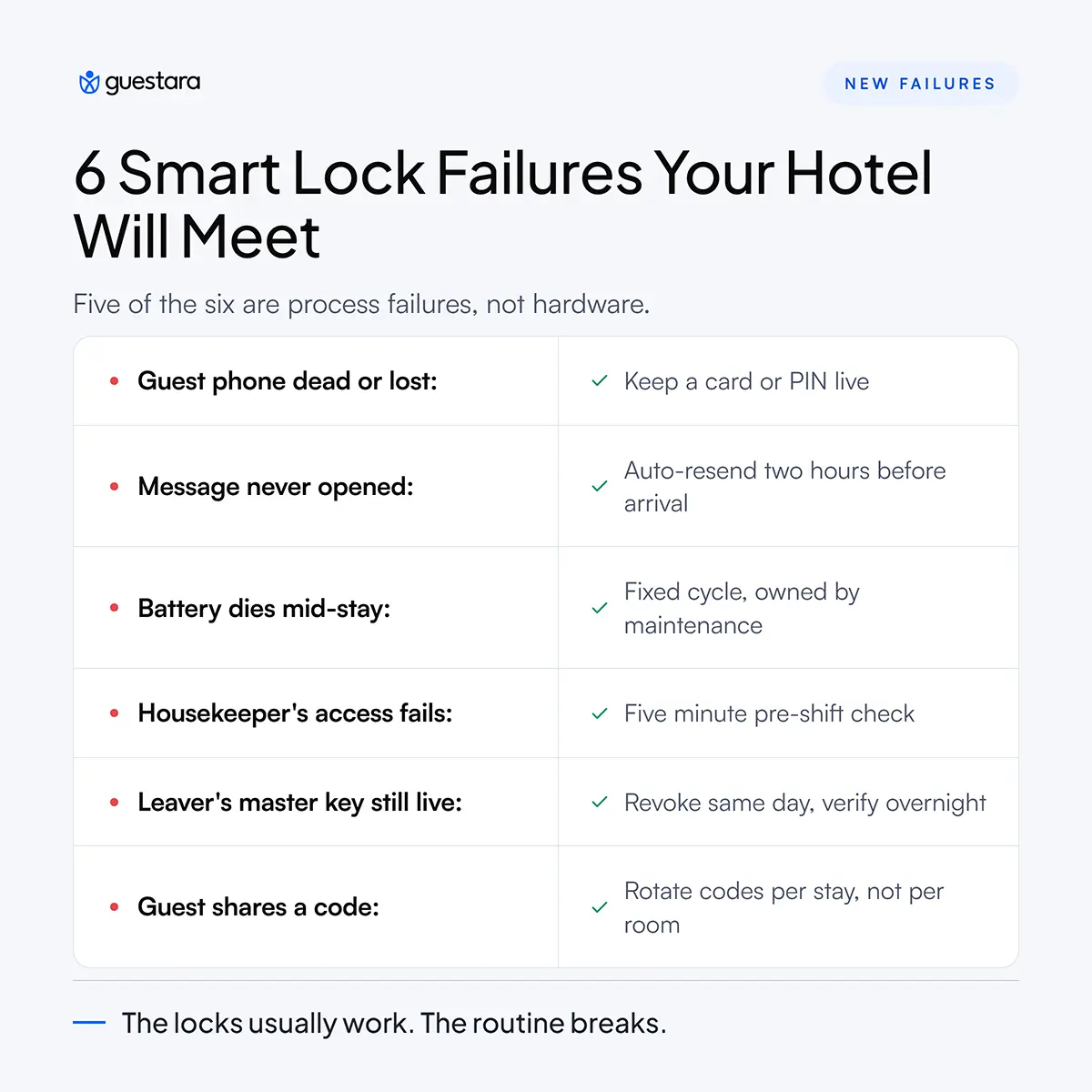
Hotel smart locks remove a set of familiar failures and introduce a different set. Knowing the new list in advance is the difference between a smooth launch and six weeks of firefighting.
Notice that five of those six are process failures, not hardware failures. That is consistent with what operators report after the first quarter. The locks usually work. The routine around them is what breaks.
For the arrival-side exceptions that sit next to these, our front desk SOP for digital check-in exceptions documents the handling case by case.
Four written procedures need to exist before your locks go live. Not after. Hotels that skip this stage spend the first month inventing answers at the desk, and those answers vary by whoever is on shift.
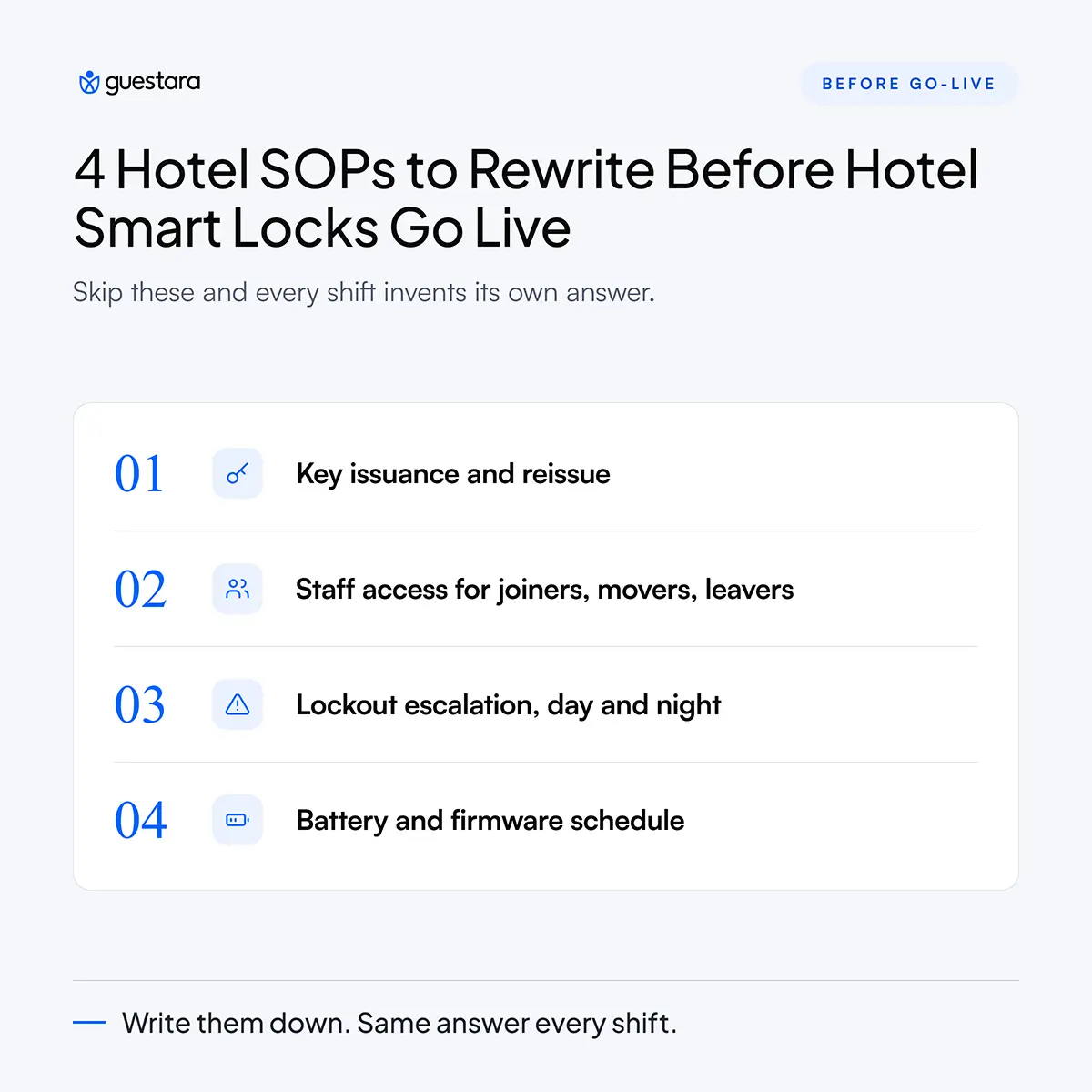
Who can issue a credential, who can revoke one, and what the guest has to prove before you resend. Two lines each. The point is that it is written down and identical across every shift.
The joiner, mover and leaver process. New staff get access on day one scoped to their department. Anyone changing role has old access removed the same day. Anyone leaving is revoked before they walk out.
Review every active staff credential monthly. This single habit closes more real risk than any hardware upgrade, because most incidents are procedural rather than technical.
What happens at 3pm with a full desk, and what happens at 3am with nobody in the lobby. Different answers, both written, both with a named phone number.
Who changes batteries and how often. Who applies firmware updates and how you record which doors have received them. Keep a version record per door, because you cannot tell a patched lock from an unpatched one by looking at it.
Training on hotel smart locks fails when it is a product demo and works when it is an exception drill. Your team does not need to understand the encryption. They need to know what to do when a guest is standing in front of them and the door will not open.
Keep the old process available alongside the new one for two weeks. Cards and codes both work. Nobody is stranded, and staff build confidence without a safety net being pulled away.
One person on property owns the lock system. They hold the vendor relationship, the firmware record and the escalation tree. Without a named owner the system belongs to nobody and the routine decays within a quarter.
Your front desk needs exactly three things they can say without thinking. What to say to a guest whose key is not working. What to say to a guest who wants a physical card. What to say to a guest asking whether this is secure.
Print them. Put them where the counter used to be useful.
Track four numbers for the first seven days. Lockout calls per hundred arrivals, check-in completion rate before arrival, average time from guest arrival to room entry, and the number of manual credentials issued at the desk.
If manual issuance is not falling by week two, the problem is your messaging, not your locks.
Smart locks change the door. What decides whether the change works is everything wrapped around it, which is how the key gets issued, how it reaches the guest, and who gets told when something goes wrong.
Guestara works with over 50 smart lock systems, issues room access automatically the moment digital check-in completes, and routes lock and access issues straight to the right team through task routing rather than a staff WhatsApp group. Onboarding takes about a week.


Hotel smart locks change what your front desk, housekeeping and night shift do every day. Here is the operational shift, the new failures, and the SOPs to rewrite.
The locks go in over a weekend. On Monday morning your front desk has nothing to hand out and nobody has told them what to do instead. The housekeeper on floor three cannot open 312 because her old card was never reissued. The night manager still has a drawer of blank keycards and no idea whether they still work.
What changes when a hotel fits smart locks is not the door. It is the daily routine of every person who used to touch a key.
Most guides stop at the purchase. This one starts the morning after. Here is what actually shifts for your front desk, your housekeepers, your maintenance team, your night shift and your guests, plus the new failures you will meet and the procedures you need to rewrite before go-live.
Three things change the moment hotel smart locks go live, and all three change on the same day whether you are ready or not.
Key issuance moves off the front desk and into your software. Access becomes time-bound, so it starts and stops on its own. And every door starts producing a record of who opened it and when.
The hardware goes in over a weekend. The operating routine takes six to eight weeks to settle. Hotels that budget for the first and not the second are the ones where staff quietly build workarounds.
Encoding a card for every arrival. Cutting a replacement when a guest loses a key. Re-keying a room after a guest is moved. Collecting cards at checkout and running them through a sanitiser. Chasing the guest who walked off with a key at 6am.
That is real work, and it disappears in week one.
Rooms still need cleaning. Guests still complain. Somebody still has to greet the family arriving at 4pm with three suitcases and a booking under the wrong surname.
The front desk does not vanish. It stops being a key counter and becomes an exception desk. That distinction is the whole story of this post.
Your front desk stops issuing keys and starts handling exceptions. The volume of guest interactions does not fall as much as operators expect. What falls is the amount of time each one takes.
US hotel labour data supports this. Across roughly 5,000 properties, guest service representatives cut their minutes per occupied room from 12.03 to 10.49 between January and September 2025, a 12.7 percent improvement, while total headcount across those hotels grew 4 percent over the same period. The report attributes the gain partly to greater use of digital tools and self-service.
Read that twice. Hotels did not cut people. They restructured what those people spend their time on.
Key encoding, card replacement, room-move re-keying and lost key incidents all go. So does the queue that formed behind them at 3pm on a Friday. Our peak-hour playbook covers how that arrival spike reshapes once keys are no longer handed over one at a time.
Guests who never completed check-in. Guests standing at a door that will not open. ID scans that failed. Bookings where the name does not match the passport. Message volume, which usually goes up rather than down.
These are harder problems than encoding a card. They need a person who can decide, not a person who can operate a machine. Budget for that in your hiring and your training.
Once nobody needs to collect anything, the counter stops being the right place to stand. The stronger pattern is a staff member on the lobby floor with a tablet, intercepting the guest who looks lost before they join a line that no longer exists.
Guests want this. In a 2022 Oracle Hospitality and Skift study of 5,266 consumers and 633 hotel executives across nine markets, only 38 percent said they wanted a fully self-service model with staff available on request. The majority still want a person in the room. They just do not want to queue for one.
Housekeeping gains live room status and loses the key drawer. Maintenance inherits a battery schedule that did not exist before. Both changes are larger than most operators plan for.
Every housekeeper needs a working credential every shift, and that credential has to cover the right floors and no others. This sounds trivial until a floater covers an unfamiliar section and finds half their rooms locked.
Build a five minute pre-shift check into the daily routine. The supervisor confirms every attendant can open one room on their assigned floor before the shift starts. It catches the problem in the corridor instead of in a guest complaint.
Every lock runs on batteries. Nobody owns them on day one because nobody owned them before.
Assign the batteries to maintenance, not housekeeping, and put them on a fixed cycle rather than waiting for warnings. A dead lock at 11pm is a guest incident. A scheduled battery change at 10am is a task. Our post on room readiness covers how these routine tasks slot into the wider housekeeping flow.
The bigger operational gain sits at checkout. When a guest completes checkout on their phone, housekeeping is notified the same second rather than waiting for the desk to call the floor.
That removes a handover that used to cost twenty to forty minutes per room on a busy departure day. Over a full turnover it is the single clearest return on the whole project.
Late arrivals stop being a reason to staff a desk overnight. That is the most direct roster change hotel smart locks produce, and it is worth planning deliberately rather than discovering by accident.
A guest arriving at 1am who already has a working room key does not need anyone awake. They need the lobby door to open and the lift to work.
The audit does not disappear. It changes shape. Overnight the duty person should confirm that every arrival due tomorrow has a credential generated, that no lock is flagged low on battery, and that no staff credential is active for someone who has left the business.
Three checks, roughly ten minutes, and they prevent almost every morning surprise.
This is the one thing you must build before go-live, not after. A guest at a door that will not open at 2am needs a route to a human in under two minutes.
The pattern that works is an automated assistant that answers instantly, tries the obvious fixes such as resending the code, and escalates to a named on-call phone when it cannot resolve. What fails is a chatbot with no exit, which turns a five minute problem into a one-star review.
Guests notice two things. There is no queue, and there is a message on their phone. Almost everything else about the change is invisible to them, which is the point.
What they also do is talk to you more, not less. Hilton's 2026 Trends Report, based on an Ipsos survey of more than 14,000 travellers across 14 countries, found that 27 percent of travellers are communicating with hotels more than they used to, favouring technology that gives quick responses.
Plan for message volume to rise. If your inbox is spread across WhatsApp, email and three OTA portals, that rise will hurt.
Couples and families need two keys, and with a digital key the second one costs nothing and requires no trip to the desk. Between January and August 2024, Hilton recorded more than 870,000 digital keys shared with travel companions, alongside roughly 100 tons of plastic saved each year by not issuing cards.
Decide your sharing policy before launch. Most properties allow a second key on the same booking and cap it there.
Some guests will not read the check-in link. They will arrive expecting a desk, and your process has to absorb that without friction.
Keep a tablet at the desk for on-the-spot registration, and keep at least one non-phone credential available for every room. A guest with a flat battery or an older handset should never be a problem you have to solve creatively.
Older guests, first-time visitors and anyone travelling in an unfamiliar country often prefer to be walked through it once. That is not a failure of the technology. It is a normal share of your guest mix. Our guide to digital check-in for older guests has the assisted flows and lobby scripts for exactly this.
Hotel smart locks remove a set of familiar failures and introduce a different set. Knowing the new list in advance is the difference between a smooth launch and six weeks of firefighting.
Notice that five of those six are process failures, not hardware failures. That is consistent with what operators report after the first quarter. The locks usually work. The routine around them is what breaks.
For the arrival-side exceptions that sit next to these, our front desk SOP for digital check-in exceptions documents the handling case by case.
Four written procedures need to exist before your locks go live. Not after. Hotels that skip this stage spend the first month inventing answers at the desk, and those answers vary by whoever is on shift.
Who can issue a credential, who can revoke one, and what the guest has to prove before you resend. Two lines each. The point is that it is written down and identical across every shift.
The joiner, mover and leaver process. New staff get access on day one scoped to their department. Anyone changing role has old access removed the same day. Anyone leaving is revoked before they walk out.
Review every active staff credential monthly. This single habit closes more real risk than any hardware upgrade, because most incidents are procedural rather than technical.
What happens at 3pm with a full desk, and what happens at 3am with nobody in the lobby. Different answers, both written, both with a named phone number.
Who changes batteries and how often. Who applies firmware updates and how you record which doors have received them. Keep a version record per door, because you cannot tell a patched lock from an unpatched one by looking at it.
Training on hotel smart locks fails when it is a product demo and works when it is an exception drill. Your team does not need to understand the encryption. They need to know what to do when a guest is standing in front of them and the door will not open.
Keep the old process available alongside the new one for two weeks. Cards and codes both work. Nobody is stranded, and staff build confidence without a safety net being pulled away.
One person on property owns the lock system. They hold the vendor relationship, the firmware record and the escalation tree. Without a named owner the system belongs to nobody and the routine decays within a quarter.
Your front desk needs exactly three things they can say without thinking. What to say to a guest whose key is not working. What to say to a guest who wants a physical card. What to say to a guest asking whether this is secure.
Print them. Put them where the counter used to be useful.
Track four numbers for the first seven days. Lockout calls per hundred arrivals, check-in completion rate before arrival, average time from guest arrival to room entry, and the number of manual credentials issued at the desk.
If manual issuance is not falling by week two, the problem is your messaging, not your locks.
Smart locks change the door. What decides whether the change works is everything wrapped around it, which is how the key gets issued, how it reaches the guest, and who gets told when something goes wrong.
Guestara works with over 50 smart lock systems, issues room access automatically the moment digital check-in completes, and routes lock and access issues straight to the right team through task routing rather than a staff WhatsApp group. Onboarding takes about a week.
Smart locks reduce the time each guest interaction takes rather than the number of staff you need. US labour data across roughly 5,000 hotels showed guest service representatives cutting minutes per occupied room by 12.7 percent between January and September 2025 while total headcount at those properties rose 4 percent. The clearest staffing change is overnight, where a property that staffed a desk purely to hand over keys to late arrivals can restructure that shift. Daytime coverage usually stays, but the role shifts from issuing keys to handling exceptions.
Housekeepers receive a staff credential scoped to their assigned floors or sections, issued as a card, a code or a mobile credential depending on the system. Access is controlled centrally, so a supervisor can extend a housekeeper to another floor without visiting any door. The practical requirement is a pre-shift check confirming every attendant can open at least one room on their section before the shift begins, which catches expired or wrongly scoped credentials in the corridor rather than during a guest complaint.
Staff resend or reissue the credential remotely, usually in seconds, without anyone walking to the door. The most common causes are a phone with no battery, a message the guest never opened, and a room that was reassigned after the key was sent. Every property should keep a non-phone option such as a card or PIN available for every room, and should have a written escalation path with a named on-call contact for lockouts outside desk hours
The hardware install takes a weekend, but the operating routine typically takes six to eight weeks to settle. Running the old and new processes in parallel for the first two weeks removes most of the anxiety, because no guest is stranded while staff build confidence. Properties that appoint one named owner for the lock system and rewrite their key issuance, staff credential, lockout and battery procedures before go-live settle considerably faster than those that improvise.
Most do not, but a meaningful share still will and your process should expect it. Guests arrive with flat phones, unopened messages, older handsets or simply a preference for speaking to someone. In a 2022 Oracle Hospitality and Skift study, only 38 percent of travellers said they wanted a fully self-service model with staff available on request, meaning the majority still value a visible person. Keeping a tablet at the desk for on-the-spot registration covers this group without slowing anyone else down.
We work closely with the industry leaders to offer seamless solutions




We’re here to help your whole team stay ahead of the curve as you grow.

Get up and running quickly with a personalized onboarding plan

Connect with real people who really get it, 24/7

Checkout our vast library of free resources, templates and more
There's only so much we can say — so let us show you! Schedule a demo today and reach your business goals.


.png)