What happens when digital check-in fails? Your front desk needs clear SOPs for missing IDs, split payments, early arrivals, and room changes.




.webp)
Digital check-in handles 60 to 80% of your arrivals cleanly. The rest reach the desk with an expired ID, a payment that failed, a bill to split three ways, or a room they now need changed. A front desk SOP turns each of those into a routine two minute fix instead of a decision your agent improvises on the spot.
Then a guest shows up at 10 AM without an ID. Another one completed mobile check-in but now wants to split the bill three ways. Someone else checked in online for Room 302, but now they need an accessible room on the ground floor.
Digital check-in works beautifully until it doesn't.
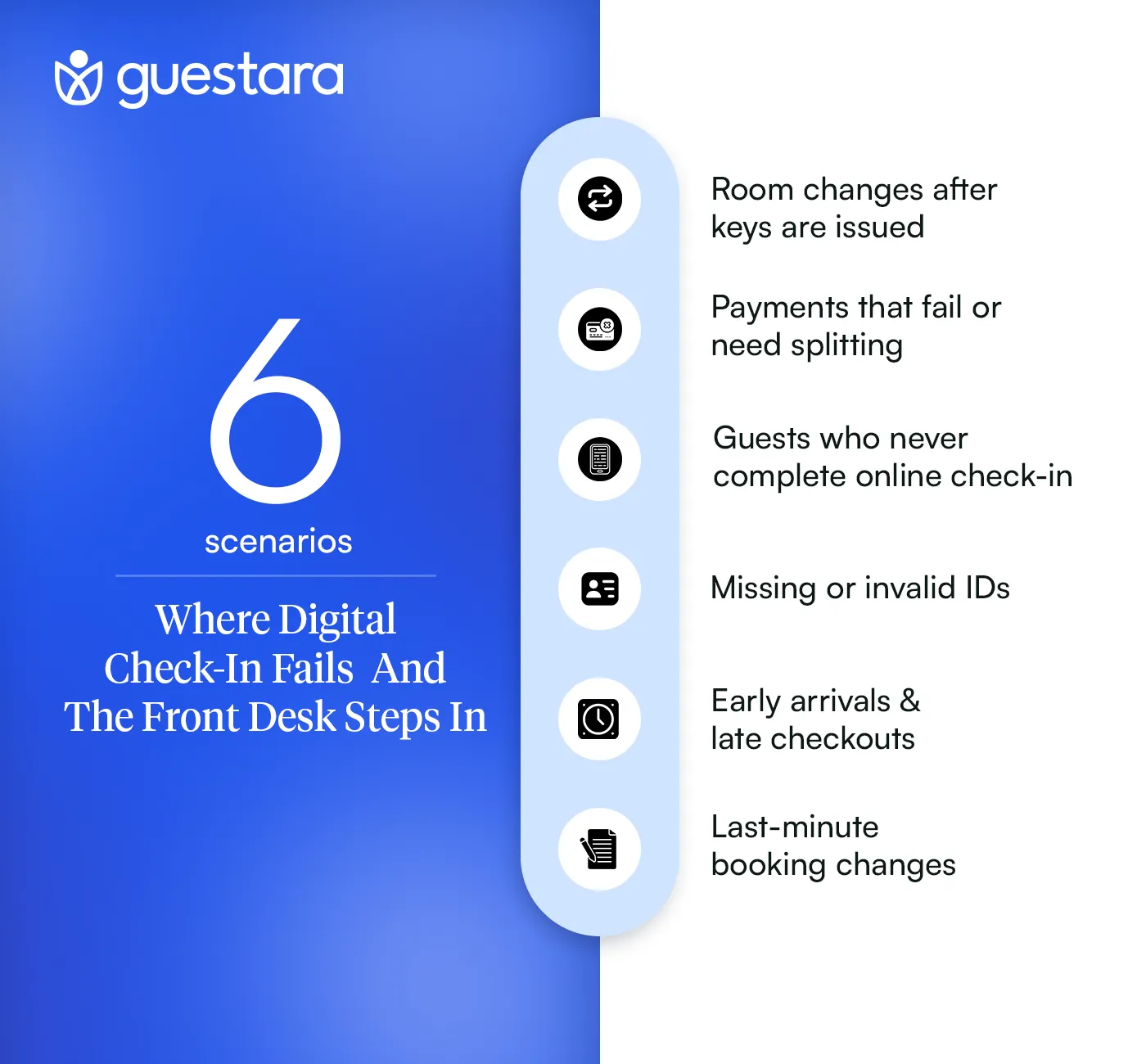
Hotel digital check-in still needs staff because 20 to 40% of arrivals need manual processing. Pre-arrival completion runs at 60 to 80%, and even guests who complete it arrive with requests the form never asked about.
Even guests who complete online check-in sometimes show up with requests that require human intervention.
Here's what actually happens:
A guest completes contactless check-in on their phone at 8 PM the night before. They upload their ID. They add a credit card. Everything looks perfect in your system.
Then they arrive at noon and ask to add their spouse to the reservation. Now you need to collect a second ID and update the registration card.
Or they completed WhatsApp hotel check-in but their payment didn't go through. Your system sent them a link, but they ignored it. Now they're standing at your desk.
Digital check-in reduces work. It doesn't eliminate exceptions.
Your front desk needs clear protocols for every common failure point.
Without them, your staff makes inconsistent decisions. One agent waives an ID requirement. Another refuses. One agent manually processes a split payment. Another tells the guest it's impossible.
This creates confusion for guests and frustration for staff.
A hotel guest who arrives without completing check-in gets processed at the desk below 50 rooms, and sent to the lobby kiosk above 50. The threshold is about queue flow rather than capability. Walking one guest through the mobile flow at the counter holds up everyone standing behind them.
Process them manually at the desk. It's faster than walking them through the mobile flow while other guests wait.
Collect their ID. Take a card imprint. Have them sign the reg card. Move on.
Have them complete self-check-in on the hotel kiosk in your lobby.
Your staff should guide them through the first few steps, then step back. This keeps your desk clear for actual exceptions.
If you don't have a kiosk, process them manually but track the reason they didn't complete pre-arrival check-in in your system notes.
Each reason a guest skips check-in points at a different fix, and only one of them is a guest problem.
This data helps you identify patterns. If 30 percent of your guests can't upload their ID from mobile, your digital check-in system has a technical issue you need to fix.
A hotel can check in a guest whose ID is expired or missing, and the SOP differs for each. An ID expired by less than 30 days is accepted and noted on the reservation. A guest with no ID at all is verified through two alternate documents or cleared with a refundable deposit.
Accept it. Make a note in the reservation. Move forward.
Most expired IDs are still valid for identification purposes even if they're not valid for driving or travel.
Your legal requirement is to verify identity, not to enforce government renewal deadlines.
Registration requirements vary by country and by city, and local rules override any general guidance on which documents to accept.
Ask if they have any government-issued document. Passport. Driver's license from any country. Military ID. National ID card.
If they have nothing, you have two options:
Option 1: Accept alternate verification
Ask for two other documents: credit card with their name and one utility bill or piece of mail with their name and address.
Cross-reference this with the email address and phone number in the booking.
Take a photo of both documents and attach them to the reservation in your PMS.
Option 2: Require a cash deposit
Charge a refundable deposit equal to one night plus incidentals.
Explain clearly that this will be refunded at checkout if there are no damages or extra charges.
Most guests in this situation will accept this without argument because they know they're asking for an exception.
Pull up the uploaded image in your system.
Verify that the person standing in front of you matches the photo.
Make a note: "ID verified via pre-arrival upload, physical ID not available at check-in."
This is completely acceptable for identity verification purposes.
A hotel can split a bill after check-in. The front desk adds the additional payment methods to the reservation in the PMS, reallocates the charges, and sends each guest their own folio. Splitting is simpler before the room is assigned, but it is never impossible afterwards.
Guests complete mobile check-in and add one credit card. Then they show up and want to split the bill between three people.
.webp)
If they ask before you assign the room, it's simple.
Go into your PMS. Add the additional payment methods manually.
Split the reservation charges however they request: by night, by percentage, or equal thirds.
Print or email each person a separate folio showing their portion.
Make sure all parties sign authorization forms for their portion of the charges. Card authorization and card-on-file handling is where most of the friction sits on a split.
If they completed contactless check-in and already have their room key, you need to adjust the billing after the fact.
Open the reservation. Add the new payment methods.
Reallocate the charges. Send updated folios to each guest via email or WhatsApp.
This is more complex.
Let's say a family booked four rooms under one confirmation number. They all completed pre-arrival check-in individually.
Now they want Room 101 billed to Dad. Rooms 102 and 103 billed separately to the adult children. Room 104 billed to Mom.
Your PMS should allow you to split a master reservation into sub-folios.
If it doesn't, you need to manually create separate folios for each room and link them with a note.
A hotel assigns an early arrival immediately when the room is ready, whatever check-in time sits on the reservation. When the room is not ready, the guest chooses between luggage storage with a text when it is, or an early check-in fee that moves their room up the housekeeping list.
Your guest completes online check-in the night before for a 3 PM check-in.
They show up at 10 AM.
Every early arrival and late checkout request resolves against two things: whether the room is ready, and what tonight’s occupancy looks like.
Explain that pre-arrival check-in confirms their reservation and speeds up the key issuance process, but it does not guarantee early access.
Offer them access to your lobby, pool, or any day-use amenities while they wait.
If you charge a fee, add it manually to their folio. Send them a confirmation via email or WhatsApp with the updated charges.
Guests can also buy early check-in and late checkout themselves. Guestara’s Upsell module puts both on the branded menu, the guest pays at the point of order, and the charge reaches the folio without an agent adding it by hand. A request bought in advance never becomes a front desk exception.
Log every early arrival and late checkout request in your system notes.
Track whether you charged a fee or waived it.
This data helps you set better policies and identify patterns in guest behavior.
Yes, and the procedure depends entirely on whether keys have been issued. Before arrival, the front desk changes the room assignment in the PMS and the digital key updates itself. After keys are issued, the old keys must be deactivated before new ones go out, or the property leaves a working key on an occupied room.
The guest completed digital check-in and was assigned Room 205.
Now they want Room 310 instead.
Maybe they want a higher floor. Maybe they're traveling with someone in another room and want to be closer. Maybe they have mobility issues and need ground-floor access.
If they request a room change before physically checking in, it's simple.
Go into your PMS. Change the room assignment. Send them an updated confirmation via pre-arrival messaging.
Their digital keys will automatically update if your system is properly connected to your door lock system.
This is where it gets tricky. If they have already been issued physical or digital keys, work in this order:
If you skip step 4, you create a security issue. An active key on an occupied room is the one mistake in this post that is not recoverable at checkout.
Explain the rate difference clearly before making the change.
If they're moving to a more expensive room, update the folio and send them a revised confirmation with the new total.
If they're moving to a less expensive room, credit the difference immediately.
Key takeaways
[[cta:cta-5 | eyebrow=Unified Inbox | heading=Handle every check-in exception from *one* window | btn=Explore Unified Inbox | link=https://www.guestara.com/unified-inbox ]]
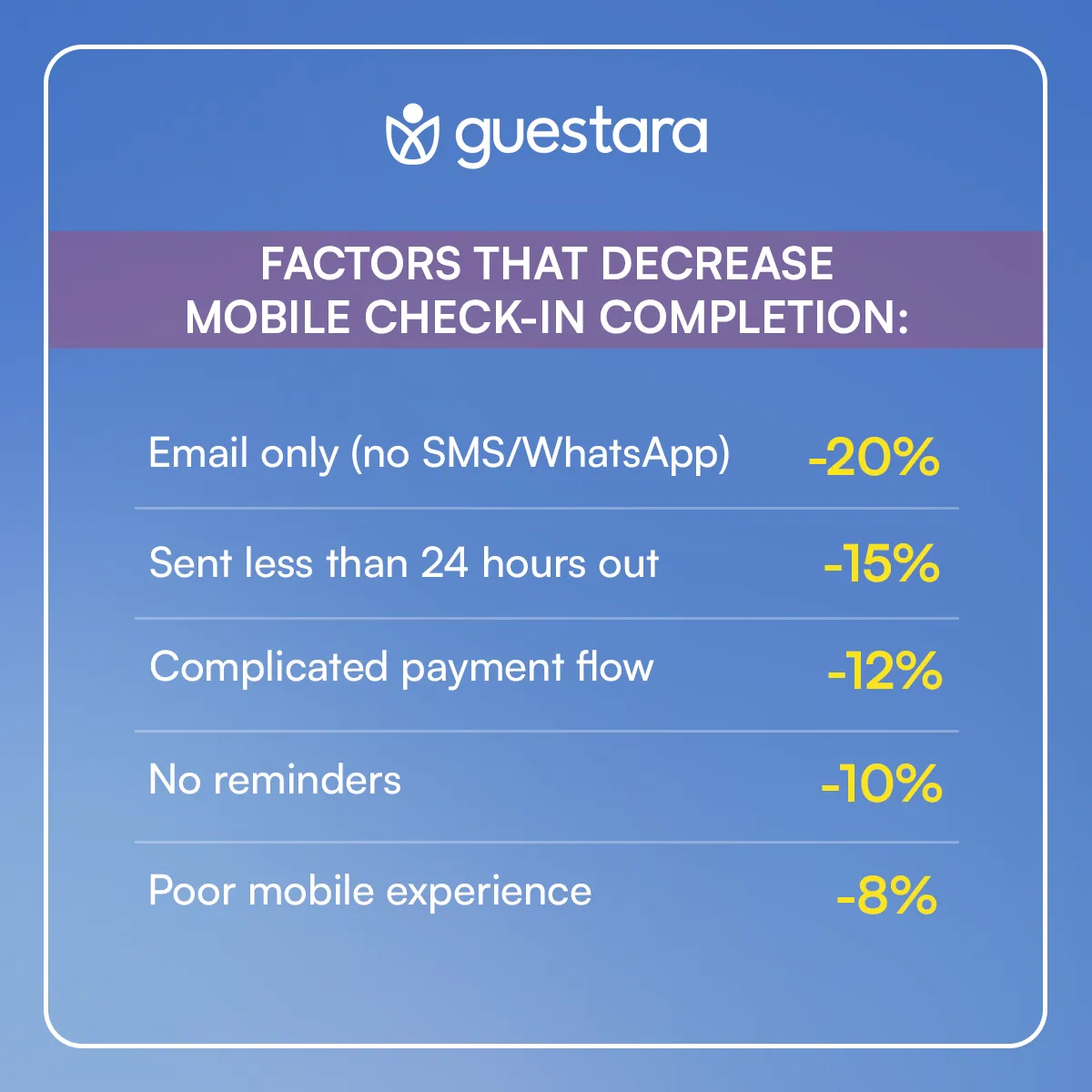
Your PMS or guest completion dashboard should show:
Review this data weekly with your team. If you see patterns, adjust your contactless check-in messaging or your digital check-in settings.
Sometimes guests get frustrated when digital systems don't work perfectly. Train your staff to acknowledge this without being defensive.
Good response: "I completely understand. Let me get this sorted for you right now."
Bad response: "Well, you were supposed to complete check-in before arriving."
The goal is to solve the problem quickly, not to prove the guest should have done something differently.
Guestara's Digital Check-In connects to your PMS and door lock system, and it gives the front desk tools to resolve exceptions without leaving the workflow.
Most hotel check-in systems handle the happy path well. The guest completes pre-arrival check-in, everything works, they get their key. The exceptions are where you need system flexibility.
If a guest didn't complete online check-in, your team triggers it from Guestara's Unified Inbox and walks them through it over WhatsApp.
If a payment fails, Guestara automatically sends a new payment link and notifies your front desk.
If a guest requests a room change, your team reassigns it in Guestara's Task Board, and the new room number flows automatically to pre-arrival messaging and to the digital key.
The goal is simple: handle exceptions without making your staff log into three different systems or confuse the guest with conflicting information.
Think of it this way. Digital check-in handles the routine work so your front desk can focus on exceptions and guest service. When 60 to 80% of your guests complete mobile check-in smoothly, your team has more time for the 20 to 40% who need help. But only if you've built clear SOPs for the exceptions.
Without them, your staff wastes time figuring out what to do each time something goes wrong. With them, exceptions become routine. Your team handles them confidently. Your guests barely notice the extra step.
For the full picture of how pre-arrival check-in works before any of these exceptions arise, see our guide to AI ID scanning and 30 second arrivals.
[[cta:cta-7 | eyebrow=Digital Check-In | heading=Fewer check-in exceptions ever reach your *front desk* | btn=Explore Contactless Check-in | link=https://www.guestara.com/contactless-checkin-checkout ]]


What happens when digital check-in fails? Your front desk needs clear SOPs for missing IDs, split payments, early arrivals, and room changes.
Digital check-in handles 60 to 80% of your arrivals cleanly. The rest reach the desk with an expired ID, a payment that failed, a bill to split three ways, or a room they now need changed. A front desk SOP turns each of those into a routine two minute fix instead of a decision your agent improvises on the spot.
Then a guest shows up at 10 AM without an ID. Another one completed mobile check-in but now wants to split the bill three ways. Someone else checked in online for Room 302, but now they need an accessible room on the ground floor.
Digital check-in works beautifully until it doesn't.
Hotel digital check-in still needs staff because 20 to 40% of arrivals need manual processing. Pre-arrival completion runs at 60 to 80%, and even guests who complete it arrive with requests the form never asked about.
Even guests who complete online check-in sometimes show up with requests that require human intervention.
Here's what actually happens:
A guest completes contactless check-in on their phone at 8 PM the night before. They upload their ID. They add a credit card. Everything looks perfect in your system.
Then they arrive at noon and ask to add their spouse to the reservation. Now you need to collect a second ID and update the registration card.
Or they completed WhatsApp hotel check-in but their payment didn't go through. Your system sent them a link, but they ignored it. Now they're standing at your desk.
Digital check-in reduces work. It doesn't eliminate exceptions.
Your front desk needs clear protocols for every common failure point.
Without them, your staff makes inconsistent decisions. One agent waives an ID requirement. Another refuses. One agent manually processes a split payment. Another tells the guest it's impossible.
This creates confusion for guests and frustration for staff.
A hotel guest who arrives without completing check-in gets processed at the desk below 50 rooms, and sent to the lobby kiosk above 50. The threshold is about queue flow rather than capability. Walking one guest through the mobile flow at the counter holds up everyone standing behind them.
Process them manually at the desk. It's faster than walking them through the mobile flow while other guests wait.
Collect their ID. Take a card imprint. Have them sign the reg card. Move on.
Have them complete self-check-in on the hotel kiosk in your lobby.
Your staff should guide them through the first few steps, then step back. This keeps your desk clear for actual exceptions.
If you don't have a kiosk, process them manually but track the reason they didn't complete pre-arrival check-in in your system notes.
Each reason a guest skips check-in points at a different fix, and only one of them is a guest problem.
This data helps you identify patterns. If 30 percent of your guests can't upload their ID from mobile, your digital check-in system has a technical issue you need to fix.
A hotel can check in a guest whose ID is expired or missing, and the SOP differs for each. An ID expired by less than 30 days is accepted and noted on the reservation. A guest with no ID at all is verified through two alternate documents or cleared with a refundable deposit.
Accept it. Make a note in the reservation. Move forward.
Most expired IDs are still valid for identification purposes even if they're not valid for driving or travel.
Your legal requirement is to verify identity, not to enforce government renewal deadlines.
Registration requirements vary by country and by city, and local rules override any general guidance on which documents to accept.
Ask if they have any government-issued document. Passport. Driver's license from any country. Military ID. National ID card.
If they have nothing, you have two options:
Option 1: Accept alternate verification
Ask for two other documents: credit card with their name and one utility bill or piece of mail with their name and address.
Cross-reference this with the email address and phone number in the booking.
Take a photo of both documents and attach them to the reservation in your PMS.
Option 2: Require a cash deposit
Charge a refundable deposit equal to one night plus incidentals.
Explain clearly that this will be refunded at checkout if there are no damages or extra charges.
Most guests in this situation will accept this without argument because they know they're asking for an exception.
Pull up the uploaded image in your system.
Verify that the person standing in front of you matches the photo.
Make a note: "ID verified via pre-arrival upload, physical ID not available at check-in."
This is completely acceptable for identity verification purposes.
A hotel can split a bill after check-in. The front desk adds the additional payment methods to the reservation in the PMS, reallocates the charges, and sends each guest their own folio. Splitting is simpler before the room is assigned, but it is never impossible afterwards.
Guests complete mobile check-in and add one credit card. Then they show up and want to split the bill between three people.
If they ask before you assign the room, it's simple.
Go into your PMS. Add the additional payment methods manually.
Split the reservation charges however they request: by night, by percentage, or equal thirds.
Print or email each person a separate folio showing their portion.
Make sure all parties sign authorization forms for their portion of the charges. Card authorization and card-on-file handling is where most of the friction sits on a split.
If they completed contactless check-in and already have their room key, you need to adjust the billing after the fact.
Open the reservation. Add the new payment methods.
Reallocate the charges. Send updated folios to each guest via email or WhatsApp.
This is more complex.
Let's say a family booked four rooms under one confirmation number. They all completed pre-arrival check-in individually.
Now they want Room 101 billed to Dad. Rooms 102 and 103 billed separately to the adult children. Room 104 billed to Mom.
Your PMS should allow you to split a master reservation into sub-folios.
If it doesn't, you need to manually create separate folios for each room and link them with a note.
A hotel assigns an early arrival immediately when the room is ready, whatever check-in time sits on the reservation. When the room is not ready, the guest chooses between luggage storage with a text when it is, or an early check-in fee that moves their room up the housekeeping list.
Your guest completes online check-in the night before for a 3 PM check-in.
They show up at 10 AM.
Every early arrival and late checkout request resolves against two things: whether the room is ready, and what tonight’s occupancy looks like.
Explain that pre-arrival check-in confirms their reservation and speeds up the key issuance process, but it does not guarantee early access.
Offer them access to your lobby, pool, or any day-use amenities while they wait.
If you charge a fee, add it manually to their folio. Send them a confirmation via email or WhatsApp with the updated charges.
Guests can also buy early check-in and late checkout themselves. Guestara’s Upsell module puts both on the branded menu, the guest pays at the point of order, and the charge reaches the folio without an agent adding it by hand. A request bought in advance never becomes a front desk exception.
Log every early arrival and late checkout request in your system notes.
Track whether you charged a fee or waived it.
This data helps you set better policies and identify patterns in guest behavior.
Yes, and the procedure depends entirely on whether keys have been issued. Before arrival, the front desk changes the room assignment in the PMS and the digital key updates itself. After keys are issued, the old keys must be deactivated before new ones go out, or the property leaves a working key on an occupied room.
The guest completed digital check-in and was assigned Room 205.
Now they want Room 310 instead.
Maybe they want a higher floor. Maybe they're traveling with someone in another room and want to be closer. Maybe they have mobility issues and need ground-floor access.
If they request a room change before physically checking in, it's simple.
Go into your PMS. Change the room assignment. Send them an updated confirmation via pre-arrival messaging.
Their digital keys will automatically update if your system is properly connected to your door lock system.
This is where it gets tricky. If they have already been issued physical or digital keys, work in this order:
If you skip step 4, you create a security issue. An active key on an occupied room is the one mistake in this post that is not recoverable at checkout.
Explain the rate difference clearly before making the change.
If they're moving to a more expensive room, update the folio and send them a revised confirmation with the new total.
If they're moving to a less expensive room, credit the difference immediately.
Key takeaways
[[cta:cta-5 | eyebrow=Unified Inbox | heading=Handle every check-in exception from *one* window | btn=Explore Unified Inbox | link=https://www.guestara.com/unified-inbox ]]
Your PMS or guest completion dashboard should show:
Review this data weekly with your team. If you see patterns, adjust your contactless check-in messaging or your digital check-in settings.
Sometimes guests get frustrated when digital systems don't work perfectly. Train your staff to acknowledge this without being defensive.
Good response: "I completely understand. Let me get this sorted for you right now."
Bad response: "Well, you were supposed to complete check-in before arriving."
The goal is to solve the problem quickly, not to prove the guest should have done something differently.
Guestara's Digital Check-In connects to your PMS and door lock system, and it gives the front desk tools to resolve exceptions without leaving the workflow.
Most hotel check-in systems handle the happy path well. The guest completes pre-arrival check-in, everything works, they get their key. The exceptions are where you need system flexibility.
If a guest didn't complete online check-in, your team triggers it from Guestara's Unified Inbox and walks them through it over WhatsApp.
If a payment fails, Guestara automatically sends a new payment link and notifies your front desk.
If a guest requests a room change, your team reassigns it in Guestara's Task Board, and the new room number flows automatically to pre-arrival messaging and to the digital key.
The goal is simple: handle exceptions without making your staff log into three different systems or confuse the guest with conflicting information.
Think of it this way. Digital check-in handles the routine work so your front desk can focus on exceptions and guest service. When 60 to 80% of your guests complete mobile check-in smoothly, your team has more time for the 20 to 40% who need help. But only if you've built clear SOPs for the exceptions.
Without them, your staff wastes time figuring out what to do each time something goes wrong. With them, exceptions become routine. Your team handles them confidently. Your guests barely notice the extra step.
For the full picture of how pre-arrival check-in works before any of these exceptions arise, see our guide to AI ID scanning and 30 second arrivals.
[[cta:cta-7 | eyebrow=Digital Check-In | heading=Fewer check-in exceptions ever reach your *front desk* | btn=Explore Contactless Check-in | link=https://www.guestara.com/contactless-checkin-checkout ]]
Most hotels see 60 to 80 percent completion rates on pre-arrival check-in. The rate depends on how early you send the link, how many reminders you send, and how easy your mobile check-in process is to complete. Properties with WhatsApp hotel check-in tend to see higher completion rates because guests are already familiar with the platform. Learn more about optimizing your pre-arrival messages for better completion rates.
You can encourage it, but you can't force it. Some guests will refuse to use mobile check-in for privacy reasons, technical limitations, or personal preference. Your front desk needs to be able to process them manually. The goal of self-check-in systems is to reduce work, not to create conflict with guests who prefer traditional check-in.
Your digital check-in system should automatically notify your front desk when a payment fails. Your SOP should be: send the guest a new payment link via email or text, and if they still don't complete it, collect payment manually when they arrive. Never let a guest access their room without a valid payment method on file.
Deactivate the old keys immediately in your door lock system, assign the new room in your PMS, issue new keys, and confirm the old keys no longer work. If your contactless check-in system is properly integrated, this should happen automatically when you change the room assignment. If not, you need to manually update each system.
That depends on your occupancy and your policy. If the room is ready and you're under 80 percent occupancy, there's no reason to charge. If you're near full occupancy and need to prioritize housekeeping, an early check-in fee is reasonable. Be consistent and make sure your policy is communicated clearly in your pre-arrival messaging.
We work closely with the industry leaders to offer seamless solutions




We’re here to help your whole team stay ahead of the curve as you grow.

Get up and running quickly with a personalized onboarding plan

Connect with real people who really get it, 24/7

Checkout our vast library of free resources, templates and more
There's only so much we can say — so let us show you! Schedule a demo today and reach your business goals.


.png)