Digital check-in syncs guest arrivals with housekeeping workflows, reducing room turnover time and improving guest satisfaction. Learn how works.




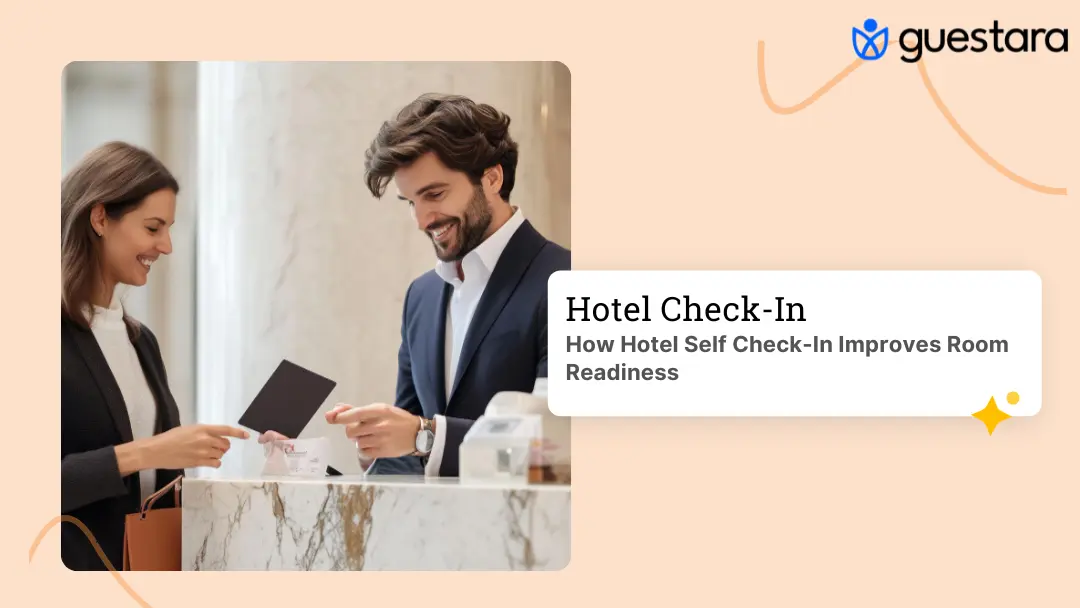
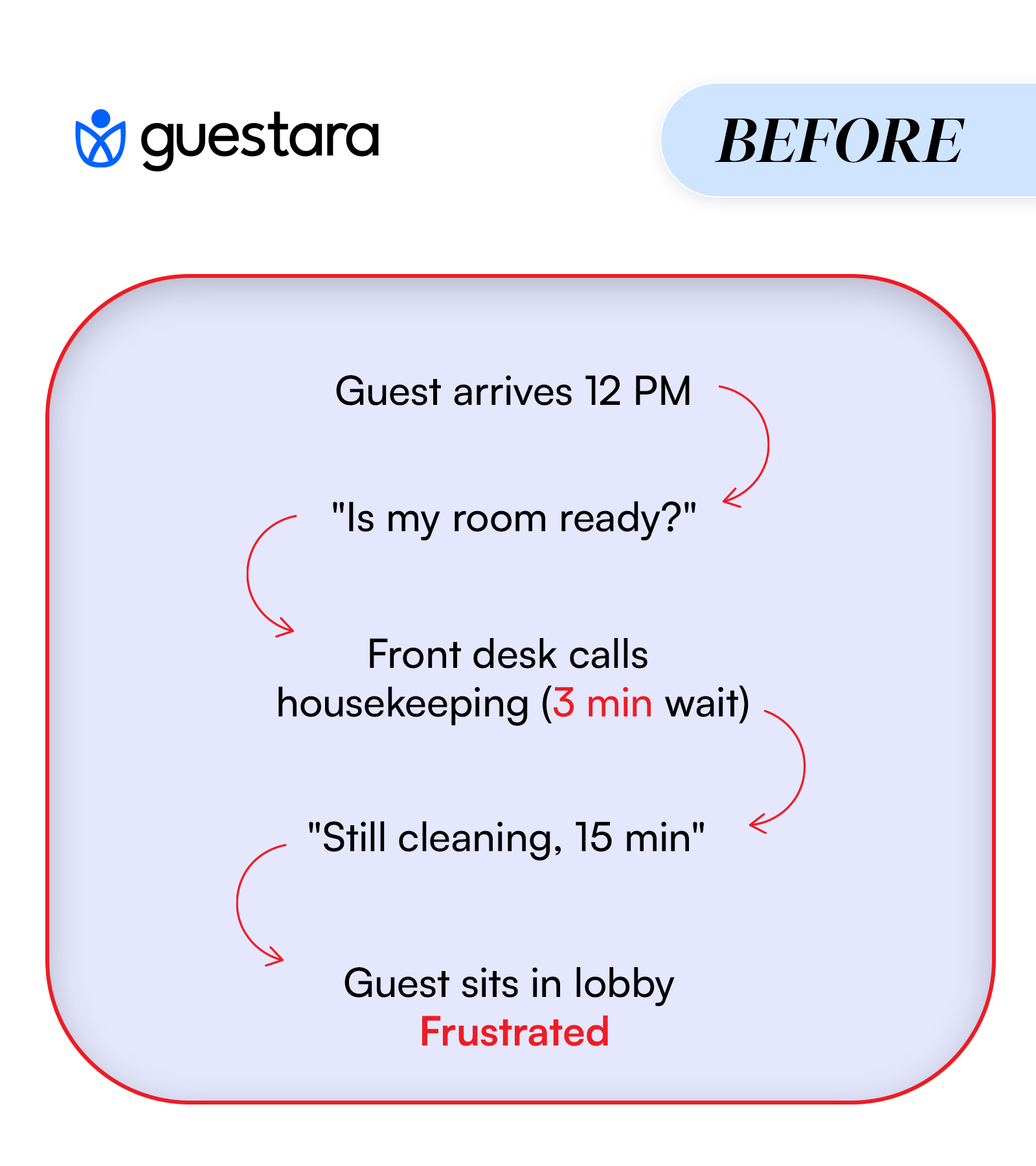
It's 1:15 PM. A guest arrives early. Your housekeeping team is still cleaning from the morning checkout surge.
You check the booking system: 23 more arrivals expected. 2 rooms ready. 7 being cleaned. 14 not started.
This is the daily reality for hotels without connected systems.
Rooms delayed on check-in create a cascade:
Research shows that check-in waits beyond 5 minutes reduce guest satisfaction by 47%.
What if housekeeping knew exactly which guests were arriving and when?
What if your team could see in real time which rooms were being cleaned, inspected, and ready?
What if early arrivals triggered automatic priority signals to your team?
This is what integrated digital check-in does.
Why Room Readiness Drives Revenue
Room readiness is a revenue problem.
Late check-ins don't just frustrate guests. They cost you money:
A guest waits 30 minutes for their room. They rate the stay lower. They don't return. They post a mediocre review.
One delayed check-in doesn't kill your business.
But 10 per month does.
When rooms are reliably ready early, you unlock:
The best-performing hotels don't fight with housekeeping. They design systems that eliminate surprises.
Your PMS knows a guest is checking in at 3 PM.
Your housekeeping software knows which rooms are clean.
But they're not talking.
Each handoff adds 5–15 minutes of delay. This is why having clear front desk SOPs for digital check-in is critical to eliminating these manual handoffs.
When systems aren't connected, room status becomes guesswork:
The data exists. It's just trapped in different systems.
Without real-time visibility, you can't answer:
Digital check-in collects real arrival data before housekeeping even touches a room.
Here's what happens:
A guest receives a pre-arrival message 24–48 hours before check-in via WhatsApp, email, or SMS.
They're asked: "What time will you arrive?"
They answer: "Around 1 PM" or "After 5 PM."
This is actual guest behavior data, not assumption.
That arrival time flows immediately into your housekeeping system.
Rooms assigned to early arrivals are flagged as high priority.
Supervisors see which rooms need to be ready first.
Teams are rebalanced.
Tasks are reordered.
Staff working on priority rooms get alerts.
As housekeeping completes each room, they mark it ready on a mobile device.
That status appears instantly on:
No delay. No phone calls. No guessing.
When a guest checks in digitally, the system sends an alert: "Guest in property confirm room ready."
This seems small. It's not.
It signals the entire team that the guest has arrived and room readiness should be confirmed across all systems.
Before digital check-in: Your system assumes all guests check in at 3 PM.
With digital check-in: Guests tell you when they're actually arriving.
This data flows into housekeeping 48 hours before arrival. Effective adoption strategies focus on WhatsApp, email, and SMS delivery to maximize the 40–60% completion rate.
Early arrivals (before 2 PM) are flagged as priority.
Standard arrivals (2–6 PM) are scheduled normally.
Late arrivals (after 6 PM) give housekeeping extra time.
Result: Housekeeping works with real information, not assumptions.
Instead of supervisors walking around with clipboards, staff update room status as they work.
They mark:
Each update appears instantly on the housekeeping supervisor's dashboard.
No supervisor has to walk to the room. No communication delay.
This is foundational to the technical implementation of digital check-in, which guides you through mobile device setup and system configuration.
The supervisor sees the "Ready for Inspection" alert.
They know this room is assigned to a guest arriving in 45 minutes.
It gets priority inspection.
Once inspected and approved: "Ready for Guest."
That status flows back to the front desk system immediately.
The front desk dashboard now shows in real time:
When a guest arrives, the front desk knows within seconds if their assigned room is ready.
Your front desk SOP should define how to handle exceptions—like when a room isn't ready but a guest has arrived—so your team reacts consistently.
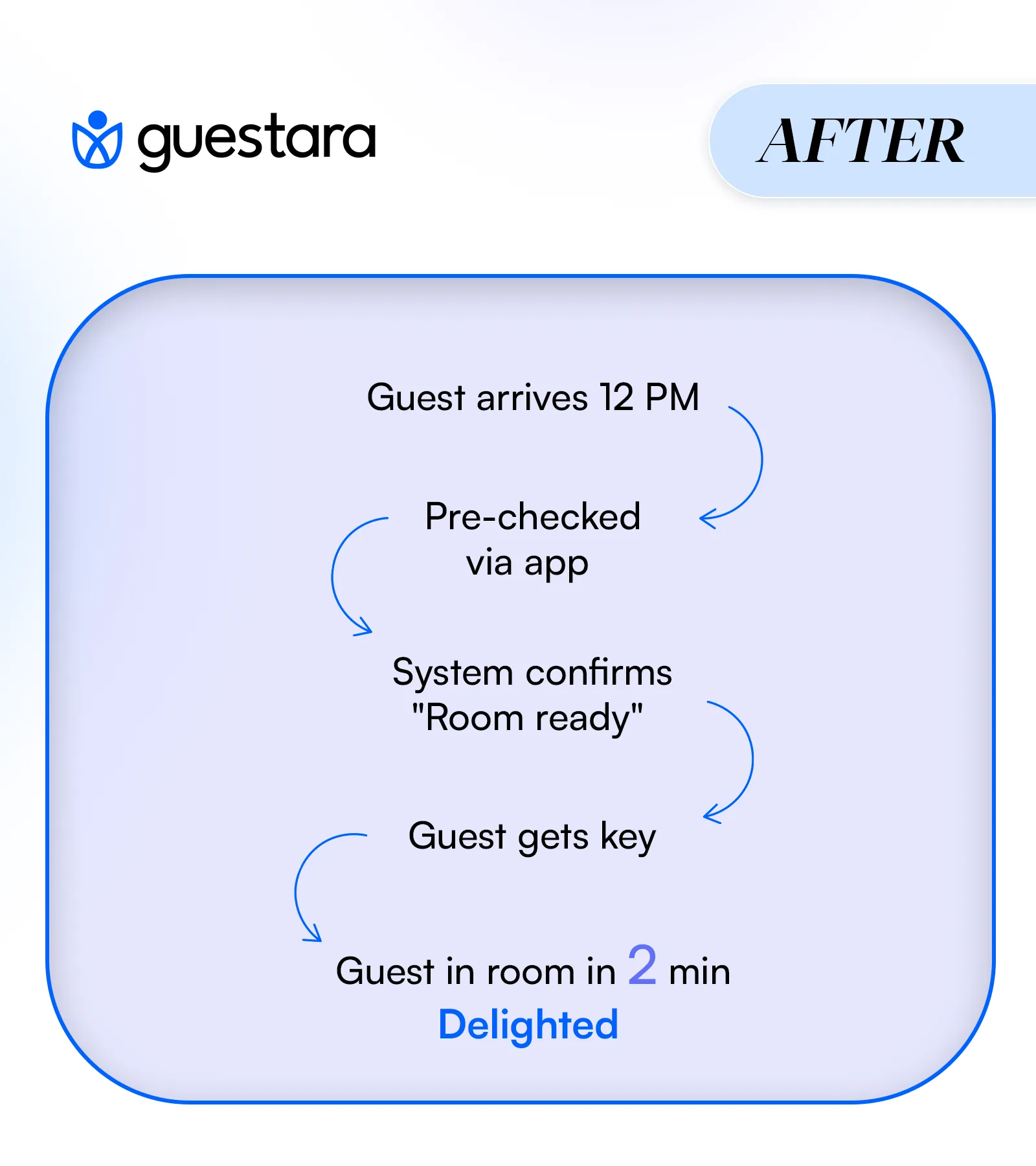
Guest arrives.
System confirms room is ready.
Guest completes check-in (digitally or at desk, takes 2–3 minutes max).
Guest receives digital key or physical keycard.
Guest accesses room immediately.
No wait. No uncertainty.
All of this data creates analytics that show exactly where time is being lost.
Your dashboard shows:
Some hotels discover:
Once you see it, you can fix it specifically.
Hotels using integrated digital check-in and housekeeping systems report:
These improvements come from eliminating invisible delays, not hiring more staff.
This is why the Peak Hour Playbook focuses on managing volume with existing resources—the right systems let you do more with the team you have.
When you check in and your room is ready, the entire stay starts differently.
You're not frustrated.
You're not disappointed.
You're relieved.
That emotional baseline carries through the entire stay.
Guests who have no wait at check-in rate their stay 68 points higher (on a 0–1000 scale) than guests who wait 20+ minutes.
The difference shows up in:
This is the foundational value of contactless check-in—when guests feel your operation is frictionless, their entire stay perception shifts. In fact, research shows that 70% of travelers would skip the front desk entirely if given the option, highlighting just how strongly guests prefer self-service check-in options.
Room readiness is the first operational promise you make to a guest.
When you keep that promise immediately, guests feel your operation is in control.
They're more forgiving of other minor issues.
They're more likely to return.
They're more likely to recommend you.
One reliable experience doesn't guarantee loyalty. But it creates a foundation.
Digital check-in is only effective if it connects three things:
If any link is missing, you revert to guessing and phone calls.
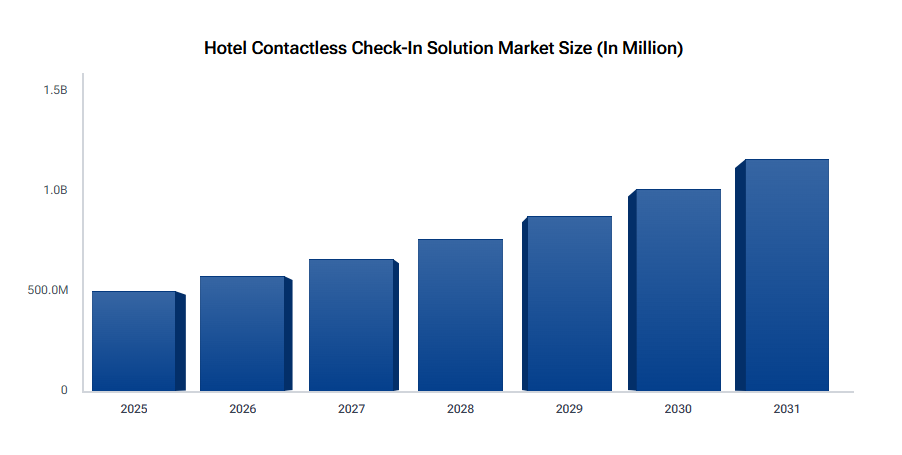
The good news: hotel contactless check-in adoption is accelerating rapidly, meaning the technology is mature, proven, and widely available. What once seemed cutting-edge is now table stakes at properties competing for modern travelers.
Your digital check-in platform must ask for ETA (estimated time of arrival) during the pre-arrival window.
This is not optional. Without actual arrival times, housekeeping has no signal about room priority.
Supported channels should include:
Different guests prefer different channels. Let them choose their preferred method.
Your check-in system and housekeeping software must be connected.
This can be:
If you're moving data manually between systems, you don't have digital check-in. You have a form with extra steps.
When a guest confirms early arrival, that flag reaches housekeeping within seconds. Not hours. Not after a manual export.
When housekeeping marks a room ready, that status updates the front desk system and PMS simultaneously.
Housekeeping staff need to update room status from phones or tablets.
Not from a desktop in the back office.
Real-time visibility requires real-time input.
Staff mark rooms clean as they finish.
Supervisors inspect on mobile devices.
Status flows back instantly.
Without mobile access, status updates are delayed 30+ minutes because staff complete a batch of rooms, then go find a computer, then supervisors hear about it later.
The front desk dashboard must show, in real time:
This single dashboard eliminates uncertainty.
When a guest arrives, the front desk knows within seconds if their assigned room is actually ready.
High-priority rooms should automatically trigger notifications to housekeeping supervisors.
If a room should be ready but isn't, alerts should surface why:
Alerts prevent reactive scrambling. They create proactive management.
Before: 50–60 minutes average After: 30–40 minutes average
This is significant enough to change your occupancy and revenue model.
Typical improvement: 20–30% increase within first month
Guests appreciate speed, but they appreciate reliability more.
They remember the hotel where their room was ready.
Before: You can't accept them reliably After: 15–25% increase in acceptance rate
When you're confident in room readiness, you can offer early check-in as a premium service or loyalty perk.
Typical improvement: 30–40% less coordination time
Instead of making phone calls and chasing updates, staff work from live data.
That freed-up time goes to guest service, upselling, and problem-solving.
Improves because you're eliminating labor waste:
Once you have real data, you can:
You implement digital check-in but don't connect it to housekeeping systems.
Result: Housekeeping still works blind. No improvement in room readiness.
Systems aren't connected. You export data from check-in, import to housekeeping, export from housekeeping, import to PMS.
Result: 15–30 minute delays. Guest arrives and room status is still unclear.
Staff still go to a back office computer to update room status instead of using mobile devices.
Result: Status updates are delayed. Real-time visibility doesn't exist.
You collect ETA data but don't use it to flag priority rooms.
Result: Housekeeping treats all rooms the same. Early arrivals still wait.
You implement the system but don't train staff or reinforce new workflows.
Result: Staff revert to old processes. System sits underused.
Use this before committing to a solution:
If you're missing more than 2 of these, you don't have an integrated system.
Room readiness is one of the highest-impact operational improvements you can make.
But only if your housekeeping and front desk teams are working with the same real-time data.
If your team is coordinating by phone and guesswork, you're losing 20–60 minutes per room. Every day. Every season.
An integrated digital check-in system with real-time housekeeping visibility gives you the tools to:
The data exists in your system. You just need the right connections to make it visible.


Digital check-in syncs guest arrivals with housekeeping workflows, reducing room turnover time and improving guest satisfaction. Learn how works.
It's 1:15 PM. A guest arrives early. Your housekeeping team is still cleaning from the morning checkout surge.
You check the booking system: 23 more arrivals expected. 2 rooms ready. 7 being cleaned. 14 not started.
This is the daily reality for hotels without connected systems.
Rooms delayed on check-in create a cascade:
Research shows that check-in waits beyond 5 minutes reduce guest satisfaction by 47%.
What if housekeeping knew exactly which guests were arriving and when?
What if your team could see in real time which rooms were being cleaned, inspected, and ready?
What if early arrivals triggered automatic priority signals to your team?
This is what integrated digital check-in does.
Why Room Readiness Drives Revenue
Room readiness is a revenue problem.
Late check-ins don't just frustrate guests. They cost you money:
A guest waits 30 minutes for their room. They rate the stay lower. They don't return. They post a mediocre review.
One delayed check-in doesn't kill your business.
But 10 per month does.
When rooms are reliably ready early, you unlock:
The best-performing hotels don't fight with housekeeping. They design systems that eliminate surprises.
Your PMS knows a guest is checking in at 3 PM.
Your housekeeping software knows which rooms are clean.
But they're not talking.
Each handoff adds 5–15 minutes of delay. This is why having clear front desk SOPs for digital check-in is critical to eliminating these manual handoffs.
When systems aren't connected, room status becomes guesswork:
The data exists. It's just trapped in different systems.
Without real-time visibility, you can't answer:
Digital check-in collects real arrival data before housekeeping even touches a room.
Here's what happens:
A guest receives a pre-arrival message 24–48 hours before check-in via WhatsApp, email, or SMS.
They're asked: "What time will you arrive?"
They answer: "Around 1 PM" or "After 5 PM."
This is actual guest behavior data, not assumption.
That arrival time flows immediately into your housekeeping system.
Rooms assigned to early arrivals are flagged as high priority.
Supervisors see which rooms need to be ready first.
Teams are rebalanced.
Tasks are reordered.
Staff working on priority rooms get alerts.
As housekeeping completes each room, they mark it ready on a mobile device.
That status appears instantly on:
No delay. No phone calls. No guessing.
When a guest checks in digitally, the system sends an alert: "Guest in property confirm room ready."
This seems small. It's not.
It signals the entire team that the guest has arrived and room readiness should be confirmed across all systems.
Before digital check-in: Your system assumes all guests check in at 3 PM.
With digital check-in: Guests tell you when they're actually arriving.
This data flows into housekeeping 48 hours before arrival. Effective adoption strategies focus on WhatsApp, email, and SMS delivery to maximize the 40–60% completion rate.
Early arrivals (before 2 PM) are flagged as priority.
Standard arrivals (2–6 PM) are scheduled normally.
Late arrivals (after 6 PM) give housekeeping extra time.
Result: Housekeeping works with real information, not assumptions.
Instead of supervisors walking around with clipboards, staff update room status as they work.
They mark:
Each update appears instantly on the housekeeping supervisor's dashboard.
No supervisor has to walk to the room. No communication delay.
This is foundational to the technical implementation of digital check-in, which guides you through mobile device setup and system configuration.
The supervisor sees the "Ready for Inspection" alert.
They know this room is assigned to a guest arriving in 45 minutes.
It gets priority inspection.
Once inspected and approved: "Ready for Guest."
That status flows back to the front desk system immediately.
The front desk dashboard now shows in real time:
When a guest arrives, the front desk knows within seconds if their assigned room is ready.
Your front desk SOP should define how to handle exceptions—like when a room isn't ready but a guest has arrived—so your team reacts consistently.
Guest arrives.
System confirms room is ready.
Guest completes check-in (digitally or at desk, takes 2–3 minutes max).
Guest receives digital key or physical keycard.
Guest accesses room immediately.
No wait. No uncertainty.
All of this data creates analytics that show exactly where time is being lost.
Your dashboard shows:
Some hotels discover:
Once you see it, you can fix it specifically.
Hotels using integrated digital check-in and housekeeping systems report:
These improvements come from eliminating invisible delays, not hiring more staff.
This is why the Peak Hour Playbook focuses on managing volume with existing resources—the right systems let you do more with the team you have.
When you check in and your room is ready, the entire stay starts differently.
You're not frustrated.
You're not disappointed.
You're relieved.
That emotional baseline carries through the entire stay.
Guests who have no wait at check-in rate their stay 68 points higher (on a 0–1000 scale) than guests who wait 20+ minutes.
The difference shows up in:
This is the foundational value of contactless check-in—when guests feel your operation is frictionless, their entire stay perception shifts. In fact, research shows that 70% of travelers would skip the front desk entirely if given the option, highlighting just how strongly guests prefer self-service check-in options.
Room readiness is the first operational promise you make to a guest.
When you keep that promise immediately, guests feel your operation is in control.
They're more forgiving of other minor issues.
They're more likely to return.
They're more likely to recommend you.
One reliable experience doesn't guarantee loyalty. But it creates a foundation.
Digital check-in is only effective if it connects three things:
If any link is missing, you revert to guessing and phone calls.
The good news: hotel contactless check-in adoption is accelerating rapidly, meaning the technology is mature, proven, and widely available. What once seemed cutting-edge is now table stakes at properties competing for modern travelers.
Your digital check-in platform must ask for ETA (estimated time of arrival) during the pre-arrival window.
This is not optional. Without actual arrival times, housekeeping has no signal about room priority.
Supported channels should include:
Different guests prefer different channels. Let them choose their preferred method.
Your check-in system and housekeeping software must be connected.
This can be:
If you're moving data manually between systems, you don't have digital check-in. You have a form with extra steps.
When a guest confirms early arrival, that flag reaches housekeeping within seconds. Not hours. Not after a manual export.
When housekeeping marks a room ready, that status updates the front desk system and PMS simultaneously.
Housekeeping staff need to update room status from phones or tablets.
Not from a desktop in the back office.
Real-time visibility requires real-time input.
Staff mark rooms clean as they finish.
Supervisors inspect on mobile devices.
Status flows back instantly.
Without mobile access, status updates are delayed 30+ minutes because staff complete a batch of rooms, then go find a computer, then supervisors hear about it later.
The front desk dashboard must show, in real time:
This single dashboard eliminates uncertainty.
When a guest arrives, the front desk knows within seconds if their assigned room is actually ready.
High-priority rooms should automatically trigger notifications to housekeeping supervisors.
If a room should be ready but isn't, alerts should surface why:
Alerts prevent reactive scrambling. They create proactive management.
Before: 50–60 minutes average After: 30–40 minutes average
This is significant enough to change your occupancy and revenue model.
Typical improvement: 20–30% increase within first month
Guests appreciate speed, but they appreciate reliability more.
They remember the hotel where their room was ready.
Before: You can't accept them reliably After: 15–25% increase in acceptance rate
When you're confident in room readiness, you can offer early check-in as a premium service or loyalty perk.
Typical improvement: 30–40% less coordination time
Instead of making phone calls and chasing updates, staff work from live data.
That freed-up time goes to guest service, upselling, and problem-solving.
Improves because you're eliminating labor waste:
Once you have real data, you can:
You implement digital check-in but don't connect it to housekeeping systems.
Result: Housekeeping still works blind. No improvement in room readiness.
Systems aren't connected. You export data from check-in, import to housekeeping, export from housekeeping, import to PMS.
Result: 15–30 minute delays. Guest arrives and room status is still unclear.
Staff still go to a back office computer to update room status instead of using mobile devices.
Result: Status updates are delayed. Real-time visibility doesn't exist.
You collect ETA data but don't use it to flag priority rooms.
Result: Housekeeping treats all rooms the same. Early arrivals still wait.
You implement the system but don't train staff or reinforce new workflows.
Result: Staff revert to old processes. System sits underused.
Use this before committing to a solution:
If you're missing more than 2 of these, you don't have an integrated system.
Room readiness is one of the highest-impact operational improvements you can make.
But only if your housekeeping and front desk teams are working with the same real-time data.
If your team is coordinating by phone and guesswork, you're losing 20–60 minutes per room. Every day. Every season.
An integrated digital check-in system with real-time housekeeping visibility gives you the tools to:
The data exists in your system. You just need the right connections to make it visible.
Yes. Hotels report 20–60 minute reductions in average turnaround when integrated with housekeeping. Without housekeeping integration, it won't meaningfully improve room readiness time.
The system still works but at reduced impact. You get real-time housekeeping visibility and faster front desk coordination. Pre-check-in completion rates are typically 40–60%.
Yes, if your PMS supports API integration. Most modern systems do. Check with your provider if you have a legacy system.
Quick wins (better visibility, fewer miscommunications) appear within 2 weeks. Measurable improvements (reduced turnaround, higher satisfaction) within 6–8 weeks.
Yes. Digital check-in requires mobile status updates to work in real time. Desktop-only updates create delays that defeat the purpose.
We work closely with the industry leaders to offer seamless solutions




We’re here to help your whole team stay ahead of the curve as you grow.

Get up and running quickly with a personalized onboarding plan

Connect with real people who really get it, 24/7

Checkout our vast library of free resources, templates and more
There's only so much we can say — so let us show you! Schedule a demo today and reach your business goals.


.png)