Hotel smart locks explained for operators. Compare lock types, check what connects to your PMS, and automate guest access from booking to checkout.




Three guests arrive at 11pm. The night manager is on a break. The key encoder at the front desk has frozen, and the only person who knows how to restart it comes on shift at 6am. Hotel smart locks exist to make that situation impossible, because they replace the physical act of handing over a key with a credential your software issues automatically.
A hotel smart lock is an electronic door lock that opens using a code, a phone, or a card credential generated by your system rather than a key cut or encoded by a person. The lock is only half the purchase. The half that decides whether the investment works is the software that issues the credential, delivers it to the guest, and shuts it off at checkout.
This guide covers what these locks actually are, which type suits your property, what to ask a vendor before you sign, what connecting them to your existing systems really involves, and how to automate room access across the full guest journey.
Hotel smart locks are electronic door locks that grant room access through a digitally issued credential instead of a mechanical key. That credential can be a numeric code, a mobile key on a phone, an RFID card, or a wristband. The lock checks whether the credential is valid for that room and that time window, then opens or refuses.
The important part is the time window. A mechanical key works forever until you change the cylinder. A smart lock credential is tied to an arrival time and a departure time. When the stay ends, access ends, with no staff action required.
Most hotels already run key cards, and many operators assume that means they already have smart locks. Often they do not.
A basic key card system encodes a card at the front desk and the door reads it. Nothing else happens. There is no record you can query easily, no way to issue a credential to a guest who is not standing in front of you, and no connection to anything else in your stack.
A smart lock system does three additional things. It accepts credentials issued from software rather than only from a desk encoder. It records every entry attempt with a timestamp. And it exposes a way for other systems to request, change, or revoke access without a person walking to the door.
If your current locks cannot do those three things, you have electronic locks, not smart locks.
The label is used loosely across the industry. In a hotel context it usually covers four families of hardware.
Hybrid is the practical answer for most independent properties, for reasons covered further down.
A hotel smart lock works by validating a credential against a rule that says who may enter which room between which two times. The credential travels from your booking system to the guest's phone, and the guest presents it at the door.
The chain has five steps, and every one of them is a place where a rollout goes wrong.
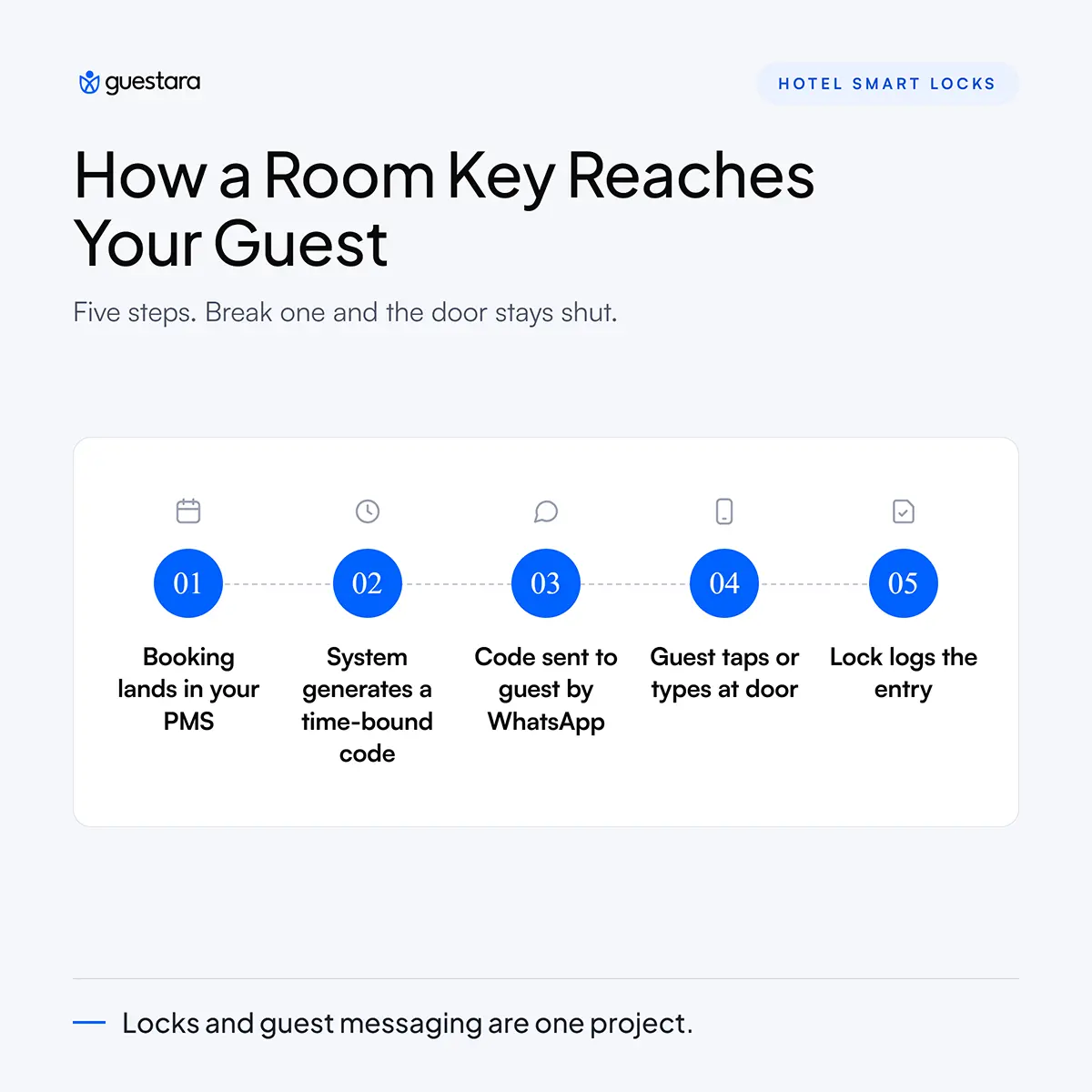
First, the booking exists in your PMS with a room number, an arrival date, and a departure date. Second, an access system reads those fields and generates a credential valid only for that room and that window. Third, the credential reaches the guest, usually by WhatsApp, SMS, or email. Fourth, the guest presents it at the door as a typed code or a phone tap. Fifth, the lock writes an entry record.
Break any link and the guest stands outside a door that will not open. That is why lock selection and guest messaging cannot be treated as separate projects.
Operators new to this category are often surprised that most hotel doors are not connected to the internet. There is a good reason.
Offline locks use a shared encryption seed. The lock knows the seed. The software knows the seed. When the software generates a code for room 214 valid from 3pm Tuesday to 11am Thursday, the lock can verify that code mathematically without ever talking to a server. No wifi at the door, no gateway in the corridor, no dead spots on the third floor.
The trade-off is that an offline lock cannot tell you anything in real time. Battery level, entry logs, and jam alerts only surface when someone physically reads the lock with a handheld device or when a card carries the data back.
Online locks solve that and add remote unlock, but they add cost per door, a network dependency, and a new failure mode. Most independent properties are better served by offline or hybrid locks with a scheduled audit routine than by putting 60 doors on wifi.
Every smart lock runs on batteries, usually four AA cells lasting somewhere between one and three years depending on traffic and radio use. Locks warn before they fail, through a beep, an LED, or a low-battery flag in the audit log.
Every credible hotel lock also has an emergency override. That is normally a mechanical key cylinder held by the duty manager, or an external contact where a battery pack briefly powers the lock so it can be opened. If a vendor cannot show you the override procedure in under a minute, that is a serious mark against them.
The right lock type depends on room count, whether you staff a desk overnight, and how your guests already behave. There is no single best lock type, and vendors who tell you otherwise are selling inventory rather than solving your problem.
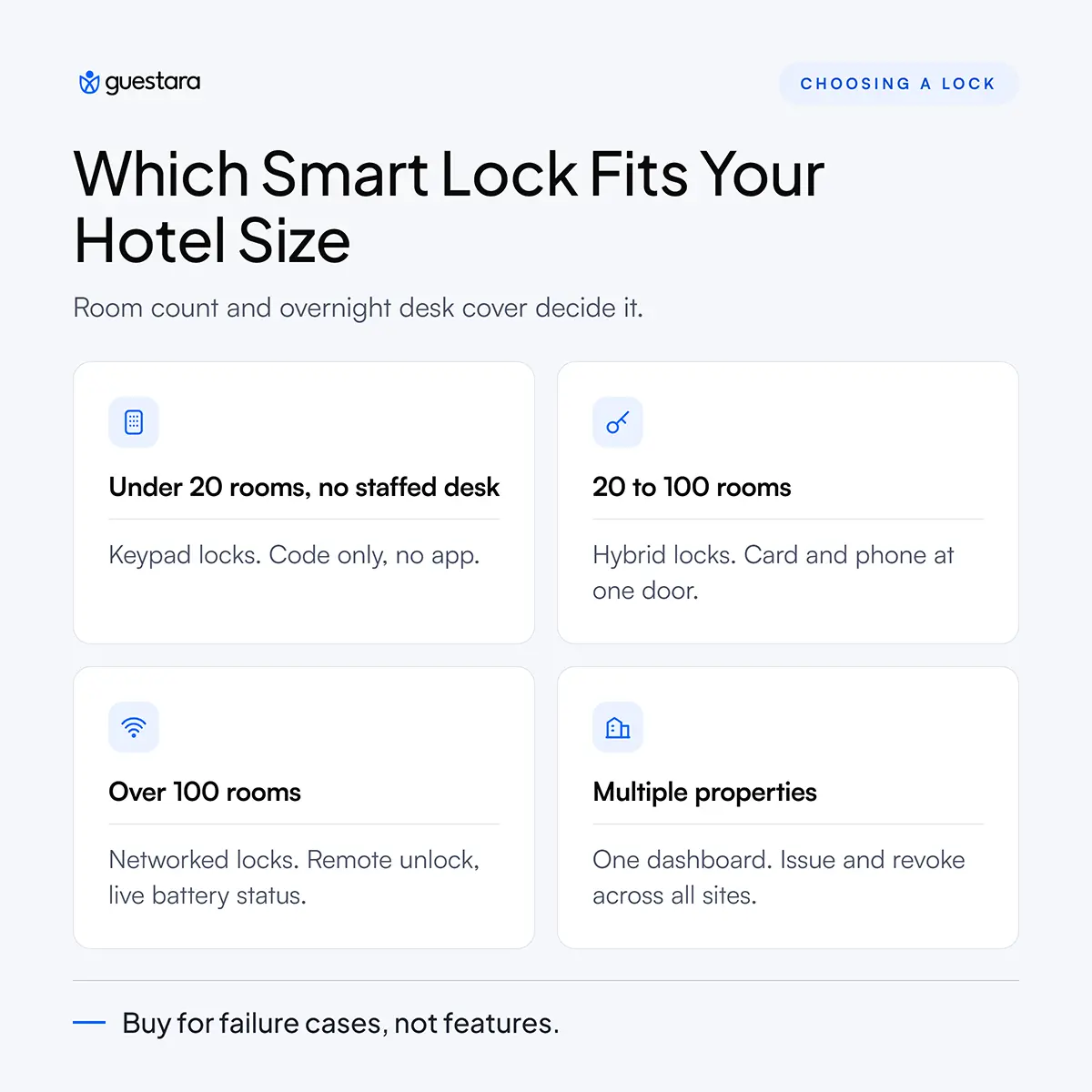
For properties under roughly 20 units, or any unit without a staffed desk, keypad locks with offline code generation are usually the strongest fit. The guest receives a numeric code by message and types it in. No app to download, no Bluetooth pairing, no phone battery dependency, and nothing to hand over.
The failure mode to plan for is code sharing. A guest can pass a working code to anyone. Time-bound codes limit the damage, but for properties with repeat local guests it is worth rotating codes per stay rather than per room.
For 20 to 100 rooms with a desk that is staffed most of the day, hybrid locks accepting both an RFID card and a mobile or code credential give the most coverage. Guests who arrive prepared use their phone. Guests who arrive at midnight with a dead phone get a card. Housekeeping keeps cards, which are simpler to manage as staff turnover.
This is also the segment where retrofit matters most, because the doors are already hung and replacing them is not on the table.
Above roughly 100 rooms, the calculation shifts toward networked or partially networked locks. At that scale the labour cost of manually auditing hundreds of doors for battery status outweighs the cost of gateways, and remote unlock genuinely reduces night-shift call-outs.
Wallet-based keys stored in Apple Wallet or Google Wallet also become worth the certification effort at this size, though they carry meaningful setup requirements and are not realistic for most independents yet.
If you run several properties, the deciding factor is not the lock at all. It is whether one dashboard can issue and revoke credentials across every site without logging into separate systems per property. Ask that question first and let it eliminate most of the shortlist.
Choose a hotel smart lock by testing it against your failure scenarios rather than its feature list. Demand for this technology is not in doubt. Hilton's traveller research found that 63 percent of travellers want the option to use a digital room key, and Hilton recorded close to 14.3 million digital keys downloaded across an eight-month period in 2024. The question is no longer whether guests will use it. The question is which system survives contact with your operation.
Work through these with every vendor. Write the answers down and compare them side by side.
The last question is the one operators skip and regret. Some lock ecosystems are effectively one-way doors.
Most hotel doors can take a smart lock without being replaced. What decides it is the existing hardware footprint.
Measure three things before any site survey. Door thickness, because most locks have a supported range. Backset, which is the distance from the door edge to the centre of the handle bore. And whether the current lock is mortise, meaning a pocket cut into the door edge, or cylindrical, meaning a round bore through the face.
If a vendor quotes you before measuring these, the quote is not real. Door modification is the single most common source of budget overrun in a lock rollout.
Connecting smart locks to your operation requires three systems to agree on the same booking, in the same room, for the same time window. Those three systems are your PMS, your guest platform, and your lock system.
The PMS holds the truth about who is booked into which room. The guest platform handles check-in, identity capture, payment, and messaging. The lock system issues the credential. If any two of those talk but the third does not, staff end up copying data by hand, which is exactly the manual work the project was meant to remove.
Four fields carry the whole process. Reservation identifier, room number, arrival timestamp, and departure timestamp. A fifth, the guest's mobile number, decides whether the credential can be delivered without staff involvement.
Room number is the one that causes trouble. Many properties assign rooms late, sometimes only when housekeeping releases them. If your credential is generated at booking, a late room change makes it worthless. The system needs to generate or regenerate the credential at the moment the room is confirmed, not before.
Before you roll out to every door, run these deliberately on a handful of rooms.
Any vendor demo will handle the happy path. These five are where systems separate.
This is the layer most lock vendors do not cover, because their product ends at the door. Somebody still has to collect the guest's ID, verify the booking, take the deposit, and send the credential at the right moment.
Guestara connects to over 50 smart lock systems and sits between the PMS and the lock, handling digital check-in with AI-based ID scanning that completes in around 30 seconds, then triggering credential delivery automatically once check-in is complete. Onboarding typically takes about a week. If you want the detail on how that check-in step works before the key is issued, our guide to 30-second AI-powered check-in covers the scanning and verification flow specifically.
For a wider view of how the arrival stack fits together, the self check-in hotel pillar guide maps every component from pre-arrival messaging through to room release.
Automating guest access means the guest receives working room access without any staff member deciding to send it. The trigger is the completed check-in, not a person at a desk.
Here is what the full sequence looks like when it runs properly.
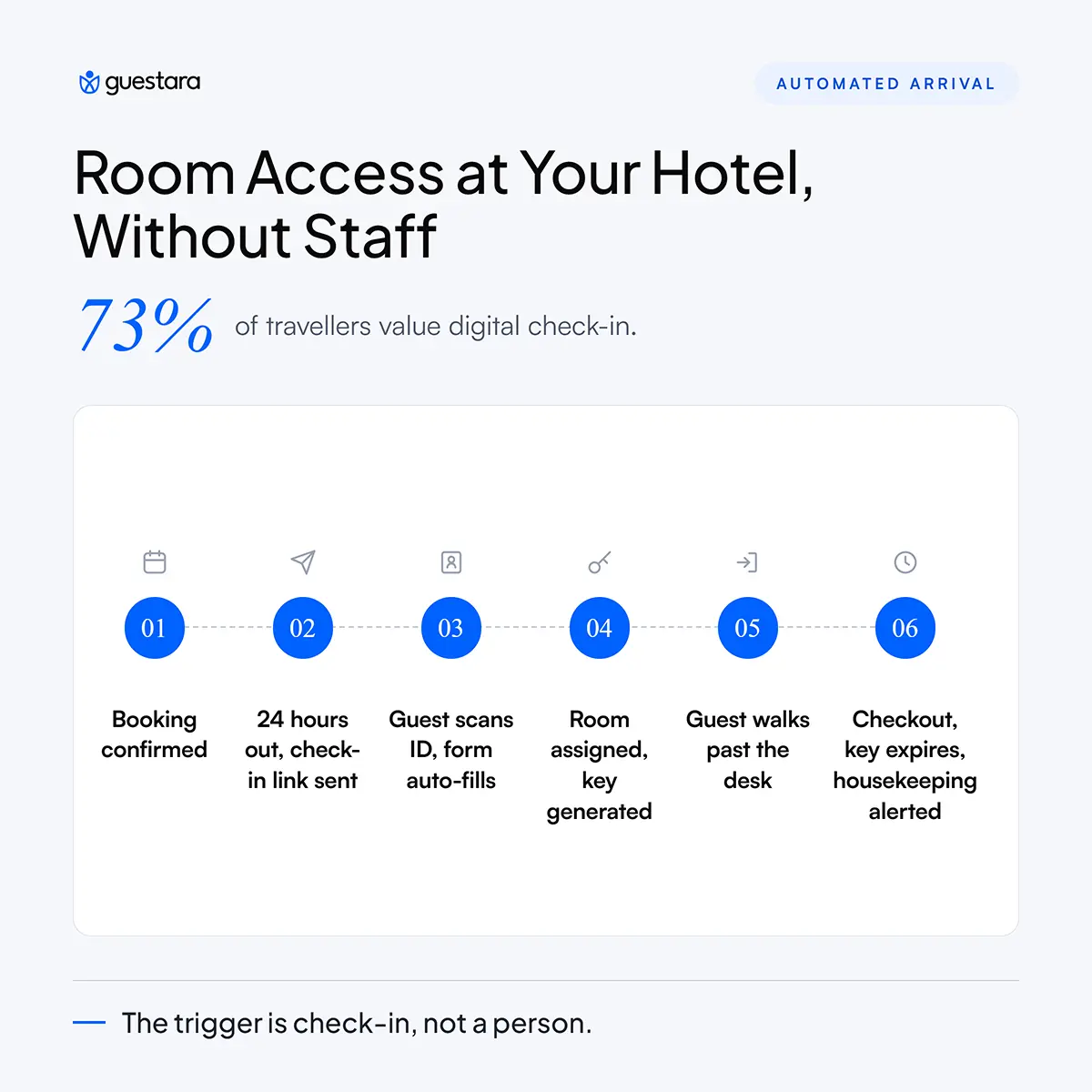
Booking is confirmed and lands in the PMS. A confirmation message goes out immediately. Twenty-four hours before arrival, the guest receives a check-in link on WhatsApp or SMS. The guest scans their ID, the form fills itself from the scan, and any deposit is collected in the same flow.
The room is assigned. The credential is generated for that room and that stay window. It arrives on the guest's phone. The guest walks past the desk and opens their door.
At checkout, the guest settles the folio from their phone, the credential expires, and housekeeping is notified the same second rather than waiting for a front desk handover. Our breakdown of how self check-in improves room readiness covers that housekeeping trigger in operational detail.
Sending the credential too early creates a support problem. Guests receive a code on Monday for a Thursday arrival, lose the message, and call the desk. Sending it too late creates a worse problem, which is a guest at the door with nothing.
The pattern that works is to send the credential at completed check-in, then resend it automatically on arrival day roughly two hours before the check-in time. Two messages, both automatic, no staff involvement.
The pressure here is real and measurable. An American Hotel and Lodging Association survey conducted with Hireology found that 65 percent of surveyed US hotels reported staffing shortages, 71 percent had openings they could not fill despite active recruiting, and front desk roles were the second most cited gap behind housekeeping. That data covers US properties specifically, but the shape of the problem is familiar to operators worldwide.
Automated access does not remove the front desk. It removes the requirement that a person be standing there at the exact moment each guest arrives. For a property covering a 24-hour desk purely to hand over keys after 10pm, that is a direct change to the roster.
Guest expectations have moved in the same direction. Hilton's 2026 Trends Report, based on an Ipsos survey of more than 14,000 travellers across 14 countries, found that 73 percent of travellers value digital check-in.
Automation covers the standard arrival. It does not cover the guest whose ID scan fails, the guest disputing a deposit, or the guest whose booking name does not match their passport. Those need a defined process, and a chatbot that escalates to a named person rather than looping. Our front desk SOP for digital check-in exceptions documents the handling for each case.
Hotel smart locks are more secure than mechanical keys in most respects, but the security depends almost entirely on the encryption scheme and on whether the property actually applies firmware updates. Neither of those is visible from the corridor.
The clearest illustration is the Unsaflok disclosure. In March 2024, a team of security researchers published findings on a series of vulnerabilities affecting a widely deployed brand of RFID hotel lock. Chained together, the weaknesses allowed an attacker to open every room in a property using a single pair of forged cards, derived from any one valid card, including an expired one pulled from an express checkout box. The researchers reported it affected more than three million locks across over 13,000 properties in 131 countries.
The manufacturer was notified in September 2022 and began upgrading properties in November 2023. By the time of public disclosure roughly 18 months later, the researchers noted that approximately 36 percent of affected locks had been updated or replaced.
That episode is worth studying not to avoid one brand but to understand what to ask any vendor.
Ask which encryption standard the credential uses and when it was last independently reviewed. Ask what their disclosure policy is when a researcher reports a flaw. Ask how a firmware update reaches a door with no network connection. Ask how fast a stolen staff master credential can be revoked across every door.
A vendor who answers these plainly is a better bet than one with a longer feature list.
Most real incidents are not cryptographic. They are procedural. Staff master cards that are never revoked when someone leaves. Codes reused across stays. Contractors given permanent access. Entry logs nobody reads until something goes wrong.
Set a rule that every staff credential is reviewed monthly and that guest codes never repeat across consecutive stays. Those two habits close more risk than any hardware upgrade.
The cost of hotel smart locks is driven less by the lock itself than by installation labour and by what you pay every month afterward. Operators who budget only for hardware are usually short by a wide margin.
The first is door preparation. If your doors are non-standard, older, or fire-rated, the carpentry can approach the cost of the locks. This is why measuring before quoting matters so much.
The second is the cost of a future security patch. As the Unsaflok example showed, a system-wide fix can mean touching every lock, reissuing every card, and upgrading desk hardware. Ask the vendor to price that scenario now, while you still have negotiating leverage.
Payback rarely shows up as a single number. It appears in three places.
Overnight desk cover, where a property that staffed a desk purely for late key handover can restructure the shift. Lost key replacement, which disappears when the credential is a code on a phone. And room turnaround, where the checkout signal reaches housekeeping instantly instead of waiting on a desk handover, which pulls forward the point at which the next guest can be let in.
If you are still shortlisting the software layer that sits above the locks, our comparison of the best hotel check-in software covers what to look for in the platform that will actually issue your credentials.
Smart locks solve the door. They do not solve everything that has to happen before the door opens, which is identity capture, payment, room assignment, and getting the credential to the right guest at the right moment.
If you want that whole sequence to run without a staff member driving it, Guestara's smart lock connection works with over 50 lock systems and issues access automatically the moment a guest completes digital check-in. Onboarding takes about a week.


Hotel smart locks explained for operators. Compare lock types, check what connects to your PMS, and automate guest access from booking to checkout.
Three guests arrive at 11pm. The night manager is on a break. The key encoder at the front desk has frozen, and the only person who knows how to restart it comes on shift at 6am. Hotel smart locks exist to make that situation impossible, because they replace the physical act of handing over a key with a credential your software issues automatically.
A hotel smart lock is an electronic door lock that opens using a code, a phone, or a card credential generated by your system rather than a key cut or encoded by a person. The lock is only half the purchase. The half that decides whether the investment works is the software that issues the credential, delivers it to the guest, and shuts it off at checkout.
This guide covers what these locks actually are, which type suits your property, what to ask a vendor before you sign, what connecting them to your existing systems really involves, and how to automate room access across the full guest journey.
Hotel smart locks are electronic door locks that grant room access through a digitally issued credential instead of a mechanical key. That credential can be a numeric code, a mobile key on a phone, an RFID card, or a wristband. The lock checks whether the credential is valid for that room and that time window, then opens or refuses.
The important part is the time window. A mechanical key works forever until you change the cylinder. A smart lock credential is tied to an arrival time and a departure time. When the stay ends, access ends, with no staff action required.
Most hotels already run key cards, and many operators assume that means they already have smart locks. Often they do not.
A basic key card system encodes a card at the front desk and the door reads it. Nothing else happens. There is no record you can query easily, no way to issue a credential to a guest who is not standing in front of you, and no connection to anything else in your stack.
A smart lock system does three additional things. It accepts credentials issued from software rather than only from a desk encoder. It records every entry attempt with a timestamp. And it exposes a way for other systems to request, change, or revoke access without a person walking to the door.
If your current locks cannot do those three things, you have electronic locks, not smart locks.
The label is used loosely across the industry. In a hotel context it usually covers four families of hardware.
Hybrid is the practical answer for most independent properties, for reasons covered further down.
A hotel smart lock works by validating a credential against a rule that says who may enter which room between which two times. The credential travels from your booking system to the guest's phone, and the guest presents it at the door.
The chain has five steps, and every one of them is a place where a rollout goes wrong.
First, the booking exists in your PMS with a room number, an arrival date, and a departure date. Second, an access system reads those fields and generates a credential valid only for that room and that window. Third, the credential reaches the guest, usually by WhatsApp, SMS, or email. Fourth, the guest presents it at the door as a typed code or a phone tap. Fifth, the lock writes an entry record.
Break any link and the guest stands outside a door that will not open. That is why lock selection and guest messaging cannot be treated as separate projects.
Operators new to this category are often surprised that most hotel doors are not connected to the internet. There is a good reason.
Offline locks use a shared encryption seed. The lock knows the seed. The software knows the seed. When the software generates a code for room 214 valid from 3pm Tuesday to 11am Thursday, the lock can verify that code mathematically without ever talking to a server. No wifi at the door, no gateway in the corridor, no dead spots on the third floor.
The trade-off is that an offline lock cannot tell you anything in real time. Battery level, entry logs, and jam alerts only surface when someone physically reads the lock with a handheld device or when a card carries the data back.
Online locks solve that and add remote unlock, but they add cost per door, a network dependency, and a new failure mode. Most independent properties are better served by offline or hybrid locks with a scheduled audit routine than by putting 60 doors on wifi.
Every smart lock runs on batteries, usually four AA cells lasting somewhere between one and three years depending on traffic and radio use. Locks warn before they fail, through a beep, an LED, or a low-battery flag in the audit log.
Every credible hotel lock also has an emergency override. That is normally a mechanical key cylinder held by the duty manager, or an external contact where a battery pack briefly powers the lock so it can be opened. If a vendor cannot show you the override procedure in under a minute, that is a serious mark against them.
The right lock type depends on room count, whether you staff a desk overnight, and how your guests already behave. There is no single best lock type, and vendors who tell you otherwise are selling inventory rather than solving your problem.
For properties under roughly 20 units, or any unit without a staffed desk, keypad locks with offline code generation are usually the strongest fit. The guest receives a numeric code by message and types it in. No app to download, no Bluetooth pairing, no phone battery dependency, and nothing to hand over.
The failure mode to plan for is code sharing. A guest can pass a working code to anyone. Time-bound codes limit the damage, but for properties with repeat local guests it is worth rotating codes per stay rather than per room.
For 20 to 100 rooms with a desk that is staffed most of the day, hybrid locks accepting both an RFID card and a mobile or code credential give the most coverage. Guests who arrive prepared use their phone. Guests who arrive at midnight with a dead phone get a card. Housekeeping keeps cards, which are simpler to manage as staff turnover.
This is also the segment where retrofit matters most, because the doors are already hung and replacing them is not on the table.
Above roughly 100 rooms, the calculation shifts toward networked or partially networked locks. At that scale the labour cost of manually auditing hundreds of doors for battery status outweighs the cost of gateways, and remote unlock genuinely reduces night-shift call-outs.
Wallet-based keys stored in Apple Wallet or Google Wallet also become worth the certification effort at this size, though they carry meaningful setup requirements and are not realistic for most independents yet.
If you run several properties, the deciding factor is not the lock at all. It is whether one dashboard can issue and revoke credentials across every site without logging into separate systems per property. Ask that question first and let it eliminate most of the shortlist.
Choose a hotel smart lock by testing it against your failure scenarios rather than its feature list. Demand for this technology is not in doubt. Hilton's traveller research found that 63 percent of travellers want the option to use a digital room key, and Hilton recorded close to 14.3 million digital keys downloaded across an eight-month period in 2024. The question is no longer whether guests will use it. The question is which system survives contact with your operation.
Work through these with every vendor. Write the answers down and compare them side by side.
The last question is the one operators skip and regret. Some lock ecosystems are effectively one-way doors.
Most hotel doors can take a smart lock without being replaced. What decides it is the existing hardware footprint.
Measure three things before any site survey. Door thickness, because most locks have a supported range. Backset, which is the distance from the door edge to the centre of the handle bore. And whether the current lock is mortise, meaning a pocket cut into the door edge, or cylindrical, meaning a round bore through the face.
If a vendor quotes you before measuring these, the quote is not real. Door modification is the single most common source of budget overrun in a lock rollout.
Connecting smart locks to your operation requires three systems to agree on the same booking, in the same room, for the same time window. Those three systems are your PMS, your guest platform, and your lock system.
The PMS holds the truth about who is booked into which room. The guest platform handles check-in, identity capture, payment, and messaging. The lock system issues the credential. If any two of those talk but the third does not, staff end up copying data by hand, which is exactly the manual work the project was meant to remove.
Four fields carry the whole process. Reservation identifier, room number, arrival timestamp, and departure timestamp. A fifth, the guest's mobile number, decides whether the credential can be delivered without staff involvement.
Room number is the one that causes trouble. Many properties assign rooms late, sometimes only when housekeeping releases them. If your credential is generated at booking, a late room change makes it worthless. The system needs to generate or regenerate the credential at the moment the room is confirmed, not before.
Before you roll out to every door, run these deliberately on a handful of rooms.
Any vendor demo will handle the happy path. These five are where systems separate.
This is the layer most lock vendors do not cover, because their product ends at the door. Somebody still has to collect the guest's ID, verify the booking, take the deposit, and send the credential at the right moment.
Guestara connects to over 50 smart lock systems and sits between the PMS and the lock, handling digital check-in with AI-based ID scanning that completes in around 30 seconds, then triggering credential delivery automatically once check-in is complete. Onboarding typically takes about a week. If you want the detail on how that check-in step works before the key is issued, our guide to 30-second AI-powered check-in covers the scanning and verification flow specifically.
For a wider view of how the arrival stack fits together, the self check-in hotel pillar guide maps every component from pre-arrival messaging through to room release.
Automating guest access means the guest receives working room access without any staff member deciding to send it. The trigger is the completed check-in, not a person at a desk.
Here is what the full sequence looks like when it runs properly.
Booking is confirmed and lands in the PMS. A confirmation message goes out immediately. Twenty-four hours before arrival, the guest receives a check-in link on WhatsApp or SMS. The guest scans their ID, the form fills itself from the scan, and any deposit is collected in the same flow.
The room is assigned. The credential is generated for that room and that stay window. It arrives on the guest's phone. The guest walks past the desk and opens their door.
At checkout, the guest settles the folio from their phone, the credential expires, and housekeeping is notified the same second rather than waiting for a front desk handover. Our breakdown of how self check-in improves room readiness covers that housekeeping trigger in operational detail.
Sending the credential too early creates a support problem. Guests receive a code on Monday for a Thursday arrival, lose the message, and call the desk. Sending it too late creates a worse problem, which is a guest at the door with nothing.
The pattern that works is to send the credential at completed check-in, then resend it automatically on arrival day roughly two hours before the check-in time. Two messages, both automatic, no staff involvement.
The pressure here is real and measurable. An American Hotel and Lodging Association survey conducted with Hireology found that 65 percent of surveyed US hotels reported staffing shortages, 71 percent had openings they could not fill despite active recruiting, and front desk roles were the second most cited gap behind housekeeping. That data covers US properties specifically, but the shape of the problem is familiar to operators worldwide.
Automated access does not remove the front desk. It removes the requirement that a person be standing there at the exact moment each guest arrives. For a property covering a 24-hour desk purely to hand over keys after 10pm, that is a direct change to the roster.
Guest expectations have moved in the same direction. Hilton's 2026 Trends Report, based on an Ipsos survey of more than 14,000 travellers across 14 countries, found that 73 percent of travellers value digital check-in.
Automation covers the standard arrival. It does not cover the guest whose ID scan fails, the guest disputing a deposit, or the guest whose booking name does not match their passport. Those need a defined process, and a chatbot that escalates to a named person rather than looping. Our front desk SOP for digital check-in exceptions documents the handling for each case.
Hotel smart locks are more secure than mechanical keys in most respects, but the security depends almost entirely on the encryption scheme and on whether the property actually applies firmware updates. Neither of those is visible from the corridor.
The clearest illustration is the Unsaflok disclosure. In March 2024, a team of security researchers published findings on a series of vulnerabilities affecting a widely deployed brand of RFID hotel lock. Chained together, the weaknesses allowed an attacker to open every room in a property using a single pair of forged cards, derived from any one valid card, including an expired one pulled from an express checkout box. The researchers reported it affected more than three million locks across over 13,000 properties in 131 countries.
The manufacturer was notified in September 2022 and began upgrading properties in November 2023. By the time of public disclosure roughly 18 months later, the researchers noted that approximately 36 percent of affected locks had been updated or replaced.
That episode is worth studying not to avoid one brand but to understand what to ask any vendor.
Ask which encryption standard the credential uses and when it was last independently reviewed. Ask what their disclosure policy is when a researcher reports a flaw. Ask how a firmware update reaches a door with no network connection. Ask how fast a stolen staff master credential can be revoked across every door.
A vendor who answers these plainly is a better bet than one with a longer feature list.
Most real incidents are not cryptographic. They are procedural. Staff master cards that are never revoked when someone leaves. Codes reused across stays. Contractors given permanent access. Entry logs nobody reads until something goes wrong.
Set a rule that every staff credential is reviewed monthly and that guest codes never repeat across consecutive stays. Those two habits close more risk than any hardware upgrade.
The cost of hotel smart locks is driven less by the lock itself than by installation labour and by what you pay every month afterward. Operators who budget only for hardware are usually short by a wide margin.
The first is door preparation. If your doors are non-standard, older, or fire-rated, the carpentry can approach the cost of the locks. This is why measuring before quoting matters so much.
The second is the cost of a future security patch. As the Unsaflok example showed, a system-wide fix can mean touching every lock, reissuing every card, and upgrading desk hardware. Ask the vendor to price that scenario now, while you still have negotiating leverage.
Payback rarely shows up as a single number. It appears in three places.
Overnight desk cover, where a property that staffed a desk purely for late key handover can restructure the shift. Lost key replacement, which disappears when the credential is a code on a phone. And room turnaround, where the checkout signal reaches housekeeping instantly instead of waiting on a desk handover, which pulls forward the point at which the next guest can be let in.
If you are still shortlisting the software layer that sits above the locks, our comparison of the best hotel check-in software covers what to look for in the platform that will actually issue your credentials.
Smart locks solve the door. They do not solve everything that has to happen before the door opens, which is identity capture, payment, room assignment, and getting the credential to the right guest at the right moment.
If you want that whole sequence to run without a staff member driving it, Guestara's smart lock connection works with over 50 lock systems and issues access automatically the moment a guest completes digital check-in. Onboarding takes about a week.
A hotel smart lock is the physical hardware on the door, and a hotel digital key is one type of credential that opens it. The lock is the device containing the reader, the motor, and the batteries. The digital key is the phone-based credential the guest presents, delivered over Bluetooth, NFC, or as a numeric code by message. A smart lock can accept several credential types at once, including a digital key, an RFID card, and a typed PIN, which is why most hotels choose hybrid locks rather than mobile-only ones.
Yes, offline hotel smart locks work with no internet connection at the door. They use a shared encryption seed held by both the lock and the credential software, so a lock can mathematically verify that a code is valid for that room and time window without contacting a server. What offline locks cannot do is report status in real time, so battery levels and entry logs must be collected by physically reading each lock with a handheld device on a schedule. Online locks report continuously but require a network connection or gateway per floor.
In most cases yes, provided the door dimensions match the lock's supported range. Three measurements decide it. Door thickness, backset, which is the distance from the door edge to the centre of the handle bore, and whether the current lock is mortise or cylindrical. Fire-rated doors need extra care because fitting a non-certified lock can void the door's rating, so check local fire and egress requirements before ordering. Any vendor quoting a retrofit price without taking these measurements first is guessing.
Smart locks connect to a PMS through an access management layer that reads booking data and generates a matching credential. The PMS supplies the reservation identifier, room number, arrival time, and departure time. The access system converts those into a credential valid only for that room and that window, and a guest platform delivers it to the guest by WhatsApp, SMS, or email. Guestara connects to over 50 smart lock systems and sits between the PMS and the locks, generating and sending the credential automatically once the guest completes digital check-in.
Staff can revoke the lost credential and issue a replacement from the dashboard in seconds, without going to the door. The old credential stops working immediately and the new one can be sent to a different number, an email address, or issued as a card or PIN at the desk. This is a meaningful advantage over mechanical keys, where a lost key means either re-cutting or leaving a working key in circulation. It is also why properties should keep at least one non-phone credential option available for every room.
We work closely with the industry leaders to offer seamless solutions




We’re here to help your whole team stay ahead of the curve as you grow.

Get up and running quickly with a personalized onboarding plan

Connect with real people who really get it, 24/7

Checkout our vast library of free resources, templates and more
There's only so much we can say — so let us show you! Schedule a demo today and reach your business goals.


.png)