Compare hotel mobile check-in, tablets, and kiosks by cost, staffing, guest experience, and setup to choose the right option for your hotel.




Mobile check-in happens on the guest's own phone. Tablet registration happens on a hotel-owned tablet at the staffed front desk. A self-service kiosk is a freestanding, unstaffed terminal, usually somewhere in the lobby, separate from the desk. All three let a guest skip a manual check-in line, but they are not interchangeable, and buying the wrong one for your property wastes money.
A general manager sits through three vendor pitches in one week. The first sells an app. The second sells a tablet. The third sells a kiosk with a card dispenser built into the housing. Each rep insists their option is the only one a modern hotel needs. By the third pitch, it is not clear these are even solving the same problem, or whether kiosk and tablet are just two names for the same box.
They are not the same box. This guide breaks down what each option actually is, what each one costs, which properties should run all three, and how to decide without sitting through a fourth vendor pitch.
The confusion is not the GM's fault. Vendors in this space often use kiosk, tablet, and self-service check-in as loose, overlapping marketing terms, sometimes describing the exact same tablet-in-a-stand hardware three different ways depending on which feature they are pitching that week. Cutting through that starts with fixed definitions, not vendor language.
Mobile check-in, tablet registration, and a self-service kiosk differ in three ways: who owns the device, whether staff are nearby, and how much hardware the hotel has to buy.
Mobile check-in runs on the guest's own phone. The guest completes ID verification and payment before arrival or the moment they walk in, using their own device and their own data connection. The hotel buys no hardware at all, only software. Guestara's Digital Check-In module runs this path, completing registration in 30 seconds through an AI ID scan.
Tablet registration runs on a tablet the hotel owns, positioned at the staffed front desk. A guest fills in their details on the tablet instead of a paper form, but a staff member is standing right there the entire time. It is a faster way to do what the front desk already does, not a replacement for the desk.
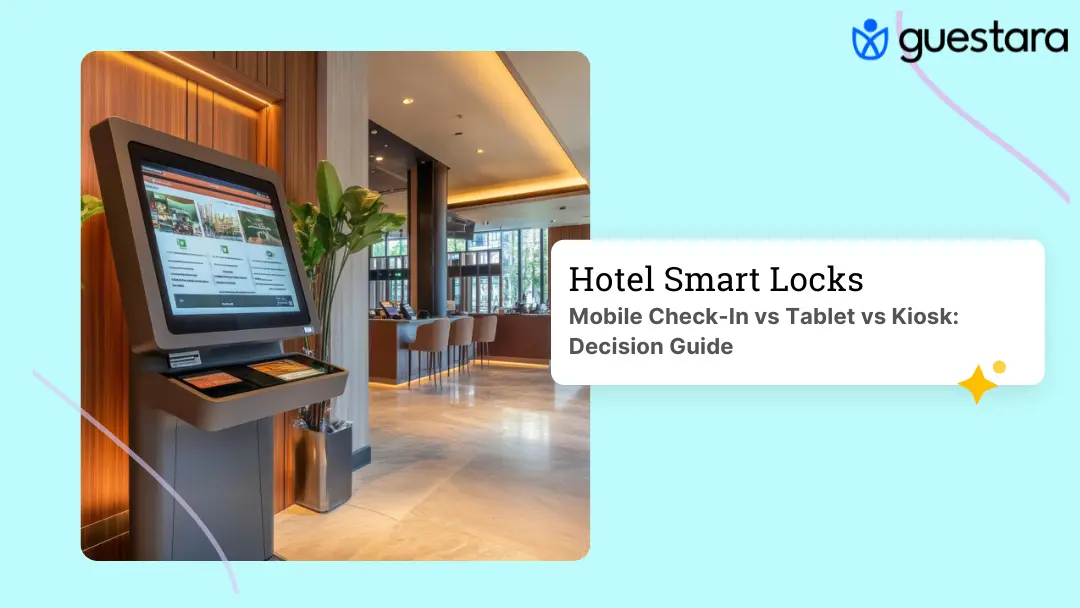
A self-service kiosk is a freestanding terminal, usually placed somewhere in the lobby away from the staffed desk. It often has a built-in ID scanner, a card reader, and sometimes a physical key card dispenser. A guest can complete an entire check-in, including collecting a room key, without talking to anyone. Guestara's Tablet Registration and kiosk module covers both deployment styles.
The confusion between tablet registration and a kiosk is understandable. Some vendors sell a tablet mounted in a kiosk-style enclosure and call the whole thing a kiosk, and a few kiosk companies describe their product as a tablet with extra hardware attached. The distinction that matters is not the screen size. It is whether the device sits at a staffed counter or stands alone.
That distinction changes the buying decision more than any spec sheet does. A tablet purchase is a front desk decision, made by whoever runs daily operations, and it rarely needs a capital budget approval. A kiosk purchase is closer to a facilities decision, since it usually means reworking lobby space, running power and network drops to a new location, and clearing the cost through whatever approval process a hotel uses for equipment over a few thousand dollars. Knowing which category a purchase falls into before a vendor call saves a hotel from stalling out mid-negotiation over budget authority nobody checked in advance.
Here is how the three options compare across the factors that actually affect a buying decision.
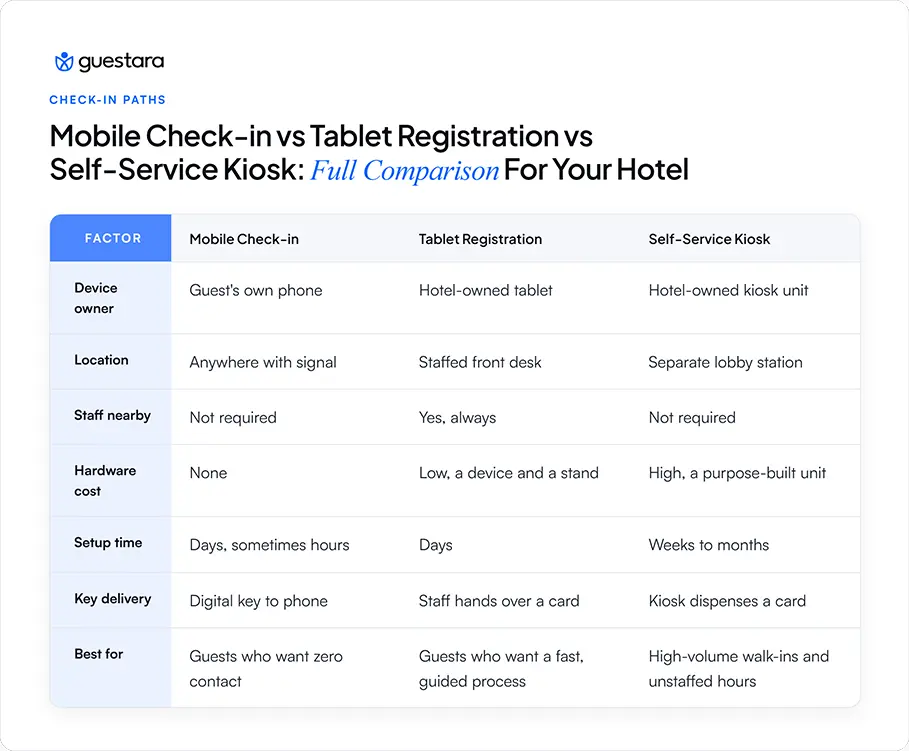
Mobile check-in and a kiosk both let a guest avoid the desk entirely, which is why the two get compared most often. Tablet registration sits in between. It removes the paper form and speeds up the desk interaction, but it keeps the human part of check-in intact, which some guests and some properties still want.
Reading this table by row instead of by column answers most buying questions on its own. If the row that matters most to you is hardware cost, mobile check-in wins outright. If the row that matters most is coverage during unstaffed hours, a kiosk is the only option of the three that works with nobody on shift. If the row that matters most is keeping a human in the loop without slowing anyone down, tablet registration is built for exactly that trade-off.
None of the three rows are wrong answers on their own. The mistake most properties make is treating this as a single choice, when the table is really describing three tools built for three different moments in the same arrival window.
Mobile check-in costs the least because there is no hardware to buy. Contactless check-in software for hotels runs $1 to $10 per room per month depending on the feature tier, and setup takes days, sometimes hours, since there is nothing to install in the lobby.
Tablet registration costs a few hundred dollars per device, close to the price of a consumer tablet plus a countertop stand. There is no specialized hardware to source, since the tablet is doing the same job it already does for email or a menu.
A self-service kiosk carries the highest upfront cost. A mid-range self-service kiosk unit runs $5,000 to $15,000 to buy, or $150 to $600 a month to lease if a property does not want the upfront hit. Installation, property management system integration, and staff training add weeks on top of that, well beyond the days a software-only rollout takes.The kiosk number surprises most first-time buyers. A single unit can cost more than a year of mobile check-in software across an entire property, which is why kiosks show up mostly at larger properties with the arrival volume to justify the investment.
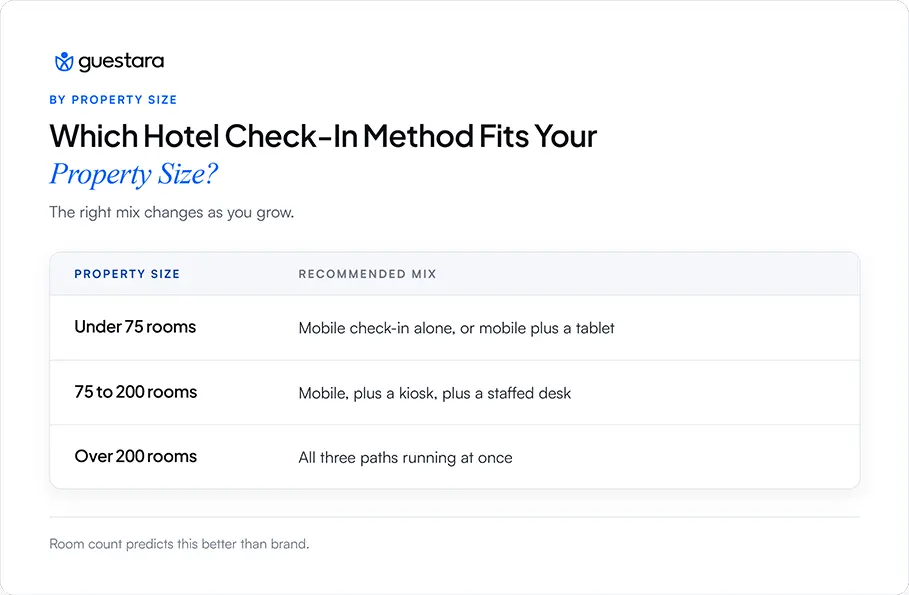
Property size is the strongest single predictor of which check-in method fits, more reliable than brand, location, or guest type alone.
Under 75 rooms, mobile check-in alone or mobile paired with a tablet at the desk usually covers arrival volume without justifying kiosk hardware. Between 75 and 200 rooms, a hybrid model, mobile plus a kiosk plus a staffed desk, handles peak arrival windows better than any single option alone. Above 200 rooms, running all three paths in parallel becomes less of a luxury and more of a necessity, since one check-in method alone cannot process a full coach tour or a conference block arriving within the same hour.
Property type matters as much as room count. A boutique property with a strong hospitality brand may skip kiosks entirely, even above 75 rooms, because a fully automated lobby station can clash with the experience the brand is selling. An airport hotel with round-the-clock arrivals leans harder on kiosks and mobile than a resort where guests want a personal welcome. A vacation rental operator with no on-site staff at all effectively runs mobile check-in as the only option, since there is no desk to place a tablet on.
The payoff for getting this right shows up at the front desk first. When mobile, tablet, and kiosk are all available, most routine arrivals never need a staff member at all, which frees the desk to handle exceptions, billing questions, and the guest who needs real help instead of processing every single check-in by hand.
Seasonality changes the math too. A resort with a sharp summer peak and a quiet winter may only need kiosk-level capacity for 12 to 16 weeks a year, which makes a rental kiosk a better fit than a purchased one. A year-round business hotel with steady arrivals has less reason to rent, since the unit earns its cost back over a longer, more predictable stretch of the year.
[[cta:cta-1 | eyebrow=Smart Checkout | heading=Give guests a fast, *contactless* checkout | sub=No front desk, no queue | btn=Book a demo | link=https://www.guestara.com/get-demo ]]
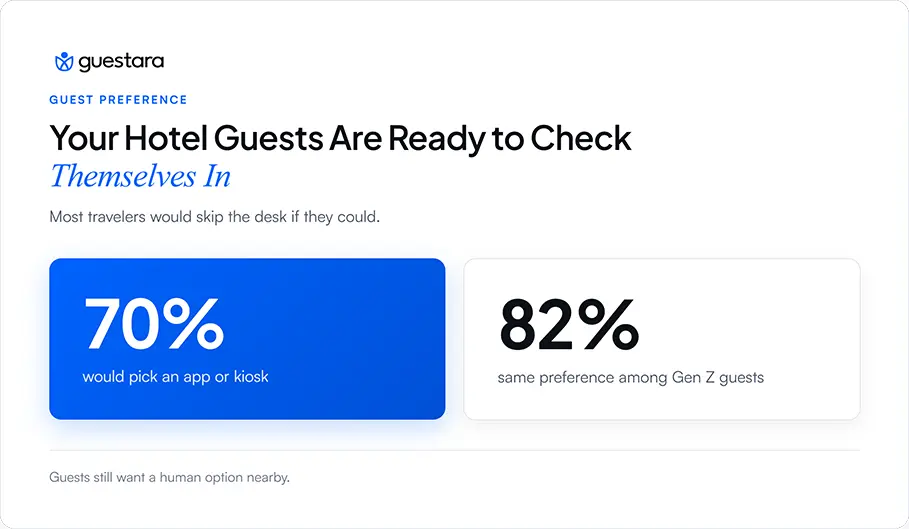
Yes, most travelers say they would rather check in themselves than wait for a staff member, though the preference comes with real caveats. Talker Research surveyed 2,000 American travelers in 2025 and found 70% are likely to use an app or a kiosk instead of the front desk, rising to 82% among Gen Z travelers.
The preference is not absolute. A separate survey of 400 US travelers found 75% have at least some privacy concerns about smart hotel technology, yet 44% would still prefer to book a hotel that offers it. Guests want the option of self-service. Fewer want it forced on them with no staffed alternative in sight.
This is the real argument for running more than one method. A guest who wants to avoid all contact should have mobile check-in available. A guest who wants convenience but also wants a human nearby should have tablet registration at the desk. A guest arriving to an empty lobby at 2am should have a kiosk that works without anyone on shift.
Yes, and most mid-size to large hotels end up running some combination of all three rather than picking just one. Each method covers a gap the other two leave open.
Mobile check-in handles the guest who wants zero contact and completes everything before arrival. Tablet registration catches the guest who did not finish mobile check-in but still wants a fast, staff-assisted process at the desk. A kiosk catches high-volume walk-ins and after-hours arrivals when no one is behind the desk at all.
The technical piece that makes this work is a shared system behind all three, tied to the same property management system and the same key delivery method, so a room assigned through mobile check-in, tablet registration, or a kiosk activates the same way at the door. Guestara's Digital Check-In and Tablet Registration modules run on the same underlying platform, which means the tablet at your desk and a standalone kiosk in the lobby are the same technology deployed in two different spots, not two separate systems to buy, learn, and maintain.
Whichever path a guest completes, a digital key sends automatically to more than 50 supported smart lock systems, and onboarding across all three typically takes about one week. For the mechanics of matching lock hardware to whichever check-in path a guest uses, see the full guide to choosing and integrating hotel smart locks.
Every check-in method creates a gap somewhere, and knowing the gap in advance is cheaper than discovering it during a busy weekend.
Mobile check-in: Fails for guests without a smartphone, a charged battery, or a reliable signal.
Tablet registration: Still requires a staffed desk, so it does not help during unstaffed hours.
Self-service kiosk: Has a high upfront cost, requires a multi-week setup, and includes mechanical parts that need maintenance.
Mobile check-in's biggest failure point is the guest who cannot use it. Older travelers, guests without a data plan while traveling internationally, and guests who simply forget to complete it before arrival still need a fallback. That fallback is usually tablet registration or a kiosk, not a redesigned app.
Tablet registration's limitation is that it does not remove the need for a staffed desk. If the goal is covering unstaffed hours, such as a small property with no overnight staff, a tablet alone does not solve that problem.
A kiosk's downside is mostly financial and logistical. The unit itself is a single point of failure. A card dispenser jams, a scanner needs a firmware update, or a screen goes dark, and now the property has an expensive, unstaffed piece of furniture in the lobby instead of a working check-in station. Learn what changes operationally for staff and guests when a property adds self-service hardware before committing to a full kiosk rollout.
Start with your property size and arrival pattern, then layer in guest type and staffing hours.
Count your rooms and your peak arrival hour. If check-ins rarely overlap, mobile check-in with a tablet backup likely covers everything. If arrivals cluster into a tight window, such as a conference block or a coach tour, add a kiosk to handle volume a single staffed desk cannot.
Look at your staffing hours next. Any hotel without 24 hour front desk coverage needs either a kiosk or a fully self-sufficient mobile check-in flow for the hours nobody is on shift. A property that is staffed around the clock can lean harder on tablet registration, since a human is always close by.
Consider your guests. A business hotel near an airport, full of guests who check in at odd hours and want to skip conversation, leans toward mobile and kiosk. A boutique property or a resort selling a personal welcome should be cautious about a kiosk replacing that first human interaction, even if the technology would move guests through faster.
If you already run mobile check-in and want to add a fast, low-cost path for the guests who skip it, tablet registration is usually the next step, not a kiosk. If you are outgrowing your front desk during peak arrival windows, a 30-second AI powered check-in flow paired with a kiosk for walk-ins closes that gap without adding headcount. If the idea of designing a fast, low-friction check-in screen from scratch feels daunting, this UX guide for building a 2-minute digital check-in flow is worth reading before you brief a vendor.


Compare hotel mobile check-in, tablets, and kiosks by cost, staffing, guest experience, and setup to choose the right option for your hotel.
Mobile check-in happens on the guest's own phone. Tablet registration happens on a hotel-owned tablet at the staffed front desk. A self-service kiosk is a freestanding, unstaffed terminal, usually somewhere in the lobby, separate from the desk. All three let a guest skip a manual check-in line, but they are not interchangeable, and buying the wrong one for your property wastes money.
A general manager sits through three vendor pitches in one week. The first sells an app. The second sells a tablet. The third sells a kiosk with a card dispenser built into the housing. Each rep insists their option is the only one a modern hotel needs. By the third pitch, it is not clear these are even solving the same problem, or whether kiosk and tablet are just two names for the same box.
They are not the same box. This guide breaks down what each option actually is, what each one costs, which properties should run all three, and how to decide without sitting through a fourth vendor pitch.
The confusion is not the GM's fault. Vendors in this space often use kiosk, tablet, and self-service check-in as loose, overlapping marketing terms, sometimes describing the exact same tablet-in-a-stand hardware three different ways depending on which feature they are pitching that week. Cutting through that starts with fixed definitions, not vendor language.
Mobile check-in, tablet registration, and a self-service kiosk differ in three ways: who owns the device, whether staff are nearby, and how much hardware the hotel has to buy.
Mobile check-in runs on the guest's own phone. The guest completes ID verification and payment before arrival or the moment they walk in, using their own device and their own data connection. The hotel buys no hardware at all, only software. Guestara's Digital Check-In module runs this path, completing registration in 30 seconds through an AI ID scan.
Tablet registration runs on a tablet the hotel owns, positioned at the staffed front desk. A guest fills in their details on the tablet instead of a paper form, but a staff member is standing right there the entire time. It is a faster way to do what the front desk already does, not a replacement for the desk.
A self-service kiosk is a freestanding terminal, usually placed somewhere in the lobby away from the staffed desk. It often has a built-in ID scanner, a card reader, and sometimes a physical key card dispenser. A guest can complete an entire check-in, including collecting a room key, without talking to anyone. Guestara's Tablet Registration and kiosk module covers both deployment styles.
The confusion between tablet registration and a kiosk is understandable. Some vendors sell a tablet mounted in a kiosk-style enclosure and call the whole thing a kiosk, and a few kiosk companies describe their product as a tablet with extra hardware attached. The distinction that matters is not the screen size. It is whether the device sits at a staffed counter or stands alone.
That distinction changes the buying decision more than any spec sheet does. A tablet purchase is a front desk decision, made by whoever runs daily operations, and it rarely needs a capital budget approval. A kiosk purchase is closer to a facilities decision, since it usually means reworking lobby space, running power and network drops to a new location, and clearing the cost through whatever approval process a hotel uses for equipment over a few thousand dollars. Knowing which category a purchase falls into before a vendor call saves a hotel from stalling out mid-negotiation over budget authority nobody checked in advance.
Here is how the three options compare across the factors that actually affect a buying decision.
Mobile check-in and a kiosk both let a guest avoid the desk entirely, which is why the two get compared most often. Tablet registration sits in between. It removes the paper form and speeds up the desk interaction, but it keeps the human part of check-in intact, which some guests and some properties still want.
Reading this table by row instead of by column answers most buying questions on its own. If the row that matters most to you is hardware cost, mobile check-in wins outright. If the row that matters most is coverage during unstaffed hours, a kiosk is the only option of the three that works with nobody on shift. If the row that matters most is keeping a human in the loop without slowing anyone down, tablet registration is built for exactly that trade-off.
None of the three rows are wrong answers on their own. The mistake most properties make is treating this as a single choice, when the table is really describing three tools built for three different moments in the same arrival window.
Mobile check-in costs the least because there is no hardware to buy. Contactless check-in software for hotels runs $1 to $10 per room per month depending on the feature tier, and setup takes days, sometimes hours, since there is nothing to install in the lobby.
Tablet registration costs a few hundred dollars per device, close to the price of a consumer tablet plus a countertop stand. There is no specialized hardware to source, since the tablet is doing the same job it already does for email or a menu.
A self-service kiosk carries the highest upfront cost. A mid-range self-service kiosk unit runs $5,000 to $15,000 to buy, or $150 to $600 a month to lease if a property does not want the upfront hit. Installation, property management system integration, and staff training add weeks on top of that, well beyond the days a software-only rollout takes.The kiosk number surprises most first-time buyers. A single unit can cost more than a year of mobile check-in software across an entire property, which is why kiosks show up mostly at larger properties with the arrival volume to justify the investment.
Property size is the strongest single predictor of which check-in method fits, more reliable than brand, location, or guest type alone.
Under 75 rooms, mobile check-in alone or mobile paired with a tablet at the desk usually covers arrival volume without justifying kiosk hardware. Between 75 and 200 rooms, a hybrid model, mobile plus a kiosk plus a staffed desk, handles peak arrival windows better than any single option alone. Above 200 rooms, running all three paths in parallel becomes less of a luxury and more of a necessity, since one check-in method alone cannot process a full coach tour or a conference block arriving within the same hour.
Property type matters as much as room count. A boutique property with a strong hospitality brand may skip kiosks entirely, even above 75 rooms, because a fully automated lobby station can clash with the experience the brand is selling. An airport hotel with round-the-clock arrivals leans harder on kiosks and mobile than a resort where guests want a personal welcome. A vacation rental operator with no on-site staff at all effectively runs mobile check-in as the only option, since there is no desk to place a tablet on.
The payoff for getting this right shows up at the front desk first. When mobile, tablet, and kiosk are all available, most routine arrivals never need a staff member at all, which frees the desk to handle exceptions, billing questions, and the guest who needs real help instead of processing every single check-in by hand.
Seasonality changes the math too. A resort with a sharp summer peak and a quiet winter may only need kiosk-level capacity for 12 to 16 weeks a year, which makes a rental kiosk a better fit than a purchased one. A year-round business hotel with steady arrivals has less reason to rent, since the unit earns its cost back over a longer, more predictable stretch of the year.
[[cta:cta-1 | eyebrow=Smart Checkout | heading=Give guests a fast, *contactless* checkout | sub=No front desk, no queue | btn=Book a demo | link=https://www.guestara.com/get-demo ]]
Yes, most travelers say they would rather check in themselves than wait for a staff member, though the preference comes with real caveats. Talker Research surveyed 2,000 American travelers in 2025 and found 70% are likely to use an app or a kiosk instead of the front desk, rising to 82% among Gen Z travelers.
The preference is not absolute. A separate survey of 400 US travelers found 75% have at least some privacy concerns about smart hotel technology, yet 44% would still prefer to book a hotel that offers it. Guests want the option of self-service. Fewer want it forced on them with no staffed alternative in sight.
This is the real argument for running more than one method. A guest who wants to avoid all contact should have mobile check-in available. A guest who wants convenience but also wants a human nearby should have tablet registration at the desk. A guest arriving to an empty lobby at 2am should have a kiosk that works without anyone on shift.
Yes, and most mid-size to large hotels end up running some combination of all three rather than picking just one. Each method covers a gap the other two leave open.
Mobile check-in handles the guest who wants zero contact and completes everything before arrival. Tablet registration catches the guest who did not finish mobile check-in but still wants a fast, staff-assisted process at the desk. A kiosk catches high-volume walk-ins and after-hours arrivals when no one is behind the desk at all.
The technical piece that makes this work is a shared system behind all three, tied to the same property management system and the same key delivery method, so a room assigned through mobile check-in, tablet registration, or a kiosk activates the same way at the door. Guestara's Digital Check-In and Tablet Registration modules run on the same underlying platform, which means the tablet at your desk and a standalone kiosk in the lobby are the same technology deployed in two different spots, not two separate systems to buy, learn, and maintain.
Whichever path a guest completes, a digital key sends automatically to more than 50 supported smart lock systems, and onboarding across all three typically takes about one week. For the mechanics of matching lock hardware to whichever check-in path a guest uses, see the full guide to choosing and integrating hotel smart locks.
Every check-in method creates a gap somewhere, and knowing the gap in advance is cheaper than discovering it during a busy weekend.
Mobile check-in: Fails for guests without a smartphone, a charged battery, or a reliable signal.
Tablet registration: Still requires a staffed desk, so it does not help during unstaffed hours.
Self-service kiosk: Has a high upfront cost, requires a multi-week setup, and includes mechanical parts that need maintenance.
Mobile check-in's biggest failure point is the guest who cannot use it. Older travelers, guests without a data plan while traveling internationally, and guests who simply forget to complete it before arrival still need a fallback. That fallback is usually tablet registration or a kiosk, not a redesigned app.
Tablet registration's limitation is that it does not remove the need for a staffed desk. If the goal is covering unstaffed hours, such as a small property with no overnight staff, a tablet alone does not solve that problem.
A kiosk's downside is mostly financial and logistical. The unit itself is a single point of failure. A card dispenser jams, a scanner needs a firmware update, or a screen goes dark, and now the property has an expensive, unstaffed piece of furniture in the lobby instead of a working check-in station. Learn what changes operationally for staff and guests when a property adds self-service hardware before committing to a full kiosk rollout.
Start with your property size and arrival pattern, then layer in guest type and staffing hours.
Count your rooms and your peak arrival hour. If check-ins rarely overlap, mobile check-in with a tablet backup likely covers everything. If arrivals cluster into a tight window, such as a conference block or a coach tour, add a kiosk to handle volume a single staffed desk cannot.
Look at your staffing hours next. Any hotel without 24 hour front desk coverage needs either a kiosk or a fully self-sufficient mobile check-in flow for the hours nobody is on shift. A property that is staffed around the clock can lean harder on tablet registration, since a human is always close by.
Consider your guests. A business hotel near an airport, full of guests who check in at odd hours and want to skip conversation, leans toward mobile and kiosk. A boutique property or a resort selling a personal welcome should be cautious about a kiosk replacing that first human interaction, even if the technology would move guests through faster.
If you already run mobile check-in and want to add a fast, low-cost path for the guests who skip it, tablet registration is usually the next step, not a kiosk. If you are outgrowing your front desk during peak arrival windows, a 30-second AI powered check-in flow paired with a kiosk for walk-ins closes that gap without adding headcount. If the idea of designing a fast, low-friction check-in screen from scratch feels daunting, this UX guide for building a 2-minute digital check-in flow is worth reading before you brief a vendor.
No. A self-service kiosk is a freestanding, unstaffed terminal, usually placed away from the front desk, that a guest uses without any staff involvement. Tablet registration is a tablet at the staffed front desk, used with a staff member standing right there. Some hardware looks similar since both can use a tablet inside the housing, but the difference that matters is staffing and location, not the screen. When comparing vendors, ask where the device is meant to sit and whether it is designed to work with nobody nearby, since that answer matters more than the brand name on the screen.
Yes, for most properties under 75 rooms, mobile check-in alone or paired with a simple tablet backup covers typical arrival volume without justifying kiosk hardware. A small hotel with light, spread-out arrivals rarely has the peak-hour crunch that makes a kiosk worth its cost. Vacation rentals and small independent properties with no on-site staff often run mobile check-in as their only method by necessity. The one thing to plan for is a fallback for guests without a compatible phone, since even a small property still needs some way to register a guest who cannot complete mobile check-in.
A self-service kiosk typically takes several weeks to a couple of months from ordering to going live, once installation, property management system integration, and staff training are factored in. Mobile check-in, by comparison, can go live within days since there is no physical hardware to install. Hotels planning a kiosk rollout should budget that lead time into any launch date tied to a season or an event. Ordering ahead of a peak season, rather than during it, avoids running the busiest weeks of the year without the hardware a property already budgeted for.
Yes, many guests still want a staffed desk available even if they do not use it themselves. Surveys show most travelers would rather check in through an app or a kiosk than wait in a line, but a majority also report privacy concerns about smart hotel technology and would still choose a property that keeps a human option available. The strongest setup offers self-service without removing the staffed desk as a fallback. Removing the desk entirely shows up as a complaint in reviews faster than a slow check-in line ever does.
A guest without a smartphone needs a fallback path, which is exactly why most hotels do not rely on mobile check-in alone. Tablet registration at the front desk or a self-service kiosk both work without the guest owning any device, since the hardware belongs to the hotel. Properties that only offer mobile check-in risk turning away or frustrating guests who are traveling without a compatible phone or a working data connection. This is the single strongest argument for keeping at least one hotel-owned device, tablet or kiosk, available at every property regardless of how strong mobile adoption looks on paper.
We work closely with the industry leaders to offer seamless solutions




We’re here to help your whole team stay ahead of the curve as you grow.

Get up and running quickly with a personalized onboarding plan

Connect with real people who really get it, 24/7

Checkout our vast library of free resources, templates and more
There's only so much we can say — so let us show you! Schedule a demo today and reach your business goals.


.png)