What a hotel management system is, how it differs from a PMS, how it connects to channel managers and booking engines, and what a small property needs.




Ask three vendors what a hotel management system is and you get three answers, all of which describe their own product. One calls it a PMS. Another says a PMS is only part of it. A third uses both terms in the same paragraph to mean different things.
That confusion is not accidental, and it costs money. A property that does not know where its PMS ends and its channel manager begins buys overlapping systems, or buys one and discovers six months later that it cannot do something it assumed was included. Here is what each system actually owns, how they connect, and which ones a property your size genuinely needs.
A hotel management system is the software a property runs its daily operations on, covering reservations, the front desk, housekeeping status, rates and inventory, billing and reporting. Most of that function sits in the property management system, or PMS, which holds the master record of every booking and room.
A hotel management system is the software that runs a property's day-to-day operations: taking and holding reservations, checking guests in and out, tracking room status, managing rates and availability, posting charges, and reporting on all of it.
In practice the term describes a category rather than a specific product. Some vendors use it as a synonym for a PMS. Others use it to mean a PMS plus everything bolted around it. Both usages are common, which is why the term alone tells you very little about what a given product does.
What matters operationally is the function, not the label. Every property needs somewhere that holds the authoritative answer to three questions: which rooms are sold, at what rate, and what each guest owes. That place is the PMS, whatever the vendor calls the wider bundle.
A PMS, or property management system, is the core system that holds the booking and guest record. A hotel management system is the looser term for the software a property runs on, which in many cases is the PMS and in others means the PMS plus the systems connected to it.
The distinction matters when you are buying. A vendor selling a hotel management system may be selling a PMS with a booking engine and channel manager included, or a PMS alone with integrations available separately. Those are materially different purchases at materially different prices.
Use PMS when you mean the core system, because it is the precise term and every vendor understands it the same way. Use hotel management system when you mean the whole operational stack.
When a vendor uses the broader term, ask which specific modules are included and which are integrations with third parties. That single question resolves most of the ambiguity in a sales conversation, and the answer tells you how many contracts you are actually signing.
A PMS performs six core functions, and anything beyond these is either an add-on module or a separate system connected to it. Knowing the six tells you when a vendor is describing core functionality and when they are describing an upsell.
The fourth row is the one that explains the rest of the stack. Rates and inventory in the PMS are the master record. A channel manager does not hold its own rates, it distributes the PMS rates. A booking engine does not hold its own availability, it sells against PMS availability. When those systems disagree with the PMS, the PMS is right and something has broken.
Eight systems make up most hotel technology stacks, and each owns a distinct job. Most confusion in buying conversations comes from vendors describing overlapping bundles without naming which of these eight they actually replace.
Read that table as a set of boundaries rather than a shopping list. A property with no restaurant does not need a POS. A single property does not need a CRS. The question is never how many of the eight you have, it is whether each job that matters to your property has exactly one owner.
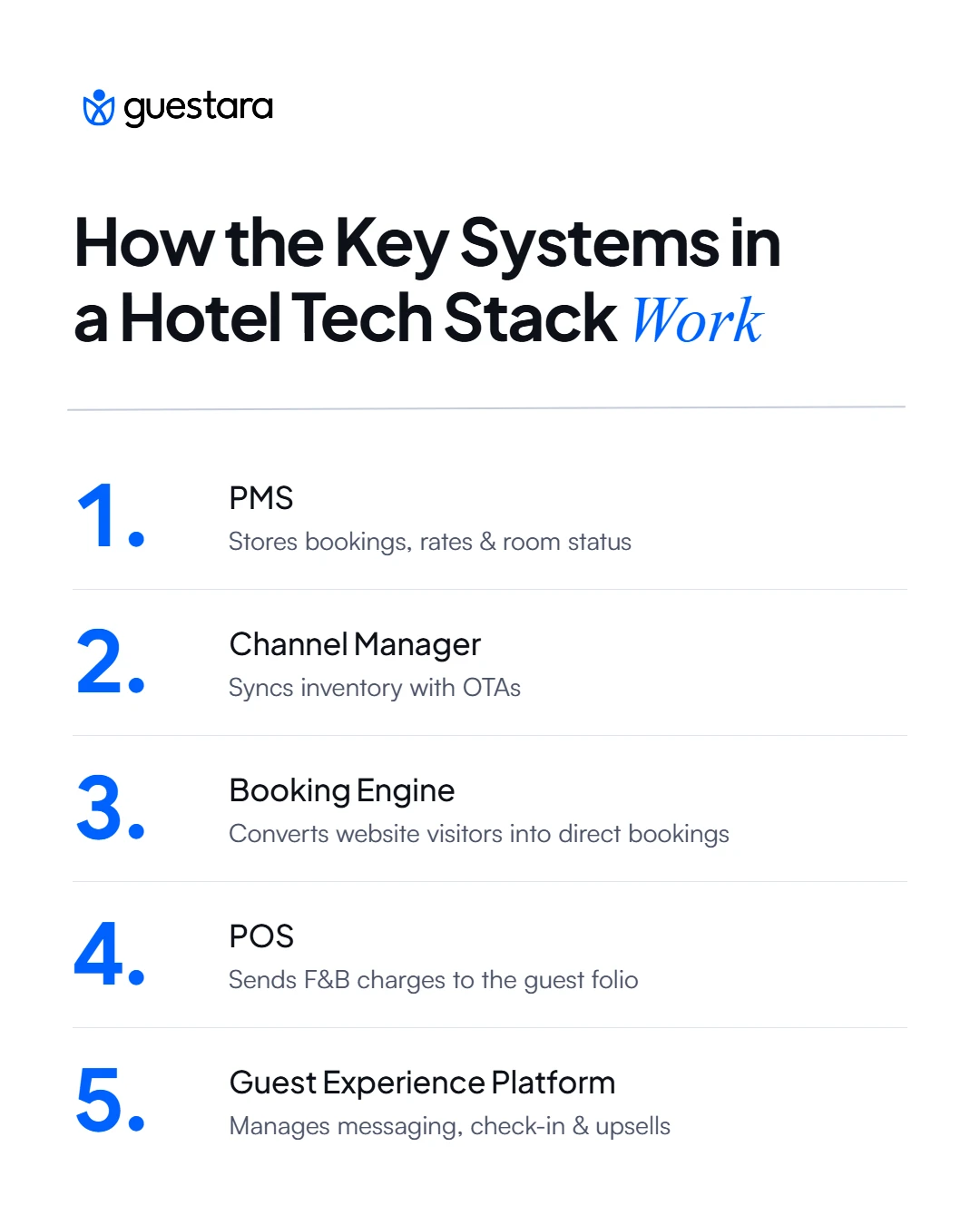
A guest experience platform sits on top of the PMS and reads its booking data, then writes activity back to it. It is not a PMS module and it is not a replacement for one, which is the question buyers ask most often and find answered least clearly.
The division is clean once you see it. The PMS knows a guest is arriving on Tuesday in room 304 on a corporate rate. The guest experience platform uses that to send the pre-arrival message, take the digital check-in, offer the late checkout and request the review, then posts the upsell charge back to the folio. One holds the record, the other acts on it.
That is why these tools are evaluated on their PMS integration before their feature list. A messaging tool that cannot read booking data cannot trigger anything automatically, which leaves you with a shared inbox. Guestara sits in this layer and integrates with PMS platforms including Cloudbeds, Hotelogix, Ezee Absolute, Apaleo, Beds24, SiteMinder, Little Hotelier and Oracle rather than replacing any of them.
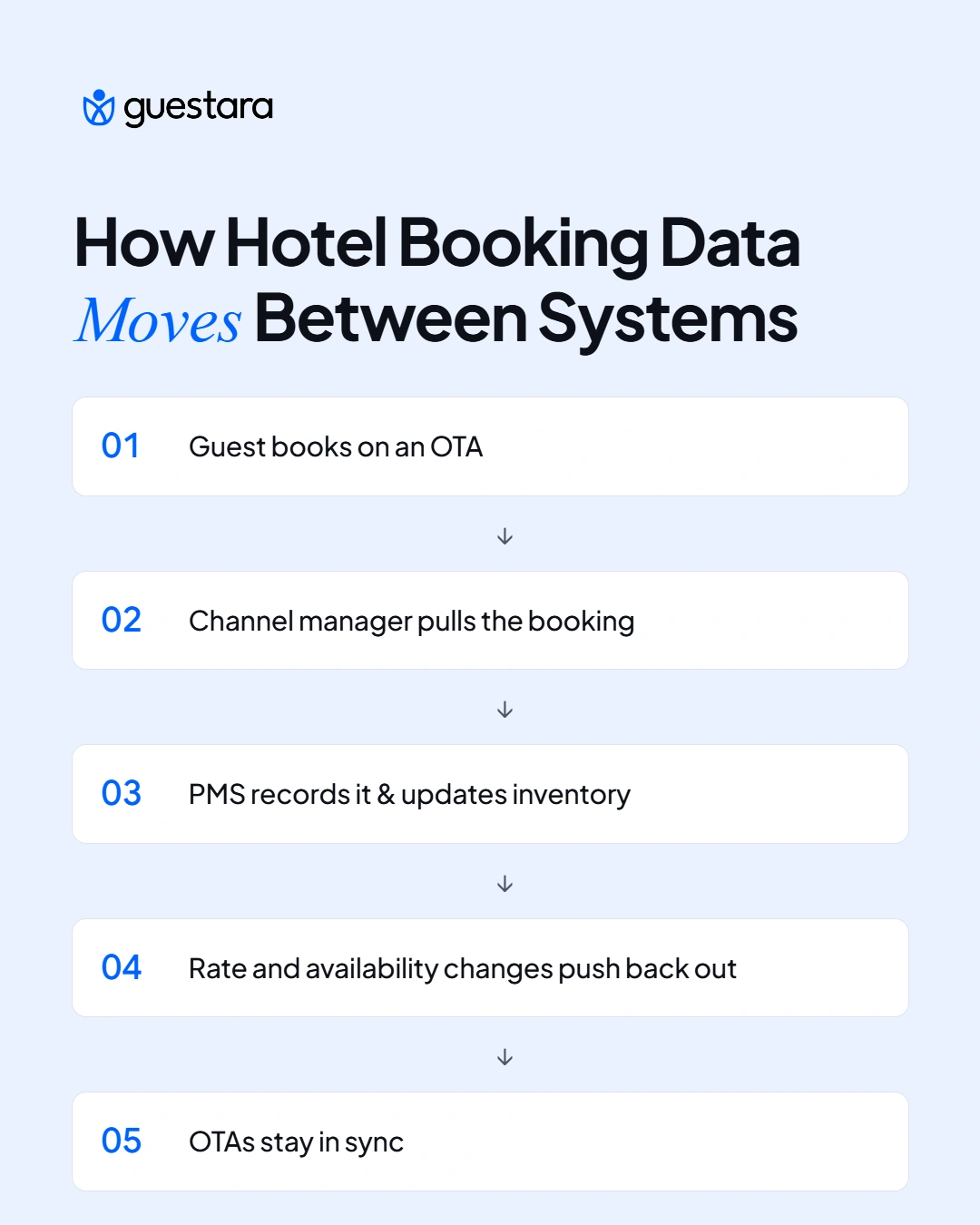
Data flows outward from the PMS and back into it, and every common technology failure in a hotel is a break in one of those flows. Tracing the six main events is more useful than any architecture diagram, because it shows you what to check when something goes wrong.
Failures are usually silent, which is what makes them expensive. A channel manager that stops pushing rates does not throw an error at the front desk. It simply keeps selling yesterday's price until somebody notices.
Check the direction of the failure first. If bookings are arriving but rates are stale, the push leg is broken. If your rates are correct everywhere but you have been double booked, the pull leg is broken. Those are different problems with different owners, and diagnosing which one you have takes a minute if you know the flows and a week if you do not.
Build one habit around this. Compare your PMS availability against one OTA listing at the same moment, once a week. It takes two minutes and catches most sync failures before a guest does.
Two-way integration means data moves in both directions between two systems, so a change in either one updates the other. A one-way integration pushes in a single direction only, which is adequate for some jobs and dangerous for inventory.
The difference decides whether you can be double booked. If your channel manager pushes availability to OTAs but cannot pull bookings back automatically, somebody has to enter every OTA booking into the PMS by hand, and the gap between a guest booking and that entry is a window in which the same room can sell twice.
Vendors describe both as "integrated" and often as "real-time," which is why the word to listen for is not integrated but bidirectional. Ask directly: when a booking arrives on an OTA, does it appear in the PMS without anyone touching it, and when I change a rate in the PMS, does it reach the OTA without anyone touching it. Two yes answers mean two-way.
There are published standards in this area, including HTNG and OpenTravel specifications, and many vendors build their APIs against them. The standards are worth knowing by name, because a vendor who cannot say what their integration is built on is usually describing something more manual than the word integration implies.
What to do with that practically: ask for the list of certified integrations rather than the list of logos on the website. A logo means a connection exists somewhere. A certification means that specific pairing has been tested and supported, and the difference surfaces the first time something breaks and each vendor points at the other.
Cloud suits most independent properties and on-premise still wins in specific cases, which is a less fashionable answer than the one most vendors give. The trade-offs are real in both directions.
The row that gets least attention is internet dependency. A cloud PMS at a property with unreliable connectivity is a cloud PMS you cannot check guests into during an outage. That is survivable with a plan, meaning a documented manual process and a way to reconcile afterwards, and it is a bad surprise without one.
Ask any cloud vendor what happens during an outage, and treat an answer along the lines of it never going down as a non-answer. Every system has outages. What you need to know is what your front desk does during one.
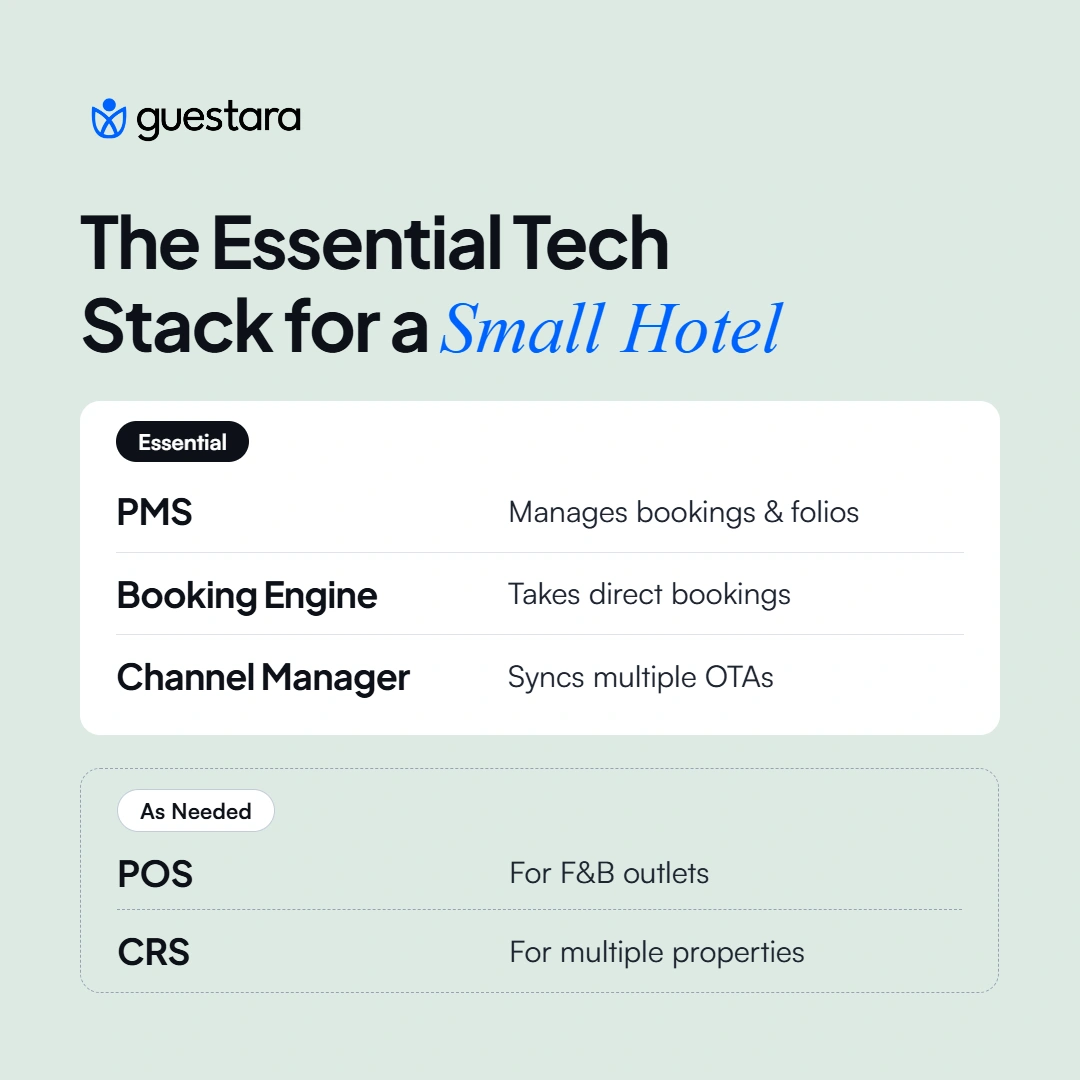
A small independent property needs three systems, not seven. The full stack is built for properties with multiple outlets, multiple sites and a revenue manager, and buying it at 25 rooms means paying for capability nobody has time to use.
Three things, in this order. A PMS, because something has to hold the booking and the folio. A booking engine, because direct bookings cost no commission and the website is where they happen. And a channel manager if you sell on more than one OTA, because manual availability updates across two channels is how double bookings happen.
That is the core. Everything else is conditional. A POS only if you have an outlet posting charges to rooms. A CRS only if you operate more than one property. An RMS rarely below about 50 rooms, because the pricing decisions at that scale are usually few enough to make by hand with a comp set and a spreadsheet.
A guest experience platform is a volume question rather than a size question. A 25-room property with high OTA dependency and heavy message traffic across WhatsApp, email and two OTA inboxes has a real problem that tooling solves. The same property with mostly repeat direct guests and a manager who answers the phone does not.
Two requirement areas matter beyond the standard feature list, and both need checking against your own jurisdiction rather than taken from any vendor's compliance page.
For Indian properties, invoicing has to meet GST requirements, which means the system needs to produce compliant tax invoices with the right fields and handle the applicable rates on room and food revenue. Ask to see a sample invoice from the system rather than accepting a yes. Foreign guest reporting is the second area: properties hosting foreign nationals have reporting obligations, and whether the system captures the required passport and visa fields and can produce that submission is worth testing before purchase rather than discovering at the front desk.
GCC properties have their own registration and reporting requirements that differ by country. The pattern is the same: ask what the system produces, see it produced, and verify the requirement with a local advisor rather than with the vendor.
Ask the questions a vendor cannot answer with a feature list, because the feature lists are all similar and the differences surface after you have signed. Six questions do most of the work.
Run a reference call before signing, with a property of similar size using the same integration set. Ask them what broke in the first three months. Every implementation has something, and the useful information is whether it was fixed and how long it took.
Then price the switching cost honestly. Migration, retraining and the productivity dip during changeover are real, and they are the reason properties stay on systems they complain about. Knowing that number before you buy makes the decision clearer in both directions.
[[cta:cta-7 | eyebrow=Guest Engagement | heading=See what sits on *top of* your PMS | btn=Explore Guest Engagement | link=https://www.guestara.com/guest-engagement-for-hospitality ]]


What a hotel management system is, how it differs from a PMS, how it connects to channel managers and booking engines, and what a small property needs.
Ask three vendors what a hotel management system is and you get three answers, all of which describe their own product. One calls it a PMS. Another says a PMS is only part of it. A third uses both terms in the same paragraph to mean different things.
That confusion is not accidental, and it costs money. A property that does not know where its PMS ends and its channel manager begins buys overlapping systems, or buys one and discovers six months later that it cannot do something it assumed was included. Here is what each system actually owns, how they connect, and which ones a property your size genuinely needs.
A hotel management system is the software a property runs its daily operations on, covering reservations, the front desk, housekeeping status, rates and inventory, billing and reporting. Most of that function sits in the property management system, or PMS, which holds the master record of every booking and room.
A hotel management system is the software that runs a property's day-to-day operations: taking and holding reservations, checking guests in and out, tracking room status, managing rates and availability, posting charges, and reporting on all of it.
In practice the term describes a category rather than a specific product. Some vendors use it as a synonym for a PMS. Others use it to mean a PMS plus everything bolted around it. Both usages are common, which is why the term alone tells you very little about what a given product does.
What matters operationally is the function, not the label. Every property needs somewhere that holds the authoritative answer to three questions: which rooms are sold, at what rate, and what each guest owes. That place is the PMS, whatever the vendor calls the wider bundle.
A PMS, or property management system, is the core system that holds the booking and guest record. A hotel management system is the looser term for the software a property runs on, which in many cases is the PMS and in others means the PMS plus the systems connected to it.
The distinction matters when you are buying. A vendor selling a hotel management system may be selling a PMS with a booking engine and channel manager included, or a PMS alone with integrations available separately. Those are materially different purchases at materially different prices.
Use PMS when you mean the core system, because it is the precise term and every vendor understands it the same way. Use hotel management system when you mean the whole operational stack.
When a vendor uses the broader term, ask which specific modules are included and which are integrations with third parties. That single question resolves most of the ambiguity in a sales conversation, and the answer tells you how many contracts you are actually signing.
A PMS performs six core functions, and anything beyond these is either an add-on module or a separate system connected to it. Knowing the six tells you when a vendor is describing core functionality and when they are describing an upsell.
The fourth row is the one that explains the rest of the stack. Rates and inventory in the PMS are the master record. A channel manager does not hold its own rates, it distributes the PMS rates. A booking engine does not hold its own availability, it sells against PMS availability. When those systems disagree with the PMS, the PMS is right and something has broken.
Eight systems make up most hotel technology stacks, and each owns a distinct job. Most confusion in buying conversations comes from vendors describing overlapping bundles without naming which of these eight they actually replace.
Read that table as a set of boundaries rather than a shopping list. A property with no restaurant does not need a POS. A single property does not need a CRS. The question is never how many of the eight you have, it is whether each job that matters to your property has exactly one owner.
A guest experience platform sits on top of the PMS and reads its booking data, then writes activity back to it. It is not a PMS module and it is not a replacement for one, which is the question buyers ask most often and find answered least clearly.
The division is clean once you see it. The PMS knows a guest is arriving on Tuesday in room 304 on a corporate rate. The guest experience platform uses that to send the pre-arrival message, take the digital check-in, offer the late checkout and request the review, then posts the upsell charge back to the folio. One holds the record, the other acts on it.
That is why these tools are evaluated on their PMS integration before their feature list. A messaging tool that cannot read booking data cannot trigger anything automatically, which leaves you with a shared inbox. Guestara sits in this layer and integrates with PMS platforms including Cloudbeds, Hotelogix, Ezee Absolute, Apaleo, Beds24, SiteMinder, Little Hotelier and Oracle rather than replacing any of them.
Data flows outward from the PMS and back into it, and every common technology failure in a hotel is a break in one of those flows. Tracing the six main events is more useful than any architecture diagram, because it shows you what to check when something goes wrong.
Failures are usually silent, which is what makes them expensive. A channel manager that stops pushing rates does not throw an error at the front desk. It simply keeps selling yesterday's price until somebody notices.
Check the direction of the failure first. If bookings are arriving but rates are stale, the push leg is broken. If your rates are correct everywhere but you have been double booked, the pull leg is broken. Those are different problems with different owners, and diagnosing which one you have takes a minute if you know the flows and a week if you do not.
Build one habit around this. Compare your PMS availability against one OTA listing at the same moment, once a week. It takes two minutes and catches most sync failures before a guest does.
Two-way integration means data moves in both directions between two systems, so a change in either one updates the other. A one-way integration pushes in a single direction only, which is adequate for some jobs and dangerous for inventory.
The difference decides whether you can be double booked. If your channel manager pushes availability to OTAs but cannot pull bookings back automatically, somebody has to enter every OTA booking into the PMS by hand, and the gap between a guest booking and that entry is a window in which the same room can sell twice.
Vendors describe both as "integrated" and often as "real-time," which is why the word to listen for is not integrated but bidirectional. Ask directly: when a booking arrives on an OTA, does it appear in the PMS without anyone touching it, and when I change a rate in the PMS, does it reach the OTA without anyone touching it. Two yes answers mean two-way.
There are published standards in this area, including HTNG and OpenTravel specifications, and many vendors build their APIs against them. The standards are worth knowing by name, because a vendor who cannot say what their integration is built on is usually describing something more manual than the word integration implies.
What to do with that practically: ask for the list of certified integrations rather than the list of logos on the website. A logo means a connection exists somewhere. A certification means that specific pairing has been tested and supported, and the difference surfaces the first time something breaks and each vendor points at the other.
Cloud suits most independent properties and on-premise still wins in specific cases, which is a less fashionable answer than the one most vendors give. The trade-offs are real in both directions.
The row that gets least attention is internet dependency. A cloud PMS at a property with unreliable connectivity is a cloud PMS you cannot check guests into during an outage. That is survivable with a plan, meaning a documented manual process and a way to reconcile afterwards, and it is a bad surprise without one.
Ask any cloud vendor what happens during an outage, and treat an answer along the lines of it never going down as a non-answer. Every system has outages. What you need to know is what your front desk does during one.
A small independent property needs three systems, not seven. The full stack is built for properties with multiple outlets, multiple sites and a revenue manager, and buying it at 25 rooms means paying for capability nobody has time to use.
Three things, in this order. A PMS, because something has to hold the booking and the folio. A booking engine, because direct bookings cost no commission and the website is where they happen. And a channel manager if you sell on more than one OTA, because manual availability updates across two channels is how double bookings happen.
That is the core. Everything else is conditional. A POS only if you have an outlet posting charges to rooms. A CRS only if you operate more than one property. An RMS rarely below about 50 rooms, because the pricing decisions at that scale are usually few enough to make by hand with a comp set and a spreadsheet.
A guest experience platform is a volume question rather than a size question. A 25-room property with high OTA dependency and heavy message traffic across WhatsApp, email and two OTA inboxes has a real problem that tooling solves. The same property with mostly repeat direct guests and a manager who answers the phone does not.
Two requirement areas matter beyond the standard feature list, and both need checking against your own jurisdiction rather than taken from any vendor's compliance page.
For Indian properties, invoicing has to meet GST requirements, which means the system needs to produce compliant tax invoices with the right fields and handle the applicable rates on room and food revenue. Ask to see a sample invoice from the system rather than accepting a yes. Foreign guest reporting is the second area: properties hosting foreign nationals have reporting obligations, and whether the system captures the required passport and visa fields and can produce that submission is worth testing before purchase rather than discovering at the front desk.
GCC properties have their own registration and reporting requirements that differ by country. The pattern is the same: ask what the system produces, see it produced, and verify the requirement with a local advisor rather than with the vendor.
Ask the questions a vendor cannot answer with a feature list, because the feature lists are all similar and the differences surface after you have signed. Six questions do most of the work.
Run a reference call before signing, with a property of similar size using the same integration set. Ask them what broke in the first three months. Every implementation has something, and the useful information is whether it was fixed and how long it took.
Then price the switching cost honestly. Migration, retraining and the productivity dip during changeover are real, and they are the reason properties stay on systems they complain about. Knowing that number before you buy makes the decision clearer in both directions.
[[cta:cta-7 | eyebrow=Guest Engagement | heading=See what sits on *top of* your PMS | btn=Explore Guest Engagement | link=https://www.guestara.com/guest-engagement-for-hospitality ]]
A PMS, or property management system, is the core system holding the booking record, rates, room status and guest folios. Hotel management system is a broader category term that vendors use both as a synonym for a PMS and to mean a PMS plus the systems connected around it. When a vendor uses the broader term, ask which modules are included and which are third-party integrations, since that determines how many contracts you are signing.
A PMS covers six core functions: reservations, front desk operations including check-in and check-out, housekeeping and room status, rates and inventory, billing and the guest folio, and reporting including the night audit. It holds the master record of availability and rates, which connected systems such as channel managers and booking engines distribute or sell against rather than holding independently.
You need one if you sell on more than one online travel agency. The PMS holds your availability but does not distribute it, so without a channel manager somebody updates each OTA by hand, and the gap between a booking arriving and being entered is a window in which the same room can sell twice. A property selling on a single channel can sometimes manage without one.
Two-way integration means data moves in both directions, so a change in either system updates the other automatically. A one-way integration pushes in a single direction only. The practical test is whether an OTA booking appears in the PMS without anyone entering it, and whether a rate changed in the PMS reaches the OTA without anyone entering it. Both must be true for an integration to be genuinely two-way.
Cloud suits most independent properties on upfront cost, remote access and integration breadth, and updates are applied by the vendor. On-premise runs without an internet connection and keeps data on your own premises, which still matters at properties with unreliable connectivity or specific data location requirements. The deciding question for cloud is what the front desk does during an outage, which needs a documented answer before purchase.
We work closely with the industry leaders to offer seamless solutions




We’re here to help your whole team stay ahead of the curve as you grow.

Get up and running quickly with a personalized onboarding plan

Connect with real people who really get it, 24/7

Checkout our vast library of free resources, templates and more
There's only so much we can say — so let us show you! Schedule a demo today and reach your business goals.