Kiosk vs mobile check-in depends on your property type. See which fits airport hotels, boutiques, resorts, hostels, and vacation rentals, and why.




The right choice between a kiosk and mobile check-in depends on your property type, not your budget. An airport hotel and a boutique inn can have the same room count and still need opposite answers.
Picture two properties on the same street. One is a 90-room airport hotel where flight crews and delayed passengers arrive in clusters at 1am. The other is a 90-room boutique hotel where the owner wants every guest greeted by name with a glass of wine. Same size. Same city. A self-service kiosk is close to essential for the first and quietly wrong for the second.
That is why room count alone never answers this question. This guide walks through kiosk versus mobile check-in by property type, so you can match the method to the kind of hotel you actually run, not to a generic best-practice list.
A self-service kiosk is a hotel-owned terminal in the lobby that a guest uses to check in without staff. Mobile check-in runs on the guest's own phone, before arrival or on the spot, with no hotel hardware involved at all.
The kiosk is a physical station, usually freestanding, often with a built-in ID scanner, a card reader, and sometimes a key card dispenser. A guest walks up, follows the prompts, and collects a room key without talking to anyone.
Mobile check-in moves that same process onto the device already in the guest's pocket. They complete ID verification and payment through a link sent by text, email, or WhatsApp, and a digital room key lands on their phone. Guestara's contactless check-in runs this path and completes registration in 30 seconds through an AI ID scan.
The two methods solve the same problem, a slow front desk, in opposite ways:
Everything that follows comes down to which of those fits your property.
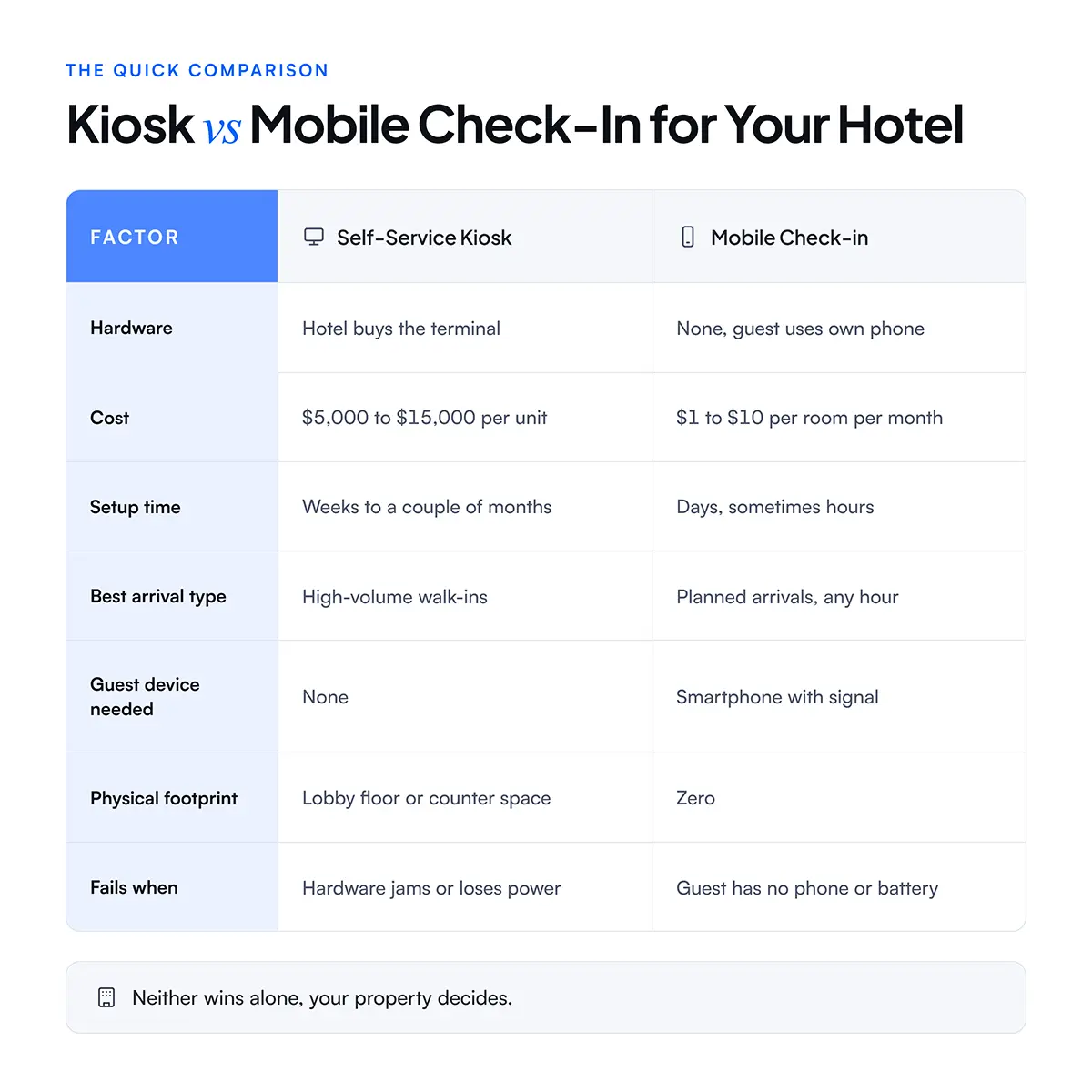
Mobile check-in wins on cost, speed of rollout, and footprint. A kiosk wins when a wave of guests arrives at once and many of them never completed anything before walking in. Neither is better in the abstract. The tiebreaker is your property type.
The clearest way to choose is to find the property type closest to yours and start from its default, then adjust.
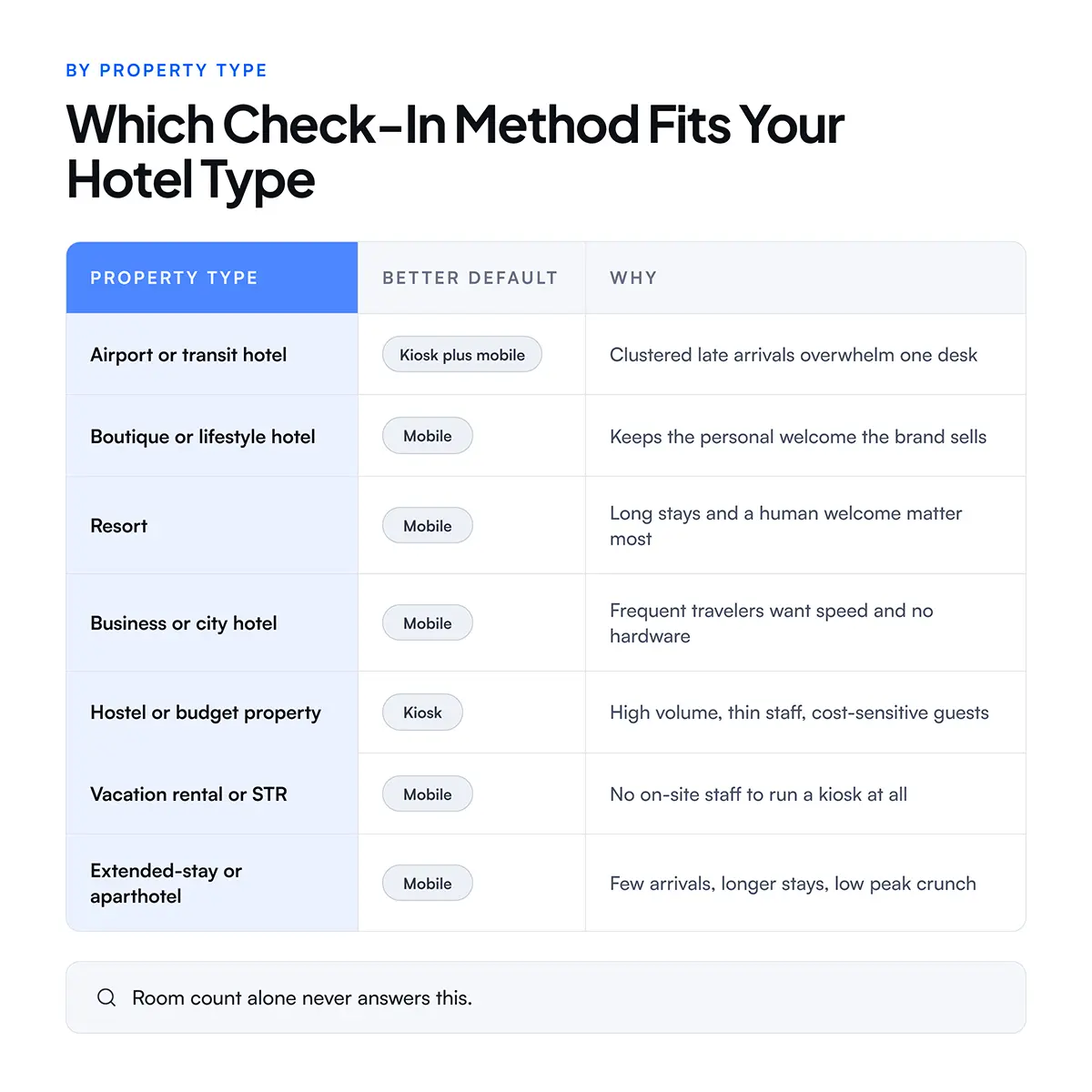
The sections below explain each of these, since the reasoning matters more than the label. Your property may sit between two of these types, and the point is to reason from the same factors, not to force yourself into one row.
Airport hotels and large convention properties lean toward kiosks because their arrivals come in waves. A delayed flight or a conference block can send thirty guests to the desk inside twenty minutes, and no single staffed counter clears that line fast.
A kiosk absorbs the surge. Guests who did not complete mobile check-in can still serve themselves at a terminal instead of joining a queue. Pairing a kiosk with mobile check-in covers both the planned arrivals and the walk-ins, which is why this property type is the strongest case for running both.
The cost math also works differently at this volume. A property clearing hundreds of arrivals on a peak night recovers a kiosk's price faster than a quiet hotel ever could, because every guest the kiosk handles is a guest the desk did not have to staff for. At an airport hotel, one bad 1am queue can cost a cluster of one-star reviews, and a kiosk that keeps that line moving pays for itself in reputation as much as in labor.
Boutique hotels and resorts usually lean toward mobile check-in, because a freestanding kiosk in the lobby works against the experience they are selling. A guest who booked a boutique property for its character does not want to be greeted by a machine.
Mobile check-in fits better here. The guest completes the paperwork on their phone before arrival, and staff spend the arrival moment on a real welcome instead of data entry. The technology disappears, which is exactly the point. For properties where the arrival experience is part of the brand, a well-designed 2-minute check-in flow does more for the guest than any lobby terminal.
This is where mobile check-in quietly beats the front desk it replaces. When the ID scan and payment are already done, the staff member is free to look up from a screen and actually greet the guest. A resort selling a sense of arrival gains from that, not loses it. The mistake is assuming self-service means less human contact, when handled this way it means the human contact is warmer, because it is no longer buried under form-filling.
Business hotels, city hotels, and extended-stay properties usually favor mobile check-in, because their guests are frequent, time-pressed, and already comfortable with self-service on their phones. A road-warrior guest wants to walk from the door to the room without stopping anywhere.
Extended-stay properties have an added reason. They see fewer arrivals per room than a transient hotel, since guests stay for weeks, so the peak-hour crunch that justifies a kiosk rarely appears. Mobile check-in covers the occasional arrival without any hardware sitting idle most of the week.
Hostels and budget properties often lean toward kiosks, while vacation rentals lean hard toward mobile, and the split comes down to staffing. A busy hostel has high guest volume and thin staff, so a kiosk handles the crowd without adding payroll. A vacation rental usually has no on-site staff at all, which rules a kiosk out entirely.
For a vacation rental or a short-term rental operator, mobile check-in is not a preference, it is the only workable model. The guest receives an access method by message, lets themselves in, and the whole arrival runs with nobody on site. A digital key sent straight to the phone is what makes fully unstaffed arrival possible.
Mobile check-in also carries a benefit that matters more for rentals than for hotels. Because the guest scans a government ID during check-in, the operator gets verified guest identity on every booking without ever meeting the person, which is exactly what many short-term rental regulations now require. A kiosk cannot do that job for a scattered set of rental units, since there is no single lobby to put one in.
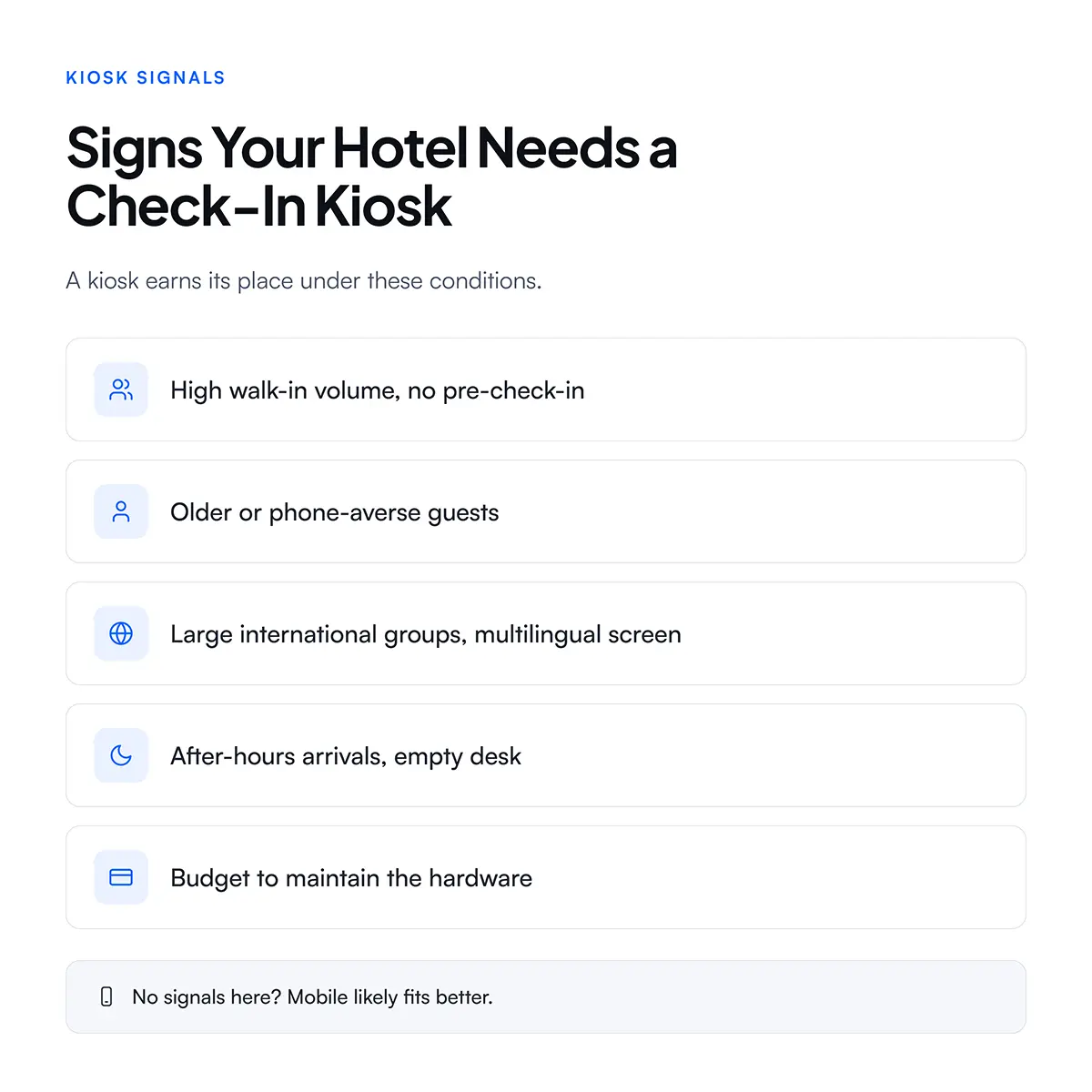
A kiosk makes more sense than mobile check-in when your property has high walk-in volume, guests who cannot or will not use a phone, and the budget to maintain hardware.
The signals that point to a kiosk:
Walk-in volume is the strongest of these. If a large share of your guests arrive without completing anything in advance, a kiosk gives them a fast self-service path instead of a line, while mobile check-in only helps guests who use it before they reach the lobby.
The catch is cost and upkeep. A kiosk is a single point of failure, so when a card dispenser jams or a screen goes dark, that station is down until someone fixes it. Kiosk hardware runs $5,000 to $15,000 per unit, plus installation, integration, and maintenance on top.
Mobile check-in wins when you want fast rollout, low cost, coverage during unstaffed hours, and a contactless arrival with no hardware in your lobby.
Where mobile check-in pulls ahead:
The cost and speed gap decides the question on its own for many small or independent properties, where contactless check-in software costs less across a full year than a single kiosk does upfront. Coverage during unstaffed hours is the quieter win, and it is the whole operating model for vacation rentals and a growing number of small hotels.
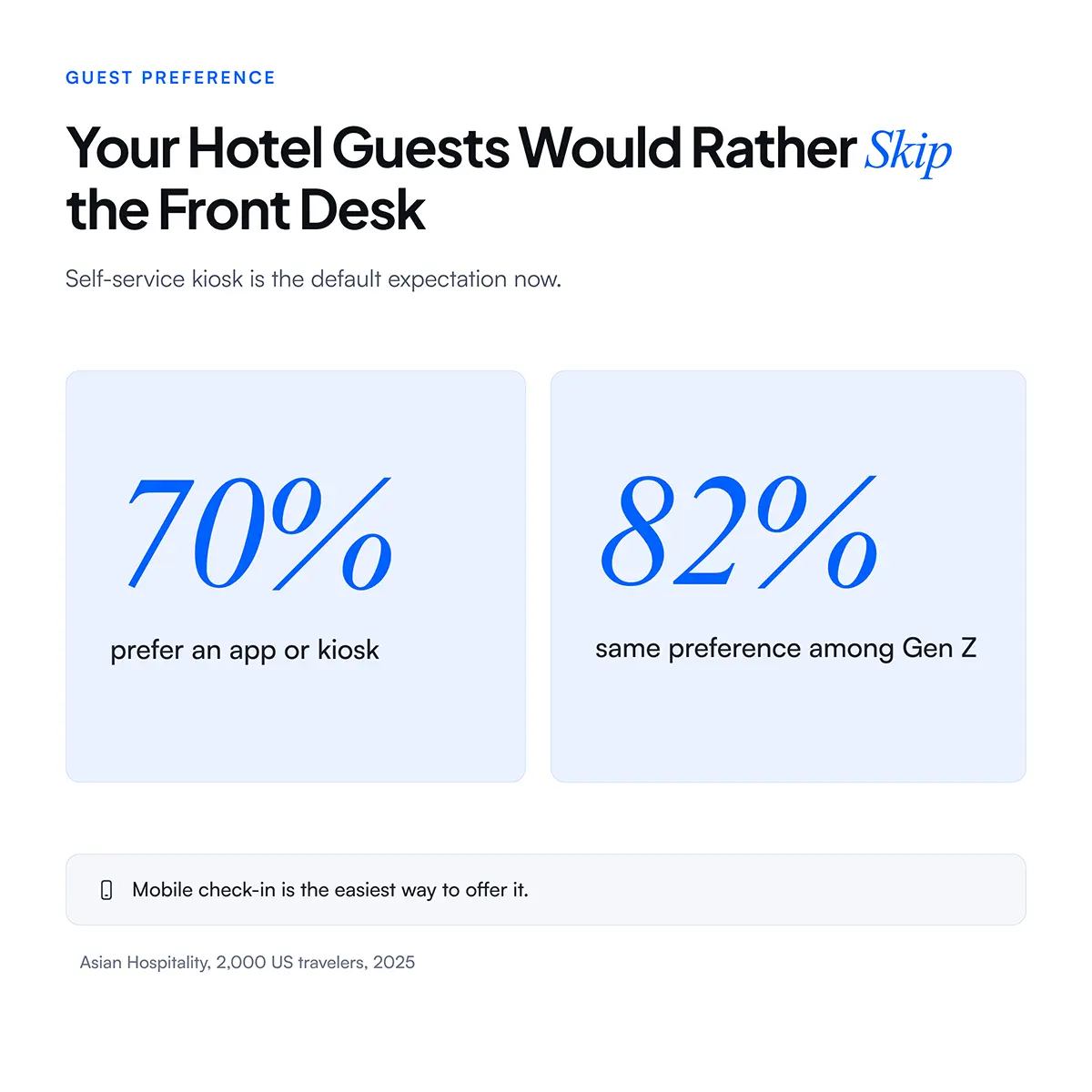
Guest demand supports it too. A 2025 survey of 2,000 American travelers found 70% are likely to check in through an app or a kiosk instead of the front desk, rising to 82% among Gen Z travelers. The preference for self-service is real, and mobile is the lowest-friction way to offer it.
No. Most properties past a certain size run mobile check-in and a kiosk together, and often add a tablet at the front desk, because each method covers a gap the others leave open.
Each method covers a different guest:
Run together, they cover every guest and every arrival hour.
There is a real caveat here. Even with strong mobile adoption, some guests arrive without a compatible phone, a charged battery, or a signal, so every property needs at least one hotel-owned fallback, a kiosk or a tablet. Leaning on mobile check-in alone turns away the guest who cannot use it.
The three-way trade-off between mobile, tablet, and kiosk deserves its own breakdown. For the full comparison including cost, setup, and staffing across all three, see the complete mobile check-in versus tablet versus kiosk decision guide. It goes deeper on the tablet option this post only touches.
Start with your property type, then layer in arrival pattern, staffing hours, and guest profile. Work through it in this order:
Whichever path fits, the lock integration matters as much as the check-in screen, since the room key has to reach the guest at the end. A platform that connects to 50+ smart lock systems means the digital key works no matter which method a guest uses, and the guide to choosing and integrating hotel smart locks covers the mechanics. For the broader picture of contactless arrival, the full contactless check-in guide and Guestara's self-service kiosk overview are both worth a read before you brief a vendor.


Kiosk vs mobile check-in depends on your property type. See which fits airport hotels, boutiques, resorts, hostels, and vacation rentals, and why.
The right choice between a kiosk and mobile check-in depends on your property type, not your budget. An airport hotel and a boutique inn can have the same room count and still need opposite answers.
Picture two properties on the same street. One is a 90-room airport hotel where flight crews and delayed passengers arrive in clusters at 1am. The other is a 90-room boutique hotel where the owner wants every guest greeted by name with a glass of wine. Same size. Same city. A self-service kiosk is close to essential for the first and quietly wrong for the second.
That is why room count alone never answers this question. This guide walks through kiosk versus mobile check-in by property type, so you can match the method to the kind of hotel you actually run, not to a generic best-practice list.
A self-service kiosk is a hotel-owned terminal in the lobby that a guest uses to check in without staff. Mobile check-in runs on the guest's own phone, before arrival or on the spot, with no hotel hardware involved at all.
The kiosk is a physical station, usually freestanding, often with a built-in ID scanner, a card reader, and sometimes a key card dispenser. A guest walks up, follows the prompts, and collects a room key without talking to anyone.
Mobile check-in moves that same process onto the device already in the guest's pocket. They complete ID verification and payment through a link sent by text, email, or WhatsApp, and a digital room key lands on their phone. Guestara's contactless check-in runs this path and completes registration in 30 seconds through an AI ID scan.
The two methods solve the same problem, a slow front desk, in opposite ways:
Everything that follows comes down to which of those fits your property.
Mobile check-in wins on cost, speed of rollout, and footprint. A kiosk wins when a wave of guests arrives at once and many of them never completed anything before walking in. Neither is better in the abstract. The tiebreaker is your property type.
The clearest way to choose is to find the property type closest to yours and start from its default, then adjust.
The sections below explain each of these, since the reasoning matters more than the label. Your property may sit between two of these types, and the point is to reason from the same factors, not to force yourself into one row.
Airport hotels and large convention properties lean toward kiosks because their arrivals come in waves. A delayed flight or a conference block can send thirty guests to the desk inside twenty minutes, and no single staffed counter clears that line fast.
A kiosk absorbs the surge. Guests who did not complete mobile check-in can still serve themselves at a terminal instead of joining a queue. Pairing a kiosk with mobile check-in covers both the planned arrivals and the walk-ins, which is why this property type is the strongest case for running both.
The cost math also works differently at this volume. A property clearing hundreds of arrivals on a peak night recovers a kiosk's price faster than a quiet hotel ever could, because every guest the kiosk handles is a guest the desk did not have to staff for. At an airport hotel, one bad 1am queue can cost a cluster of one-star reviews, and a kiosk that keeps that line moving pays for itself in reputation as much as in labor.
Boutique hotels and resorts usually lean toward mobile check-in, because a freestanding kiosk in the lobby works against the experience they are selling. A guest who booked a boutique property for its character does not want to be greeted by a machine.
Mobile check-in fits better here. The guest completes the paperwork on their phone before arrival, and staff spend the arrival moment on a real welcome instead of data entry. The technology disappears, which is exactly the point. For properties where the arrival experience is part of the brand, a well-designed 2-minute check-in flow does more for the guest than any lobby terminal.
This is where mobile check-in quietly beats the front desk it replaces. When the ID scan and payment are already done, the staff member is free to look up from a screen and actually greet the guest. A resort selling a sense of arrival gains from that, not loses it. The mistake is assuming self-service means less human contact, when handled this way it means the human contact is warmer, because it is no longer buried under form-filling.
Business hotels, city hotels, and extended-stay properties usually favor mobile check-in, because their guests are frequent, time-pressed, and already comfortable with self-service on their phones. A road-warrior guest wants to walk from the door to the room without stopping anywhere.
Extended-stay properties have an added reason. They see fewer arrivals per room than a transient hotel, since guests stay for weeks, so the peak-hour crunch that justifies a kiosk rarely appears. Mobile check-in covers the occasional arrival without any hardware sitting idle most of the week.
Hostels and budget properties often lean toward kiosks, while vacation rentals lean hard toward mobile, and the split comes down to staffing. A busy hostel has high guest volume and thin staff, so a kiosk handles the crowd without adding payroll. A vacation rental usually has no on-site staff at all, which rules a kiosk out entirely.
For a vacation rental or a short-term rental operator, mobile check-in is not a preference, it is the only workable model. The guest receives an access method by message, lets themselves in, and the whole arrival runs with nobody on site. A digital key sent straight to the phone is what makes fully unstaffed arrival possible.
Mobile check-in also carries a benefit that matters more for rentals than for hotels. Because the guest scans a government ID during check-in, the operator gets verified guest identity on every booking without ever meeting the person, which is exactly what many short-term rental regulations now require. A kiosk cannot do that job for a scattered set of rental units, since there is no single lobby to put one in.
A kiosk makes more sense than mobile check-in when your property has high walk-in volume, guests who cannot or will not use a phone, and the budget to maintain hardware.
The signals that point to a kiosk:
Walk-in volume is the strongest of these. If a large share of your guests arrive without completing anything in advance, a kiosk gives them a fast self-service path instead of a line, while mobile check-in only helps guests who use it before they reach the lobby.
The catch is cost and upkeep. A kiosk is a single point of failure, so when a card dispenser jams or a screen goes dark, that station is down until someone fixes it. Kiosk hardware runs $5,000 to $15,000 per unit, plus installation, integration, and maintenance on top.
Mobile check-in wins when you want fast rollout, low cost, coverage during unstaffed hours, and a contactless arrival with no hardware in your lobby.
Where mobile check-in pulls ahead:
The cost and speed gap decides the question on its own for many small or independent properties, where contactless check-in software costs less across a full year than a single kiosk does upfront. Coverage during unstaffed hours is the quieter win, and it is the whole operating model for vacation rentals and a growing number of small hotels.
Guest demand supports it too. A 2025 survey of 2,000 American travelers found 70% are likely to check in through an app or a kiosk instead of the front desk, rising to 82% among Gen Z travelers. The preference for self-service is real, and mobile is the lowest-friction way to offer it.
No. Most properties past a certain size run mobile check-in and a kiosk together, and often add a tablet at the front desk, because each method covers a gap the others leave open.
Each method covers a different guest:
Run together, they cover every guest and every arrival hour.
There is a real caveat here. Even with strong mobile adoption, some guests arrive without a compatible phone, a charged battery, or a signal, so every property needs at least one hotel-owned fallback, a kiosk or a tablet. Leaning on mobile check-in alone turns away the guest who cannot use it.
The three-way trade-off between mobile, tablet, and kiosk deserves its own breakdown. For the full comparison including cost, setup, and staffing across all three, see the complete mobile check-in versus tablet versus kiosk decision guide. It goes deeper on the tablet option this post only touches.
Start with your property type, then layer in arrival pattern, staffing hours, and guest profile. Work through it in this order:
Whichever path fits, the lock integration matters as much as the check-in screen, since the room key has to reach the guest at the end. A platform that connects to 50+ smart lock systems means the digital key works no matter which method a guest uses, and the guide to choosing and integrating hotel smart locks covers the mechanics. For the broader picture of contactless arrival, the full contactless check-in guide and Guestara's self-service kiosk overview are both worth a read before you brief a vendor.
Yes, mobile check-in is almost always cheaper than a kiosk. Mobile check-in software runs roughly $1 to $10 per room per month with no hardware to buy, while a single kiosk unit costs $5,000 to $15,000 plus installation and maintenance. For a small or mid-size property, mobile check-in usually costs less in a full year than one kiosk does upfront.
Boutique hotels, resorts, and vacation rentals are the property types that most often skip kiosks. Boutiques and resorts sell a personal arrival experience that a lobby terminal works against, and vacation rentals have no on-site staff to maintain a kiosk in the first place. These property types usually get better results from mobile check-in, which keeps the arrival either personal or fully contactless.
Yes, and most mid-size to large hotels do. Mobile check-in handles planned and contactless arrivals, while a kiosk handles walk-ins and after-hours arrivals when the desk is unstaffed. Running both on a single platform, rather than two separate systems, keeps the guest experience consistent and avoids managing two vendors and two logins.
A hotel with no overnight staff needs either a self-service kiosk or a fully independent mobile check-in flow, since there is no one at the desk to help. Mobile check-in with a digital key is the lowest-cost option, letting a guest arrive at any hour and reach their room without staff. A kiosk works too, but it adds hardware cost and needs someone available to fix it if it fails.
Most travelers do prefer self-service, though not without limits. A 2025 survey of 2,000 American travelers found around 70% would rather check in through an app or a kiosk than wait at the front desk, and that figure rises to 82% among Gen Z guests. At the same time, many guests still want a staffed option available as a fallback, so the strongest setup offers self-service without removing the human desk entirely.
We work closely with the industry leaders to offer seamless solutions




We’re here to help your whole team stay ahead of the curve as you grow.

Get up and running quickly with a personalized onboarding plan

Connect with real people who really get it, 24/7

Checkout our vast library of free resources, templates and more
There's only so much we can say — so let us show you! Schedule a demo today and reach your business goals.


.png)