Comprehensive guide to hotel guest messaging software. Learn how to choose the right communication platform to improve guest satisfaction and operational efficiency.




You're a general manager or hotel director evaluating communication solutions. Your team is scattered across front desk, housekeeping, maintenance, and F&B. Guests are reaching out through email, phone, WhatsApp, SMS. No one has a clear view of what's happening. Messages get lost. Response times are inconsistent. Guest satisfaction is suffering.
This is the gap that hotel guest messaging and communication software is designed to fill.
The right software solution doesn't just handle incoming messages. It orchestrates your entire guest communication ecosystem—consolidating channels, automating responses, routing messages intelligently, and giving you visibility into what's actually happening with guest interactions.
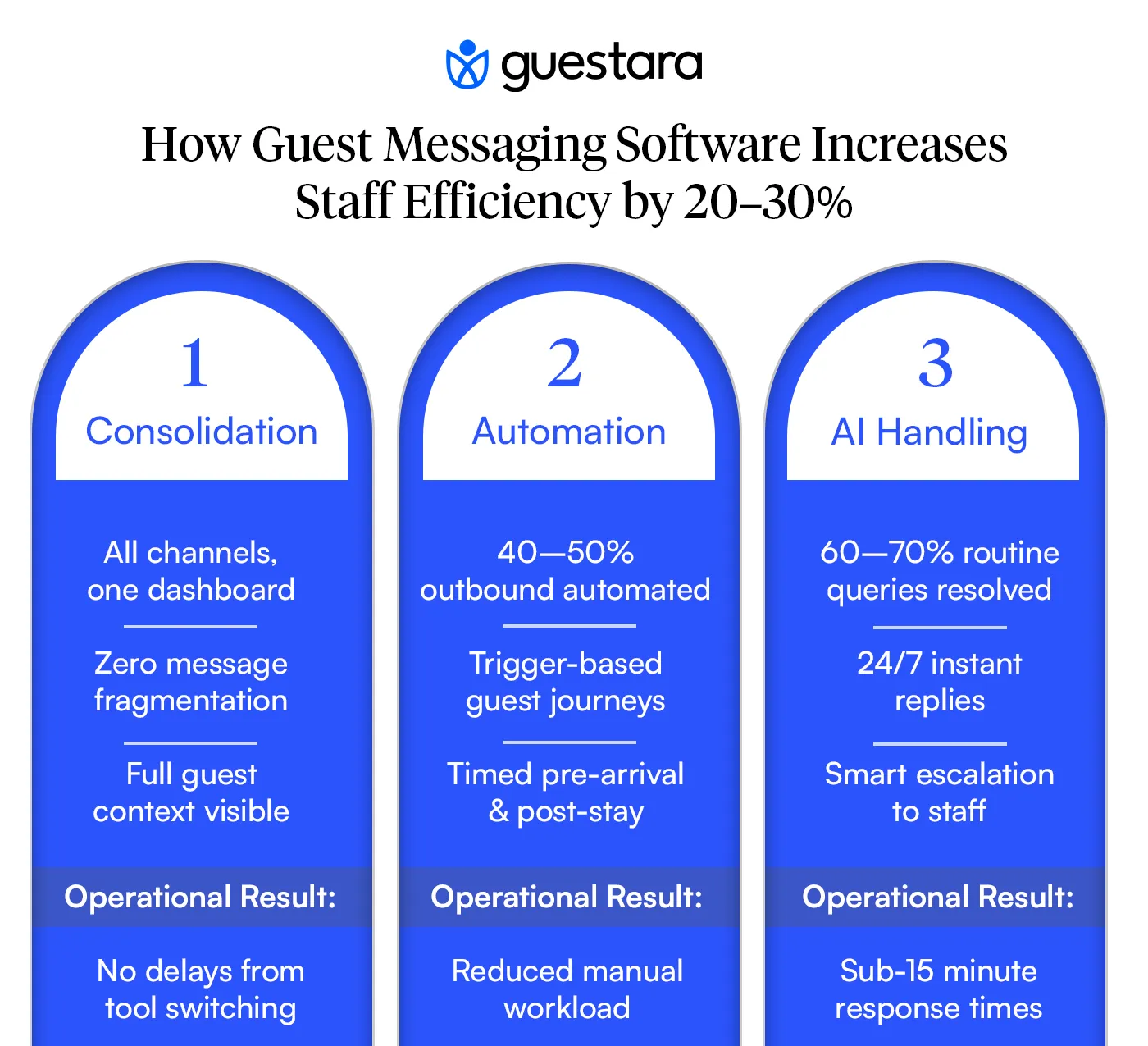
Hotels implementing guest communication software are seeing measurable business impact: response times dropping from hours to minutes, staff efficiency increasing 20-30%, guest satisfaction scores improving 8-12 points, and ancillary revenue increasing 5-15%.
This guide is written for hotel decision makers. We'll walk through what this software actually does, how to evaluate options, what to expect from implementation, and how to measure success. For context on how messaging fits into your complete guest journey strategy, you may also want to reference our complete guide to hotel guest messaging and journey automation. By the end of this guide, you'll understand whether your property needs this solution and what to expect from investment.
Hotel guest messaging and communication software is far more than just a unified inbox. It's a comprehensive guest communication and automation platform that consolidates multiple channels while orchestrating intelligent guest interactions across the entire lifecycle.
At its core, it does four things:
1. Consolidates Communication Channels All incoming messages from SMS, WhatsApp, email, in-app, Facebook, etc. appear in one dashboard. Your team sees everything in one place without jumping between tools.
2. Automates Guest Journeys The software creates automated message sequences triggered by guest actions. When a guest books, a welcome journey starts automatically. When they arrive, check-in messages and digital keys are sent. When they check out, review requests are triggered. You're not manually sending each message—the software orchestrates the entire guest journey.
3. Powers AI Conversations Intelligent chatbots handle common guest queries automatically. A guest asks "What time is breakfast?" The AI chatbot responds instantly with correct information. A guest asks "Can I extend my stay?" The chatbot checks availability and either confirms or routes to a human. Routine questions are answered 24/7 without staff involvement.
4. Provides Intelligence & Analytics Every interaction generates data. The software shows you which guests request what, when communication peaks, which types of requests are most common, and how your team is performing.
To understand the fundamentals of what guest messaging is and why guests are choosing it over traditional communication methods, see our guide on what is hotel guest messaging. The software we discuss here is the tool that makes messaging-first communication operationally possible at scale.
Think of it as a command center for guest communication that also automates 60-70% of routine interactions.
Three realities are converging.
According to Forrester research, consumers now expect response times under one hour. For guests already at your property, that expectation drops to 15 minutes.
Your team can't hit those targets with fragmented communication tools. A guest messages WhatsApp. Your front desk doesn't see it because they're checking email. By the time anyone responds, 45 minutes have passed. The guest is frustrated.
Front desk teams spend 40-50% of their time answering phones. This doesn't scale. During peak check-in, you can't meet guest demand. Calls roll to voicemail. Guests get upset. Staff burn out.
According to Deloitte's research on hotel guest experience strategy, the hotels investing in technology to reduce manual communication burden are seeing measurable improvements in staff satisfaction and retention. The properties that have shifted to messaging-first communication report staff efficiency improvements of 20-30%. Same number of people, significantly more guests handled effectively.
Every guest interaction is a data point. Which guests request early breakfast? Which guests ask about airport transport? Which guests have complaints? Which guests ask about upgrades?
Hotels without communication software lose this data. It evaporates into phone conversations and scattered emails. Hotels with centralized software capture it. They use it to personalize future stays, identify patterns, and optimize operations.
This data advantage becomes a competitive differentiator.
Hotel guest messaging software typically includes five core components:
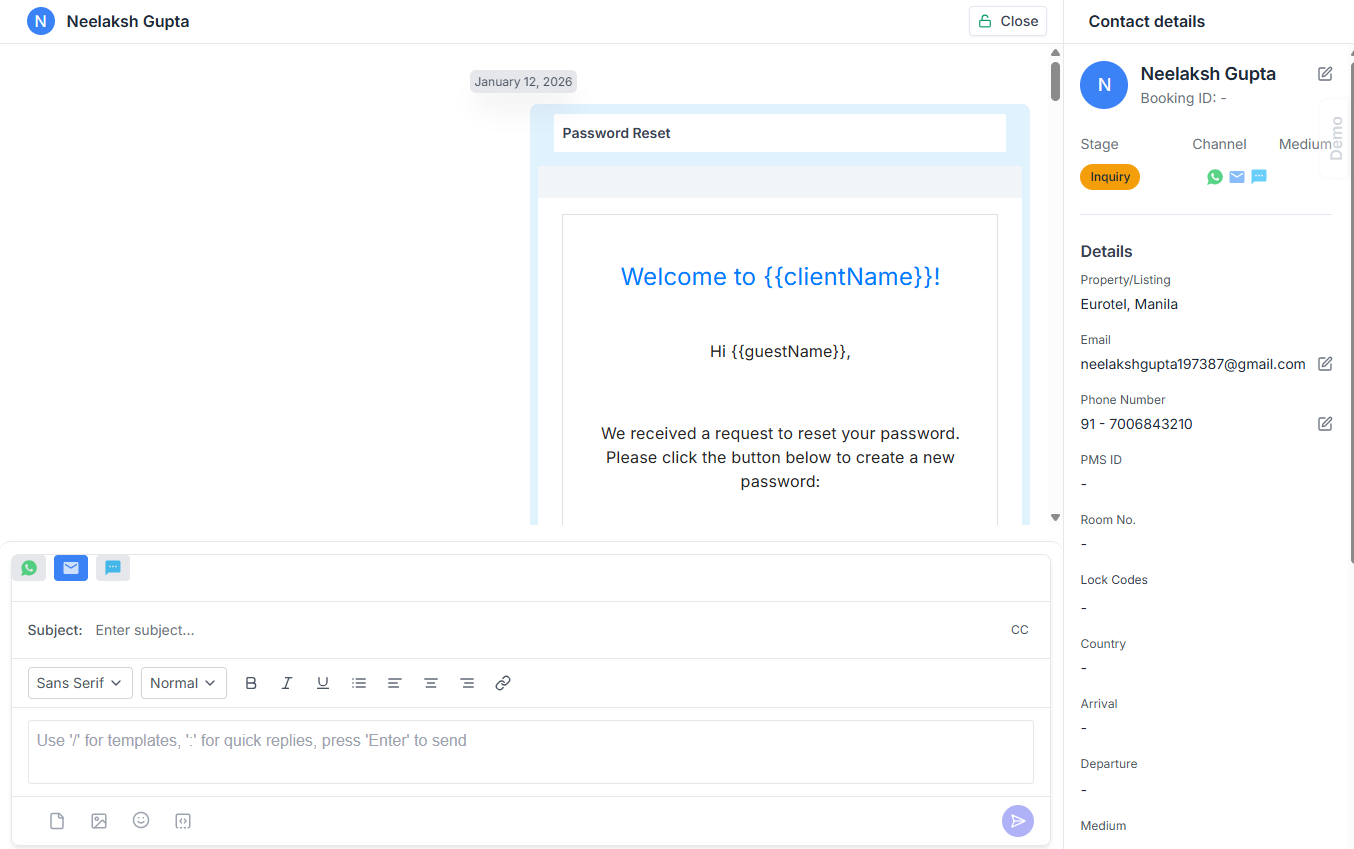
All incoming messages from all channels appear in one dashboard. SMS, WhatsApp, email, in-app messages, even Facebook—all in one place. Your team sees everything at a glance. This unified inbox approach is the foundation of efficient guest communication. Without consolidation, you still have fragmentation.
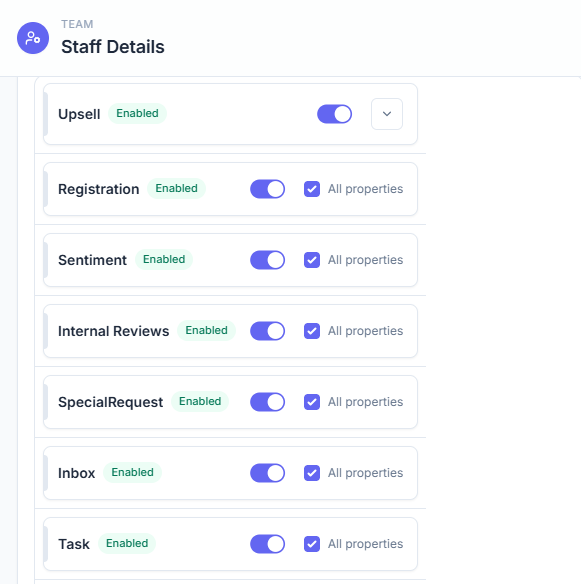
Messages are automatically routed to the right person or team. A maintenance request goes to housekeeping. A restaurant question goes to F&B. A complaint goes to management. No manual sorting. No message getting stuck in the wrong inbox.
When a message arrives, the software shows full context: which reservation it's tied to, the guest's name and profile, their previous stays, their preferences, their past interactions. Your team has everything they need to respond appropriately in seconds.
Routine messages are handled automatically through two methods:
a) Scheduled Message Journeys Create automated sequences triggered by guest actions. When a guest books, they automatically receive: booking confirmation (immediate) → pre-arrival guide (2 days before) → check-in reminder (24 hours before) → welcome message (at check-in) → mid-stay check-in (day 3) → checkout reminder (day of checkout) → review request (24 hours after).
These journeys are guest-specific. A guest arriving on day 5 doesn't get reminded about day 3. A guest with late checkout gets reminders adjusted. The software handles all logic.
b) AI Chatbot for Common Queries An intelligent chatbot answers the 60-70% of guest questions that are routine. Guest asks "What time is breakfast?" Chatbot responds instantly with correct info. Guest asks "How do I reset my room key?" Chatbot provides instructions. Guest asks "Can I extend my stay?" Chatbot checks availability and either confirms or routes to front desk.
The AI learns your property's information (operating hours, room types, policies, amenities) and handles complex queries intelligently. If a query needs human judgment, it escalates automatically.
You see metrics that matter: average response time, message volume by channel, which types of requests are most common, peak communication periods, staff performance, guest satisfaction correlation. This data informs decisions.
Not all hotel guest messaging software is the same. Understanding the categories helps you evaluate.
These platforms consolidate SMS messages and basic SMS sending. Good for simple, transactional text communication. Limited to SMS only. No multi-channel support. Minimal automation.
Best for: Properties that only need SMS, very small hotels with minimal volume
These focus on real-time conversation. Similar to chat on retail websites. Guest messages, your team responds in real-time. Good for immediate, interactive communication.
Best for: Properties with heavy in-stay guest interaction needs
These consolidate multiple channels (SMS, WhatsApp, email, in-app) into one inbox. Include automation, routing, guest context, and analytics. A full guest engagement platform is what most hotels actually need for complete communication transformation.
Best for: Properties wanting complete communication transformation
Price: $300-1200/month depending on message volume
Some property management systems include guest communication features. Good integration with your existing PMS. May be less specialized than dedicated platforms.
Best for: Properties already invested in specific PMS
Price: Often included with PMS subscription or add-on fee
The journey automation and AI chatbot features are where the real business value appears.
Without automation, your team manually sends messages. They still need to type responses, send them at right times, ensure nothing slips through cracks.
With journey automation, 40-50% of messages are sent automatically at optimal times. Your team's effort drops significantly. A booking creates 5-7 automated messages across the guest journey. Your team doesn't touch them.
With AI chatbot, 60-70% of inbound guest questions are answered automatically. No staff required. Available 24/7. Instant responses.
Impact on staff efficiency: Instead of 5 staff hours per day on guest communication, you're down to 1-2 hours. Those freed hours mean:
Impact on guest satisfaction: Guests get instant answers 24/7. They don't wait for staff to be available. They don't get frustrated waiting on hold.
Impact on revenue: Pre-arrival journeys mention room upgrades, dining packages, activities. In-stay journeys mention services. Post-stay journeys drive reviews and return bookings. All happening automatically.
This is why payback period is often 2-4 weeks—the efficiency and automation benefits pay for the software immediately.
When evaluating hotel guest messaging software, focus on these core capabilities.
Does the software support the channels your guests actually use?
Don't pay for channels you don't need, but ensure it covers your priority channels.
The software must connect to your property management system. This is non-negotiable.
When a guest books through your PMS, their reservation data should flow automatically. Check-in time, special requests, room number, rate, notes—all automatically available to your messaging team. This saves time and eliminates errors.
Poor PMS integration means manual data entry. That's a massive efficiency loss.
This is where the real power of the software shows up. Ask specifically about:
Journey Builder (Message Automation)
Can you set up multi-step automated sequences based on guest actions?
Best platforms let you build complex journeys visually without coding. You see the flow: "If guest books → Send message 1 → If they respond to message 1 → Send message 2 → If no response after 24 hours → Send reminder."
AI Chatbot Capabilities
Does the platform include an AI chatbot that can:
The best chatbots handle 60-70% of routine guest questions, freeing your staff for higher-value work. An AI chatbot answering "What time is breakfast?" 100 times per month saves your staff 3-4 hours.
Can you set rules for where messages go?
"All maintenance requests go to housekeeping queue" "All restaurant questions go to F&B manager" "All complaints go to general manager"
This prevents messages from getting lost and ensures the right person handles each type of request.
When a message arrives, does the agent see:
This context is crucial. An agent can respond appropriately without asking "Which room are you in?" three times.
Can you see:
You can't manage what you don't measure. Real-time dashboards let you see what's happening now and identify issues before they escalate.
Does the software meet your requirements for:
This is especially important if guests are sharing sensitive information through the platform.
About the Platform:
About Implementation:
About Support:
About Pricing:
Be cautious if:
Look for:
Phase 1: Foundation (Week 1-2)
Setup, training, testing
Phase 2: Go Live (Week 3)
Phase 3: Expand (Week 4-8)
Phase 4: Optimize (Week 9-12)
You don't need to hire new people. Your existing team uses the software.
Training needed:
Most teams pick up the basics in 2-3 hours. They master it within 1-2 weeks.
Mistake 1: Not involving your PMS vendor early
If integration is complex, your PMS vendor may need to be involved. Don't discover this mid-implementation.
Mistake 2: Automating too much too early
Guests will tolerate automation for transactional messages. But if it feels overdone, it feels impersonal. Start simple, add gradually.
Mistake 3: Not setting clear response time expectations
If your team doesn't know that 15 minutes is the target, they'll take 2 hours. Set expectations clearly.
Mistake 4: Ignoring analytics
The data is there. If you're not looking at it, you're missing optimization opportunities.
Mistake 5: Treating it as a "front desk thing"
Communication affects housekeeping, F&B, maintenance, management. Everyone needs to be involved and trained.
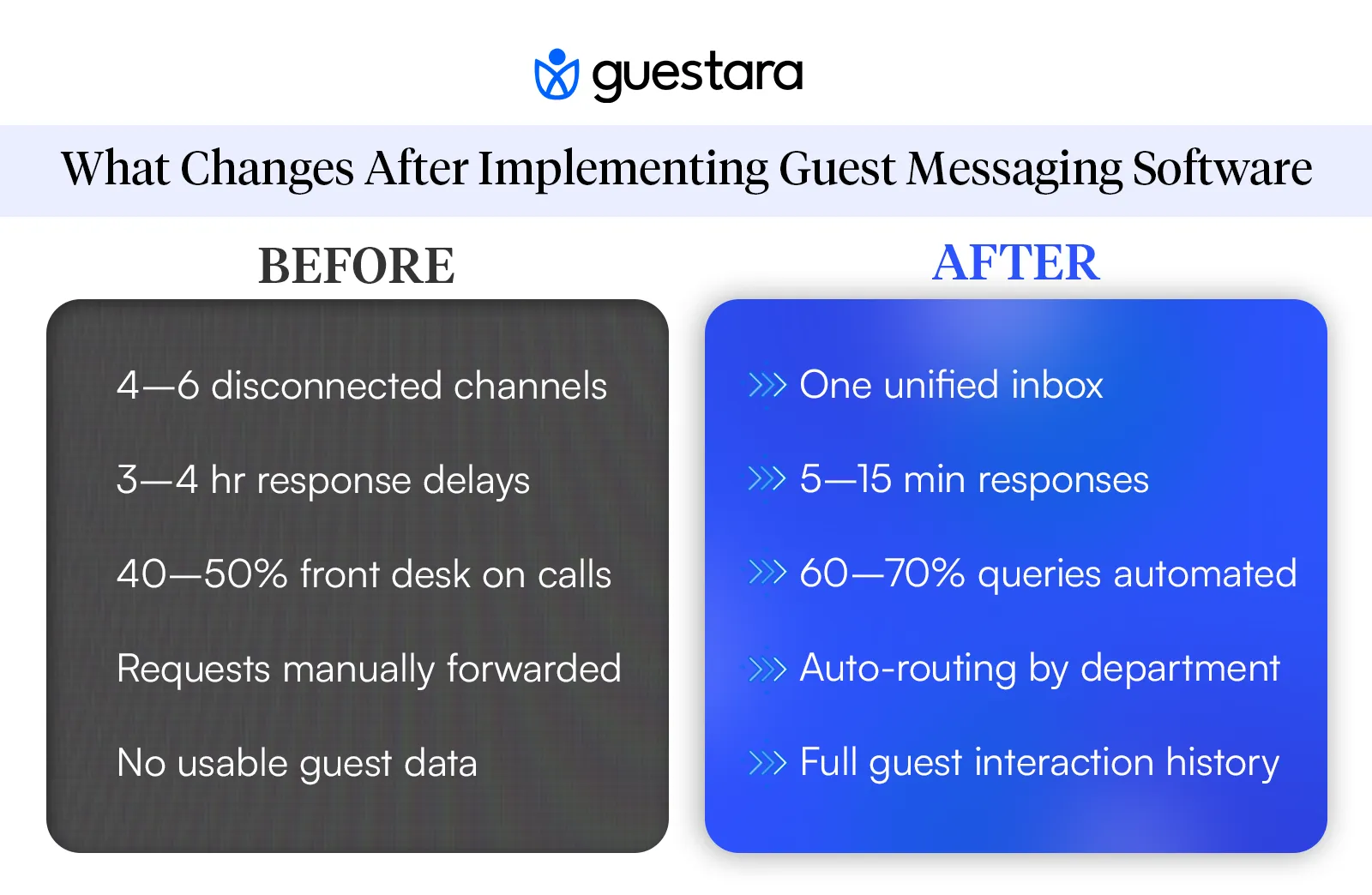
Current state: Email 3-4 hours, phone variable, missed messages common With software: 5-15 minutes typical, rarely missed
Impact: Guests feel heard. Satisfaction improves measurably.
According to Hotel Tech Report's analysis of hospitality statistics, hotels with sub-15-minute response times see 25-35% better guest satisfaction scores compared to those with hour-long response windows. The data confirms that speed in communication is one of the top three factors influencing guest satisfaction today.
Current state: Front desk spends 40-50% of time on phone With software: Front desk spends 10-15% on communication
Impact: Same team handles 30-40% more guests. Or same volume with fewer staff.
Current state: NPS varies, many reviews mention "couldn't reach hotel" With software: NPS typically improves 8-12 points
Impact: Better reviews, higher repeat booking rates, stronger reputation.
Current state: Upsells happen ad-hoc, many opportunities missed With software: Natural upsell moments captured through messaging
Impact: 5-15% increase in ancillary revenue (upgrades, dining, services, experiences)
Understanding how messaging integrates with the complete guest journey helps you identify where these revenue opportunities naturally occur—pre-arrival, during stay, and post-stay.
Current state: Guest preferences lost, operational insights unavailable With software: Complete record of every interaction, clear patterns emerge
Impact: Better personalization, smarter operational decisions.
Yes, if:
Probably yes, if:
Maybe, if:
Do you have communication issues? YES → Continue NO → Still consider it for competitive advantage
Is guest satisfaction a metric you care about? YES → Guest messaging software will help NO → Why not? This is how you compete
Are your staff asking for better tools? YES → Listen to them. Implement software. NO → Still implement. They'll appreciate it once they try.
Can you afford $100-500/month? YES → You're already paying this in inefficiency NO → Look at ROI. It pays for itself in 2-4 weeks
Is your PMS modern with good API? YES → Integration will be smooth NO → Choose a vendor with pre-built PMS integrations
If you answered YES to 3-4 questions above, you're ready to implement. Your ROI is likely strong and your team will appreciate the upgrade.
If you answered YES to 1-2 questions, you're still a good candidate, but focus on the specific benefits that matter to you.
If you answered NO to most, start smaller: maybe a basic SMS solution first.
Guest messaging software is a tool. The real value comes from how you use it.
Use it for personalization: Remember guest preferences and reference them in future communications.
Use it for speed: Your competitive advantage is 5-minute responses when competitors take 2 hours.
Use it for service recovery: A guest has an issue? Respond immediately and fix it before it becomes a negative review.
Use it for upselling: Respectful, timely suggestions for services guests actually want.
Use it for data: Understand what your guests care about. Use that to improve your property.
Use it for staff: Give your team the tools to do their job well. They'll stay longer and provide better service.
The software enables all of this. But your people, processes, and culture ultimately determine whether you get the benefit.


Comprehensive guide to hotel guest messaging software. Learn how to choose the right communication platform to improve guest satisfaction and operational efficiency.
You're a general manager or hotel director evaluating communication solutions. Your team is scattered across front desk, housekeeping, maintenance, and F&B. Guests are reaching out through email, phone, WhatsApp, SMS. No one has a clear view of what's happening. Messages get lost. Response times are inconsistent. Guest satisfaction is suffering.
This is the gap that hotel guest messaging and communication software is designed to fill.
The right software solution doesn't just handle incoming messages. It orchestrates your entire guest communication ecosystem—consolidating channels, automating responses, routing messages intelligently, and giving you visibility into what's actually happening with guest interactions.
Hotels implementing guest communication software are seeing measurable business impact: response times dropping from hours to minutes, staff efficiency increasing 20-30%, guest satisfaction scores improving 8-12 points, and ancillary revenue increasing 5-15%.
This guide is written for hotel decision makers. We'll walk through what this software actually does, how to evaluate options, what to expect from implementation, and how to measure success. For context on how messaging fits into your complete guest journey strategy, you may also want to reference our complete guide to hotel guest messaging and journey automation. By the end of this guide, you'll understand whether your property needs this solution and what to expect from investment.
Hotel guest messaging and communication software is far more than just a unified inbox. It's a comprehensive guest communication and automation platform that consolidates multiple channels while orchestrating intelligent guest interactions across the entire lifecycle.
At its core, it does four things:
1. Consolidates Communication Channels All incoming messages from SMS, WhatsApp, email, in-app, Facebook, etc. appear in one dashboard. Your team sees everything in one place without jumping between tools.
2. Automates Guest Journeys The software creates automated message sequences triggered by guest actions. When a guest books, a welcome journey starts automatically. When they arrive, check-in messages and digital keys are sent. When they check out, review requests are triggered. You're not manually sending each message—the software orchestrates the entire guest journey.
3. Powers AI Conversations Intelligent chatbots handle common guest queries automatically. A guest asks "What time is breakfast?" The AI chatbot responds instantly with correct information. A guest asks "Can I extend my stay?" The chatbot checks availability and either confirms or routes to a human. Routine questions are answered 24/7 without staff involvement.
4. Provides Intelligence & Analytics Every interaction generates data. The software shows you which guests request what, when communication peaks, which types of requests are most common, and how your team is performing.
To understand the fundamentals of what guest messaging is and why guests are choosing it over traditional communication methods, see our guide on what is hotel guest messaging. The software we discuss here is the tool that makes messaging-first communication operationally possible at scale.
Think of it as a command center for guest communication that also automates 60-70% of routine interactions.
Three realities are converging.
According to Forrester research, consumers now expect response times under one hour. For guests already at your property, that expectation drops to 15 minutes.
Your team can't hit those targets with fragmented communication tools. A guest messages WhatsApp. Your front desk doesn't see it because they're checking email. By the time anyone responds, 45 minutes have passed. The guest is frustrated.
Front desk teams spend 40-50% of their time answering phones. This doesn't scale. During peak check-in, you can't meet guest demand. Calls roll to voicemail. Guests get upset. Staff burn out.
According to Deloitte's research on hotel guest experience strategy, the hotels investing in technology to reduce manual communication burden are seeing measurable improvements in staff satisfaction and retention. The properties that have shifted to messaging-first communication report staff efficiency improvements of 20-30%. Same number of people, significantly more guests handled effectively.
Every guest interaction is a data point. Which guests request early breakfast? Which guests ask about airport transport? Which guests have complaints? Which guests ask about upgrades?
Hotels without communication software lose this data. It evaporates into phone conversations and scattered emails. Hotels with centralized software capture it. They use it to personalize future stays, identify patterns, and optimize operations.
This data advantage becomes a competitive differentiator.
Hotel guest messaging software typically includes five core components:
All incoming messages from all channels appear in one dashboard. SMS, WhatsApp, email, in-app messages, even Facebook—all in one place. Your team sees everything at a glance. This unified inbox approach is the foundation of efficient guest communication. Without consolidation, you still have fragmentation.
Messages are automatically routed to the right person or team. A maintenance request goes to housekeeping. A restaurant question goes to F&B. A complaint goes to management. No manual sorting. No message getting stuck in the wrong inbox.
When a message arrives, the software shows full context: which reservation it's tied to, the guest's name and profile, their previous stays, their preferences, their past interactions. Your team has everything they need to respond appropriately in seconds.
Routine messages are handled automatically through two methods:
a) Scheduled Message Journeys Create automated sequences triggered by guest actions. When a guest books, they automatically receive: booking confirmation (immediate) → pre-arrival guide (2 days before) → check-in reminder (24 hours before) → welcome message (at check-in) → mid-stay check-in (day 3) → checkout reminder (day of checkout) → review request (24 hours after).
These journeys are guest-specific. A guest arriving on day 5 doesn't get reminded about day 3. A guest with late checkout gets reminders adjusted. The software handles all logic.
b) AI Chatbot for Common Queries An intelligent chatbot answers the 60-70% of guest questions that are routine. Guest asks "What time is breakfast?" Chatbot responds instantly with correct info. Guest asks "How do I reset my room key?" Chatbot provides instructions. Guest asks "Can I extend my stay?" Chatbot checks availability and either confirms or routes to front desk.
The AI learns your property's information (operating hours, room types, policies, amenities) and handles complex queries intelligently. If a query needs human judgment, it escalates automatically.
You see metrics that matter: average response time, message volume by channel, which types of requests are most common, peak communication periods, staff performance, guest satisfaction correlation. This data informs decisions.
Not all hotel guest messaging software is the same. Understanding the categories helps you evaluate.
These platforms consolidate SMS messages and basic SMS sending. Good for simple, transactional text communication. Limited to SMS only. No multi-channel support. Minimal automation.
Best for: Properties that only need SMS, very small hotels with minimal volume
These focus on real-time conversation. Similar to chat on retail websites. Guest messages, your team responds in real-time. Good for immediate, interactive communication.
Best for: Properties with heavy in-stay guest interaction needs
These consolidate multiple channels (SMS, WhatsApp, email, in-app) into one inbox. Include automation, routing, guest context, and analytics. A full guest engagement platform is what most hotels actually need for complete communication transformation.
Best for: Properties wanting complete communication transformation
Price: $300-1200/month depending on message volume
Some property management systems include guest communication features. Good integration with your existing PMS. May be less specialized than dedicated platforms.
Best for: Properties already invested in specific PMS
Price: Often included with PMS subscription or add-on fee
The journey automation and AI chatbot features are where the real business value appears.
Without automation, your team manually sends messages. They still need to type responses, send them at right times, ensure nothing slips through cracks.
With journey automation, 40-50% of messages are sent automatically at optimal times. Your team's effort drops significantly. A booking creates 5-7 automated messages across the guest journey. Your team doesn't touch them.
With AI chatbot, 60-70% of inbound guest questions are answered automatically. No staff required. Available 24/7. Instant responses.
Impact on staff efficiency: Instead of 5 staff hours per day on guest communication, you're down to 1-2 hours. Those freed hours mean:
Impact on guest satisfaction: Guests get instant answers 24/7. They don't wait for staff to be available. They don't get frustrated waiting on hold.
Impact on revenue: Pre-arrival journeys mention room upgrades, dining packages, activities. In-stay journeys mention services. Post-stay journeys drive reviews and return bookings. All happening automatically.
This is why payback period is often 2-4 weeks—the efficiency and automation benefits pay for the software immediately.
When evaluating hotel guest messaging software, focus on these core capabilities.
Does the software support the channels your guests actually use?
Don't pay for channels you don't need, but ensure it covers your priority channels.
The software must connect to your property management system. This is non-negotiable.
When a guest books through your PMS, their reservation data should flow automatically. Check-in time, special requests, room number, rate, notes—all automatically available to your messaging team. This saves time and eliminates errors.
Poor PMS integration means manual data entry. That's a massive efficiency loss.
This is where the real power of the software shows up. Ask specifically about:
Journey Builder (Message Automation)
Can you set up multi-step automated sequences based on guest actions?
Best platforms let you build complex journeys visually without coding. You see the flow: "If guest books → Send message 1 → If they respond to message 1 → Send message 2 → If no response after 24 hours → Send reminder."
AI Chatbot Capabilities
Does the platform include an AI chatbot that can:
The best chatbots handle 60-70% of routine guest questions, freeing your staff for higher-value work. An AI chatbot answering "What time is breakfast?" 100 times per month saves your staff 3-4 hours.
Can you set rules for where messages go?
"All maintenance requests go to housekeeping queue" "All restaurant questions go to F&B manager" "All complaints go to general manager"
This prevents messages from getting lost and ensures the right person handles each type of request.
When a message arrives, does the agent see:
This context is crucial. An agent can respond appropriately without asking "Which room are you in?" three times.
Can you see:
You can't manage what you don't measure. Real-time dashboards let you see what's happening now and identify issues before they escalate.
Does the software meet your requirements for:
This is especially important if guests are sharing sensitive information through the platform.
About the Platform:
About Implementation:
About Support:
About Pricing:
Be cautious if:
Look for:
Phase 1: Foundation (Week 1-2)
Setup, training, testing
Phase 2: Go Live (Week 3)
Phase 3: Expand (Week 4-8)
Phase 4: Optimize (Week 9-12)
You don't need to hire new people. Your existing team uses the software.
Training needed:
Most teams pick up the basics in 2-3 hours. They master it within 1-2 weeks.
Mistake 1: Not involving your PMS vendor early
If integration is complex, your PMS vendor may need to be involved. Don't discover this mid-implementation.
Mistake 2: Automating too much too early
Guests will tolerate automation for transactional messages. But if it feels overdone, it feels impersonal. Start simple, add gradually.
Mistake 3: Not setting clear response time expectations
If your team doesn't know that 15 minutes is the target, they'll take 2 hours. Set expectations clearly.
Mistake 4: Ignoring analytics
The data is there. If you're not looking at it, you're missing optimization opportunities.
Mistake 5: Treating it as a "front desk thing"
Communication affects housekeeping, F&B, maintenance, management. Everyone needs to be involved and trained.
Current state: Email 3-4 hours, phone variable, missed messages common With software: 5-15 minutes typical, rarely missed
Impact: Guests feel heard. Satisfaction improves measurably.
According to Hotel Tech Report's analysis of hospitality statistics, hotels with sub-15-minute response times see 25-35% better guest satisfaction scores compared to those with hour-long response windows. The data confirms that speed in communication is one of the top three factors influencing guest satisfaction today.
Current state: Front desk spends 40-50% of time on phone With software: Front desk spends 10-15% on communication
Impact: Same team handles 30-40% more guests. Or same volume with fewer staff.
Current state: NPS varies, many reviews mention "couldn't reach hotel" With software: NPS typically improves 8-12 points
Impact: Better reviews, higher repeat booking rates, stronger reputation.
Current state: Upsells happen ad-hoc, many opportunities missed With software: Natural upsell moments captured through messaging
Impact: 5-15% increase in ancillary revenue (upgrades, dining, services, experiences)
Understanding how messaging integrates with the complete guest journey helps you identify where these revenue opportunities naturally occur—pre-arrival, during stay, and post-stay.
Current state: Guest preferences lost, operational insights unavailable With software: Complete record of every interaction, clear patterns emerge
Impact: Better personalization, smarter operational decisions.
Yes, if:
Probably yes, if:
Maybe, if:
Do you have communication issues? YES → Continue NO → Still consider it for competitive advantage
Is guest satisfaction a metric you care about? YES → Guest messaging software will help NO → Why not? This is how you compete
Are your staff asking for better tools? YES → Listen to them. Implement software. NO → Still implement. They'll appreciate it once they try.
Can you afford $100-500/month? YES → You're already paying this in inefficiency NO → Look at ROI. It pays for itself in 2-4 weeks
Is your PMS modern with good API? YES → Integration will be smooth NO → Choose a vendor with pre-built PMS integrations
If you answered YES to 3-4 questions above, you're ready to implement. Your ROI is likely strong and your team will appreciate the upgrade.
If you answered YES to 1-2 questions, you're still a good candidate, but focus on the specific benefits that matter to you.
If you answered NO to most, start smaller: maybe a basic SMS solution first.
Guest messaging software is a tool. The real value comes from how you use it.
Use it for personalization: Remember guest preferences and reference them in future communications.
Use it for speed: Your competitive advantage is 5-minute responses when competitors take 2 hours.
Use it for service recovery: A guest has an issue? Respond immediately and fix it before it becomes a negative review.
Use it for upselling: Respectful, timely suggestions for services guests actually want.
Use it for data: Understand what your guests care about. Use that to improve your property.
Use it for staff: Give your team the tools to do their job well. They'll stay longer and provide better service.
The software enables all of this. But your people, processes, and culture ultimately determine whether you get the benefit.
Yes. Once you position messaging as the fast option, guests self-select toward it. When your response time is 5 minutes on WhatsApp and 30 minutes on phone, most guests choose WhatsApp.
You set response time expectations. Guests understand that off-hours responses might take longer. You control availability without abandoning the guest during their stay.
Most staff pick up basics in 2-3 hours. They're comfortable by week 2. The interface is usually intuitive.
You can escalate to phone for sensitive conversations (payment, disputes, serious complaints). The software allows for this.
Choose a vendor that meets your regulatory requirements (GDPR, CCPA, etc.). They handle encryption and compliance. You just need to train staff not to share sensitive info via messaging.
We work closely with the industry leaders to offer seamless solutions




We’re here to help your whole team stay ahead of the curve as you grow.

Get up and running quickly with a personalized onboarding plan

Connect with real people who really get it, 24/7

Checkout our vast library of free resources, templates and more
There's only so much we can say — so let us show you! Schedule a demo today and reach your business goals.


.png)