Hotel checklists explained: read-do against do-confirm, why five to nine items beats thirty, where to set pause points and why most checklists quietly fail.





Most hotels already have checklists. They are in a folder at the front desk, or laminated in the housekeeping store, or in a spreadsheet somebody built two years ago. Some of them get completed properly. Most get ticked in a batch at the end of a shift, which produces a signed sheet and no actual verification.
The problem is almost never that the team is careless. It is that the checklist was designed badly: too long, run at no particular moment, listing every step of a task that a trained person already knows, and owned by nobody. There is real research on what separates a checklist that works from one that gets ticked, and almost none of it reaches hospitality. Here it is.
A hotel checklist is a short, fixed list of verification steps run at a defined moment in a shift to catch the items most often missed. The effective ones confirm work already done rather than instructing it, stay inside the limits of working memory, and name one person accountable for running them.
A checklist works when it is short, run at a fixed moment, and limited to the steps that cause real harm when missed. Length, timing and selection are the three variables, and most hotel checklists get all three wrong at once.
The evidence base for this comes from surgery and aviation rather than hospitality. The most cited study, Haynes and colleagues in the New England Journal of Medicine in 2009, introduced a 19-item surgical safety checklist across eight hospitals worldwide and compared 3,733 patients before implementation with 3,955 after. Complications fell from 11.0% to 7.0% and the death rate from 1.5% to 0.8%.
Two things about that study matter for a hotelier, and the second is usually left out.
The first is the size of the effect from a tool that took about two minutes to run. The second is that other studies of the same checklist have found no improvement at all. Where that happened, the explanations given were inadequate training, confusion over who was responsible for checking items, poor staff buy-in and cultural differences between settings. The checklist was the same. The implementation was not.
That is the useful lesson. A checklist is not a document, it is a practice, and the document is the easy part.
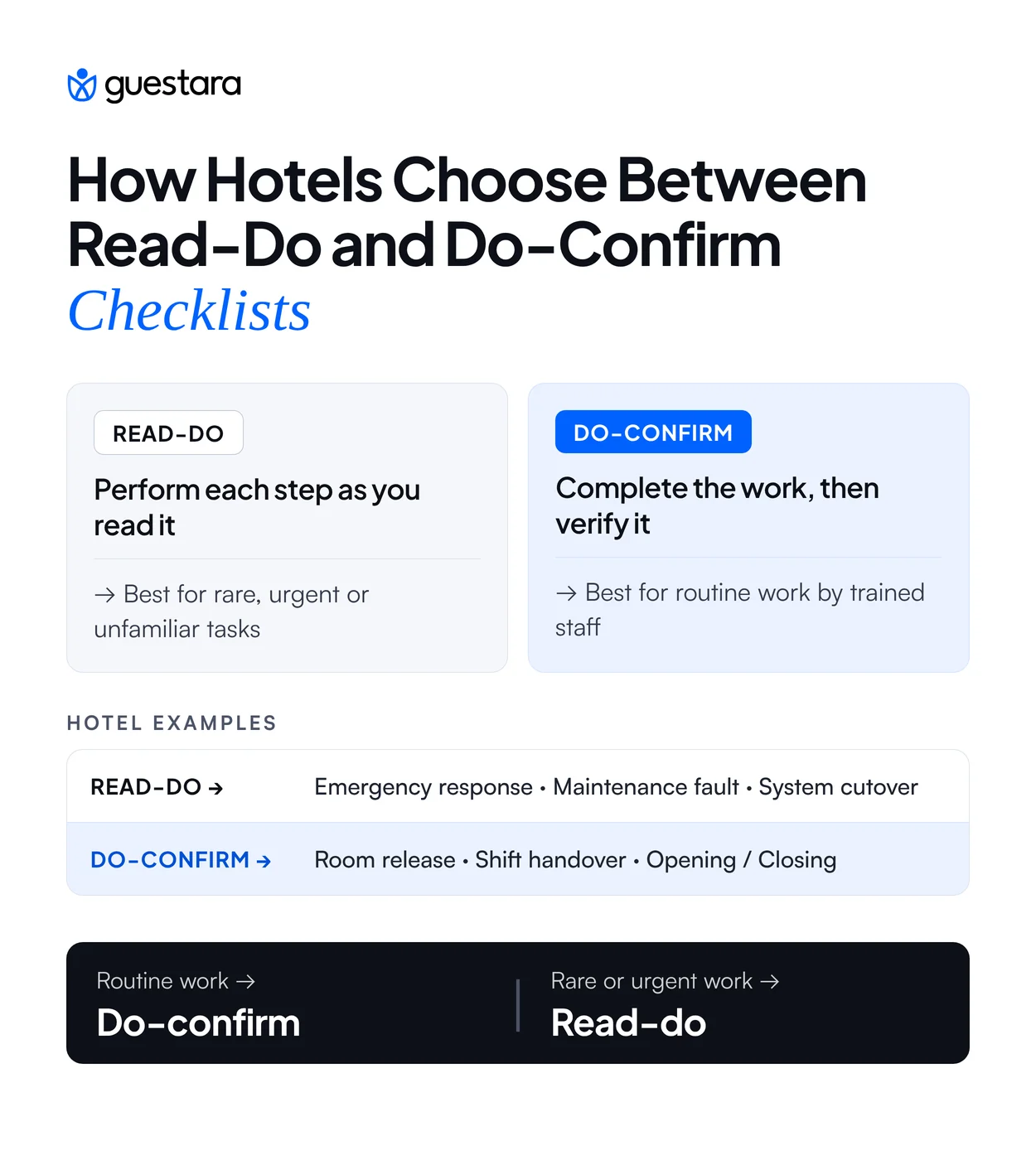
There are two kinds of checklist and they are not interchangeable. A read-do checklist is worked through as you go, like a recipe, with each step performed as it is read. A do-confirm checklist is run after the work, where the person does the job from training and then pauses to verify nothing was missed.
Choosing the wrong one is the most common design failure in hotel operations, and it is why experienced staff resent checklists. Handing a read-do list to a room attendant who has cleaned four thousand rooms treats them as though they cannot think, and they will tick it in a batch rather than work from it.
Decide by asking who runs it and how often. Routine work performed daily by trained people needs do-confirm. Work that happens rarely, under pressure, or by somebody who has not done it before needs read-do.
The same task can need both. A night audit run by the usual auditor is do-confirm. The same audit run by a front desk agent covering at short notice is read-do, and that is an argument for keeping both versions rather than one compromise.
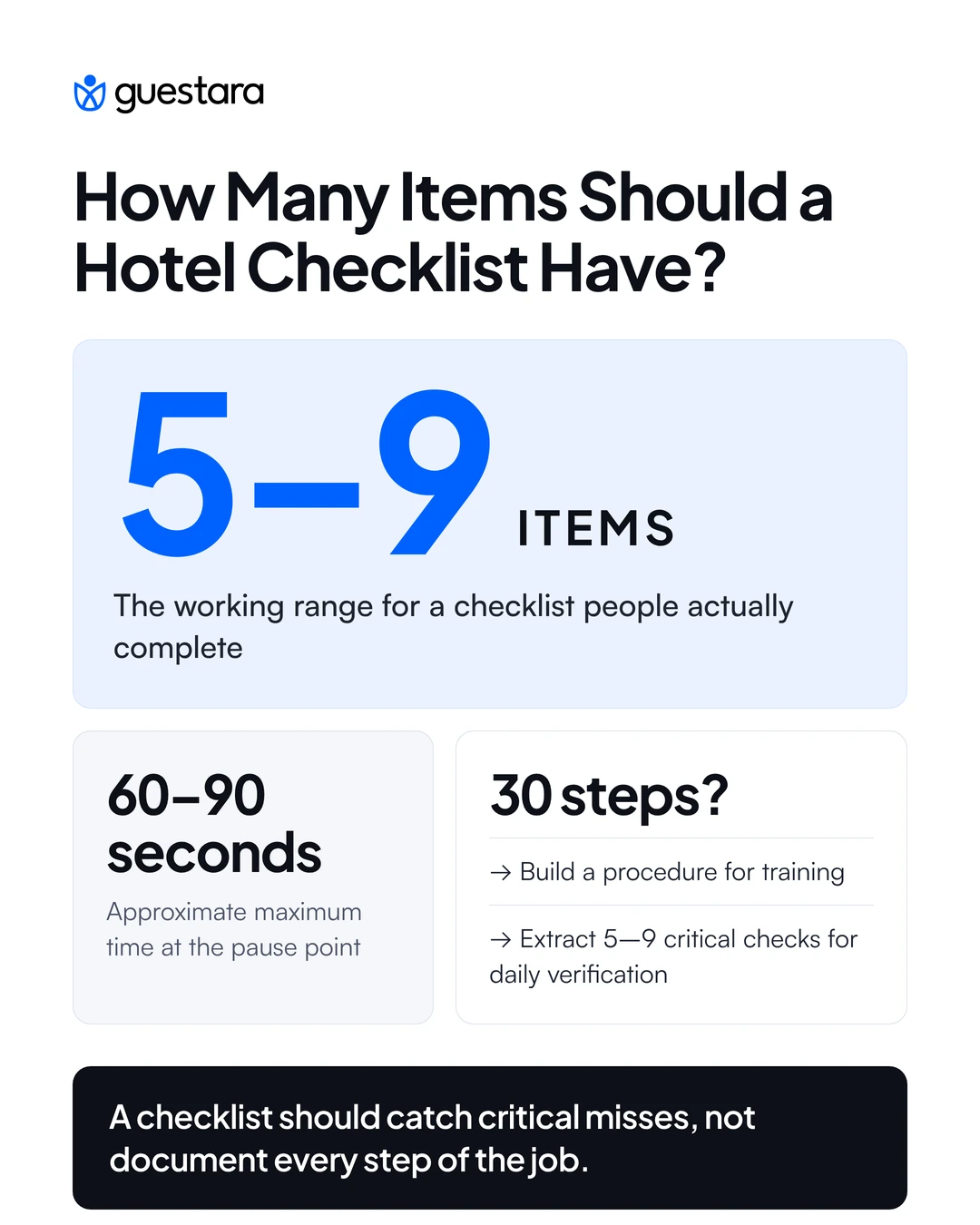
Keep it to roughly five to nine items. That range is a rule of thumb drawn from the limits of working memory, and while it is not a law, the direction is well supported: a checklist long enough to feel thorough is usually too long to be used.
The time limit matters as much as the count. Beyond about 60 to 90 seconds at a pause point, a checklist becomes a distraction from the work and people start shortcutting it. A 30-item room inspection sheet does not get completed in 90 seconds, which means it does not get completed.
Compare that against what hotel checklists usually look like. Published hotel checklists routinely run to 15 or 17 items per department, and some properties maintain sheets of 40. Those are not checklists. They are training documents, and they are useful as training documents, which is a different job done at a different time.
Then it is a procedure, and it needs both documents. Write the full procedure as training material and reference material. Then extract the five to nine items from it that actually cause damage when missed, and make those the checklist.
The full procedure teaches somebody the job once. The checklist catches the misses every day. Trying to make one document do both produces something too long to run and too terse to learn from.
Where a long sequence genuinely has to be verified in full, split it by pause point rather than compressing it. A room release checklist at the point of inspection and a floor closing checklist at end of shift are two short lists run at two moments, which works. One 20-item list run at neither moment does not.
A pause point is the defined moment at which the checklist is run, and a checklist without one does not get used. This is the single most skipped element in hotel checklist design, because the document gets written and the moment never gets decided.
In surgery the pause points are before anaesthesia, before incision and before the patient leaves the room. In aviation they are before taxi, before takeoff, after landing. Each is an unmistakable moment, and the checklist is tied to it rather than to a time of day.
Hotels have the same natural moments and rarely use them. Before a room is released for sale. At shift handover, when responsibility actually transfers. Before the kitchen opens. At the point a guest reports a fault. Each is a real transition where something is about to proceed on the assumption that the previous step was done properly.
Tie the checklist to the transition, not the clock. A checklist due at 3pm gets done at 3pm regardless of whether the work it verifies has happened. A checklist run before a room is released cannot be completed early, because the thing it checks has to exist first.
Where the trigger is not obvious, say it explicitly on the list itself. Where it is obvious, such as a fire panel activating, it does not need stating.
Include only the items that cause real damage when missed and are genuinely easy to forget. Everything else belongs in training. This selection test is what keeps a checklist inside its length limit without arbitrary cutting.
Two conditions have to hold together. The item has to matter, meaning a guest notices or money is lost when it is skipped. And it has to be forgettable, meaning a competent person under time pressure plausibly misses it. An item that is catastrophic but unmissable does not need to be on a list. Nobody forgets to unlock the front door.
The third row is the one that makes this practical. Build your checklist from your own complaint and maintenance logs rather than from a template. The items that recur in your log are, by definition, the ones your team actually misses at your property, and they will differ from another hotel's list.
That is also why a downloaded checklist underperforms a built one. A template tells you what somebody else forgets.
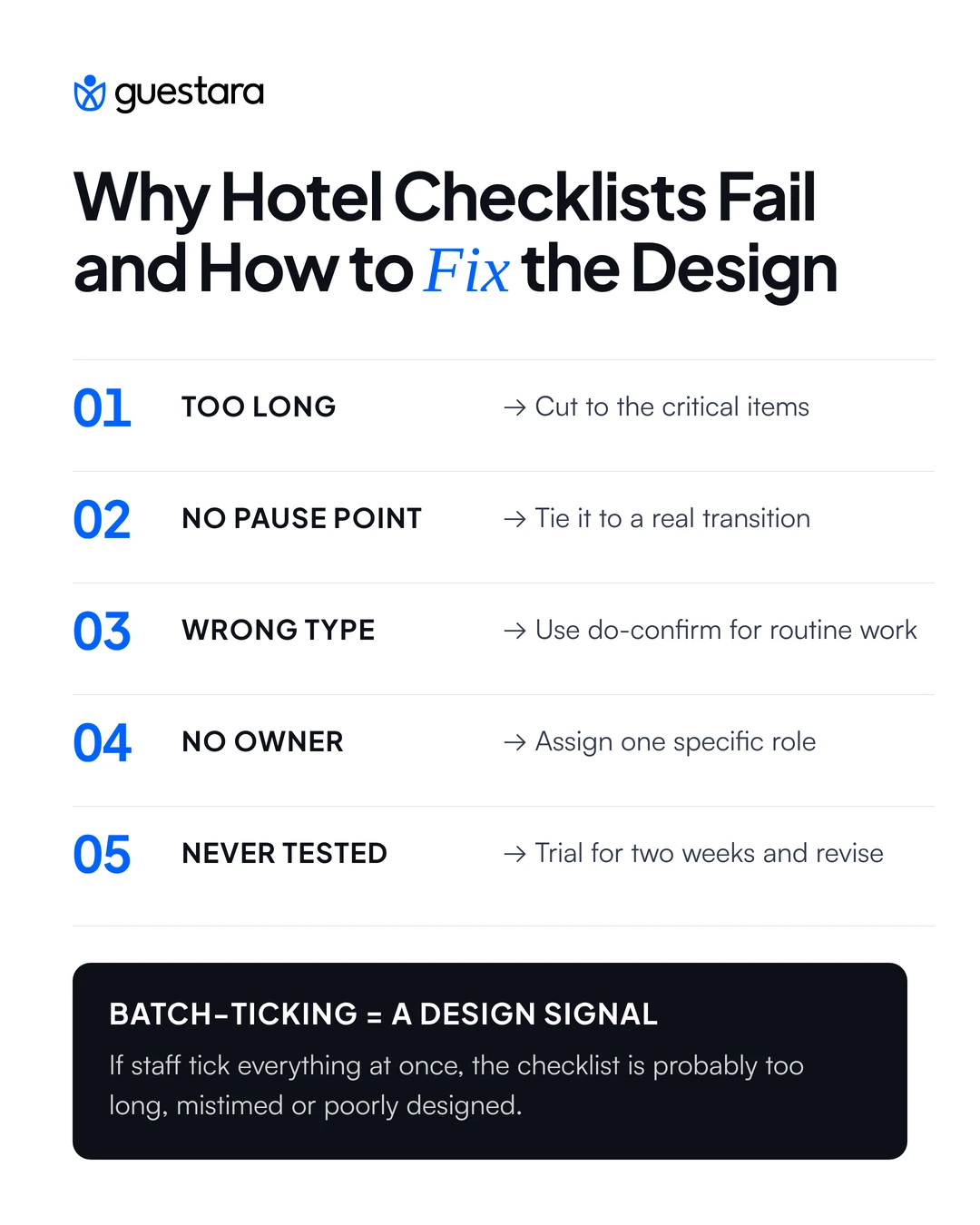
Checklists fail for predictable reasons, and almost all of them are design or ownership failures rather than staff failures. Blaming completion rates on attitude usually means the list was unusable.
Batch-ticking is the symptom that tells you which failure you have. When a checklist is completed in one sitting after the work, the list is either too long, mistyped as read-do, or tied to no particular moment.
It is worth treating as diagnostic rather than disciplinary. A team that batch-ticks a 25-item sheet is behaving rationally, because completing it properly would cost more time than the work it verifies. Shorten the list and the behaviour usually changes without a conversation about standards.
The deeper version of this problem is that a batch-ticked checklist is worse than no checklist. It produces a record showing the work was verified, which stops anyone looking, while the verification never happened.
Different departments need different checklist types and different pause points, which is why a single house style across the property does not work. The useful question per department is which transition matters and who owns it.
Note the pattern. Routine departmental work is do-confirm and short. Anything rare, urgent or performed by whoever happens to be there is read-do, and those are the only lists that should run long.
Name a role rather than a department for every list. Housekeeping does not run a checklist. The floor supervisor on duty does.
Ownership has two parts that often get separated by accident: who completes it and who reviews that it was completed. If the same person does both, the review is not happening. The supervisor completes the room release check and the duty manager reviews completion rates weekly, which is a different question from whether any individual room was fine.
The format matters less than the design, and a well-designed paper checklist beats a badly designed digital one. That said, the three formats fail in different ways and the choice should follow the pause point.
The deciding question is whether you need the data. A laminated card at the right pause point is excellent for the person doing the work and gives management nothing to review. A digital list gives you completion rates and timestamps, which is the only way to spot a checklist quietly going unrun.
Where you do go digital, the test is whether it opens and completes faster than the paper version. If logging a completed room takes longer than walking back to a clipboard, the team will find a workaround, and the workaround will be ticking five rooms at once.
Measure completion and outcome separately, because a checklist can be completed perfectly and still be the wrong checklist. Completion tells you whether the practice is alive. Outcome tells you whether it was worth running.
Track completion rate by checklist and by shift rather than as a property average. An average of 85% can mean every list is mostly done, or that two shifts are at 100% and one is at 55%, and those are different problems with different conversations attached.
Then check outcome against the log you built the list from. If the room release checklist was created because dirty-room complaints kept recurring, the test is whether those complaints fell. If completion is high and the complaint has not moved, the items are wrong and the list needs rebuilding rather than enforcing.
Four numbers are enough. Completion rate per checklist, completion rate by shift, time taken to complete, and the specific failure the list was built to prevent.
The third one is the early warning. A checklist whose completion time is creeping down toward a few seconds is being batch-ticked, and that shows up in the timestamps long before it shows up in a complaint.
Review quarterly and cut ruthlessly. A checklist with an item nobody has ever found a problem with has one item too many, and every item you remove makes the remaining ones more likely to be checked properly.
[[cta:cta-1v | heading=See where automation replaces the *checks* nobody runs | btn=Explore Hospitality AI | link=https://www.guestara.com/hospitality-ai ]]


Hotel checklists explained: read-do against do-confirm, why five to nine items beats thirty, where to set pause points and why most checklists quietly fail.
Most hotels already have checklists. They are in a folder at the front desk, or laminated in the housekeeping store, or in a spreadsheet somebody built two years ago. Some of them get completed properly. Most get ticked in a batch at the end of a shift, which produces a signed sheet and no actual verification.
The problem is almost never that the team is careless. It is that the checklist was designed badly: too long, run at no particular moment, listing every step of a task that a trained person already knows, and owned by nobody. There is real research on what separates a checklist that works from one that gets ticked, and almost none of it reaches hospitality. Here it is.
A hotel checklist is a short, fixed list of verification steps run at a defined moment in a shift to catch the items most often missed. The effective ones confirm work already done rather than instructing it, stay inside the limits of working memory, and name one person accountable for running them.
A checklist works when it is short, run at a fixed moment, and limited to the steps that cause real harm when missed. Length, timing and selection are the three variables, and most hotel checklists get all three wrong at once.
The evidence base for this comes from surgery and aviation rather than hospitality. The most cited study, Haynes and colleagues in the New England Journal of Medicine in 2009, introduced a 19-item surgical safety checklist across eight hospitals worldwide and compared 3,733 patients before implementation with 3,955 after. Complications fell from 11.0% to 7.0% and the death rate from 1.5% to 0.8%.
Two things about that study matter for a hotelier, and the second is usually left out.
The first is the size of the effect from a tool that took about two minutes to run. The second is that other studies of the same checklist have found no improvement at all. Where that happened, the explanations given were inadequate training, confusion over who was responsible for checking items, poor staff buy-in and cultural differences between settings. The checklist was the same. The implementation was not.
That is the useful lesson. A checklist is not a document, it is a practice, and the document is the easy part.
There are two kinds of checklist and they are not interchangeable. A read-do checklist is worked through as you go, like a recipe, with each step performed as it is read. A do-confirm checklist is run after the work, where the person does the job from training and then pauses to verify nothing was missed.
Choosing the wrong one is the most common design failure in hotel operations, and it is why experienced staff resent checklists. Handing a read-do list to a room attendant who has cleaned four thousand rooms treats them as though they cannot think, and they will tick it in a batch rather than work from it.
Decide by asking who runs it and how often. Routine work performed daily by trained people needs do-confirm. Work that happens rarely, under pressure, or by somebody who has not done it before needs read-do.
The same task can need both. A night audit run by the usual auditor is do-confirm. The same audit run by a front desk agent covering at short notice is read-do, and that is an argument for keeping both versions rather than one compromise.
Keep it to roughly five to nine items. That range is a rule of thumb drawn from the limits of working memory, and while it is not a law, the direction is well supported: a checklist long enough to feel thorough is usually too long to be used.
The time limit matters as much as the count. Beyond about 60 to 90 seconds at a pause point, a checklist becomes a distraction from the work and people start shortcutting it. A 30-item room inspection sheet does not get completed in 90 seconds, which means it does not get completed.
Compare that against what hotel checklists usually look like. Published hotel checklists routinely run to 15 or 17 items per department, and some properties maintain sheets of 40. Those are not checklists. They are training documents, and they are useful as training documents, which is a different job done at a different time.
Then it is a procedure, and it needs both documents. Write the full procedure as training material and reference material. Then extract the five to nine items from it that actually cause damage when missed, and make those the checklist.
The full procedure teaches somebody the job once. The checklist catches the misses every day. Trying to make one document do both produces something too long to run and too terse to learn from.
Where a long sequence genuinely has to be verified in full, split it by pause point rather than compressing it. A room release checklist at the point of inspection and a floor closing checklist at end of shift are two short lists run at two moments, which works. One 20-item list run at neither moment does not.
A pause point is the defined moment at which the checklist is run, and a checklist without one does not get used. This is the single most skipped element in hotel checklist design, because the document gets written and the moment never gets decided.
In surgery the pause points are before anaesthesia, before incision and before the patient leaves the room. In aviation they are before taxi, before takeoff, after landing. Each is an unmistakable moment, and the checklist is tied to it rather than to a time of day.
Hotels have the same natural moments and rarely use them. Before a room is released for sale. At shift handover, when responsibility actually transfers. Before the kitchen opens. At the point a guest reports a fault. Each is a real transition where something is about to proceed on the assumption that the previous step was done properly.
Tie the checklist to the transition, not the clock. A checklist due at 3pm gets done at 3pm regardless of whether the work it verifies has happened. A checklist run before a room is released cannot be completed early, because the thing it checks has to exist first.
Where the trigger is not obvious, say it explicitly on the list itself. Where it is obvious, such as a fire panel activating, it does not need stating.
Include only the items that cause real damage when missed and are genuinely easy to forget. Everything else belongs in training. This selection test is what keeps a checklist inside its length limit without arbitrary cutting.
Two conditions have to hold together. The item has to matter, meaning a guest notices or money is lost when it is skipped. And it has to be forgettable, meaning a competent person under time pressure plausibly misses it. An item that is catastrophic but unmissable does not need to be on a list. Nobody forgets to unlock the front door.
The third row is the one that makes this practical. Build your checklist from your own complaint and maintenance logs rather than from a template. The items that recur in your log are, by definition, the ones your team actually misses at your property, and they will differ from another hotel's list.
That is also why a downloaded checklist underperforms a built one. A template tells you what somebody else forgets.
Checklists fail for predictable reasons, and almost all of them are design or ownership failures rather than staff failures. Blaming completion rates on attitude usually means the list was unusable.
Batch-ticking is the symptom that tells you which failure you have. When a checklist is completed in one sitting after the work, the list is either too long, mistyped as read-do, or tied to no particular moment.
It is worth treating as diagnostic rather than disciplinary. A team that batch-ticks a 25-item sheet is behaving rationally, because completing it properly would cost more time than the work it verifies. Shorten the list and the behaviour usually changes without a conversation about standards.
The deeper version of this problem is that a batch-ticked checklist is worse than no checklist. It produces a record showing the work was verified, which stops anyone looking, while the verification never happened.
Different departments need different checklist types and different pause points, which is why a single house style across the property does not work. The useful question per department is which transition matters and who owns it.
Note the pattern. Routine departmental work is do-confirm and short. Anything rare, urgent or performed by whoever happens to be there is read-do, and those are the only lists that should run long.
Name a role rather than a department for every list. Housekeeping does not run a checklist. The floor supervisor on duty does.
Ownership has two parts that often get separated by accident: who completes it and who reviews that it was completed. If the same person does both, the review is not happening. The supervisor completes the room release check and the duty manager reviews completion rates weekly, which is a different question from whether any individual room was fine.
The format matters less than the design, and a well-designed paper checklist beats a badly designed digital one. That said, the three formats fail in different ways and the choice should follow the pause point.
The deciding question is whether you need the data. A laminated card at the right pause point is excellent for the person doing the work and gives management nothing to review. A digital list gives you completion rates and timestamps, which is the only way to spot a checklist quietly going unrun.
Where you do go digital, the test is whether it opens and completes faster than the paper version. If logging a completed room takes longer than walking back to a clipboard, the team will find a workaround, and the workaround will be ticking five rooms at once.
Measure completion and outcome separately, because a checklist can be completed perfectly and still be the wrong checklist. Completion tells you whether the practice is alive. Outcome tells you whether it was worth running.
Track completion rate by checklist and by shift rather than as a property average. An average of 85% can mean every list is mostly done, or that two shifts are at 100% and one is at 55%, and those are different problems with different conversations attached.
Then check outcome against the log you built the list from. If the room release checklist was created because dirty-room complaints kept recurring, the test is whether those complaints fell. If completion is high and the complaint has not moved, the items are wrong and the list needs rebuilding rather than enforcing.
Four numbers are enough. Completion rate per checklist, completion rate by shift, time taken to complete, and the specific failure the list was built to prevent.
The third one is the early warning. A checklist whose completion time is creeping down toward a few seconds is being batch-ticked, and that shows up in the timestamps long before it shows up in a complaint.
Review quarterly and cut ruthlessly. A checklist with an item nobody has ever found a problem with has one item too many, and every item you remove makes the remaining ones more likely to be checked properly.
[[cta:cta-1v | heading=See where automation replaces the *checks* nobody runs | btn=Explore Hospitality AI | link=https://www.guestara.com/hospitality-ai ]]
A read-do checklist is worked through as the task is performed, with each step carried out as it is read, like a recipe. A do-confirm checklist is run after the work, where the person completes the job from training and then pauses to verify nothing was missed. Routine work by trained staff suits do-confirm, while rare, urgent or unfamiliar tasks suit read-do.
Roughly five to nine items, a rule of thumb based on the limits of working memory. The time limit matters as much as the count, because a checklist taking longer than about 60 to 90 seconds at its pause point tends to get shortcut rather than completed. A task needing 30 steps should have a full written procedure for training plus a short checklist of the steps that cause real damage when missed.
A pause point is the defined moment at which a checklist is run, such as before a room is released for sale or at shift handover. Tying a checklist to a transition rather than a clock time prevents it being completed before the work it verifies has happened. A checklist without a pause point is rarely completed properly, because no moment obliges anyone to run it.
Batch-ticking is usually a rational response to a badly designed list rather than a discipline problem. It indicates the checklist is too long, is the wrong type for the task, or is tied to no particular moment, so completing it properly would cost more time than the work it verifies. Shortening the list and fixing its pause point normally changes the behaviour.
The evidence is strong but conditional. In the most cited study, a 19-item surgical safety checklist across eight hospitals was associated with complications falling from 11.0% to 7.0% and deaths from 1.5% to 0.8%. Other studies of the same checklist found no improvement, and the explanations given were inadequate training, unclear responsibility for checking items and weak staff buy-in rather than any flaw in the checklist itself.
We work closely with the industry leaders to offer seamless solutions




We’re here to help your whole team stay ahead of the curve as you grow.

Get up and running quickly with a personalized onboarding plan

Connect with real people who really get it, 24/7

Checkout our vast library of free resources, templates and more
There's only so much we can say — so let us show you! Schedule a demo today and reach your business goals.