Discover the most common hotel communication breakdowns that cause missed guest messages, why they happen, and how to fix the staff workflow gaps behind them.




.webp)
A guest messages your hotel at 11am asking about early check-in.
Nobody sees it until 3pm. By then, the guest has arrived, waited at the front desk, and mentally written the review they will post when they get home.
A couple messages through Booking.com two days before their anniversary stay asking if the hotel can arrange flowers in the room. The message sits in the OTA extranet. Nobody checks it. They arrive and there are no flowers. They say nothing at checkout. They leave a 3-star review and mention the stay felt impersonal.
A guest on property messages the hotel WhatsApp at 10pm about a noise issue from the room next door. The staff member who handles WhatsApp has finished their shift. The number is a personal phone that went home with them. The guest lies awake for an hour before calling the front desk directly.
None of these are dramatic operational failures. They are the ordinary, daily cost of a hotel communication system that was never designed to catch everything. And the worst part is that most of these breakdowns are invisible to management. No alarm sounds. No report flags it. The messages were simply never seen, and the guests simply never mentioned it.
This blog names the most common hotel communication breakdowns precisely, explains the workflow condition that causes each one, and gives you the fix.
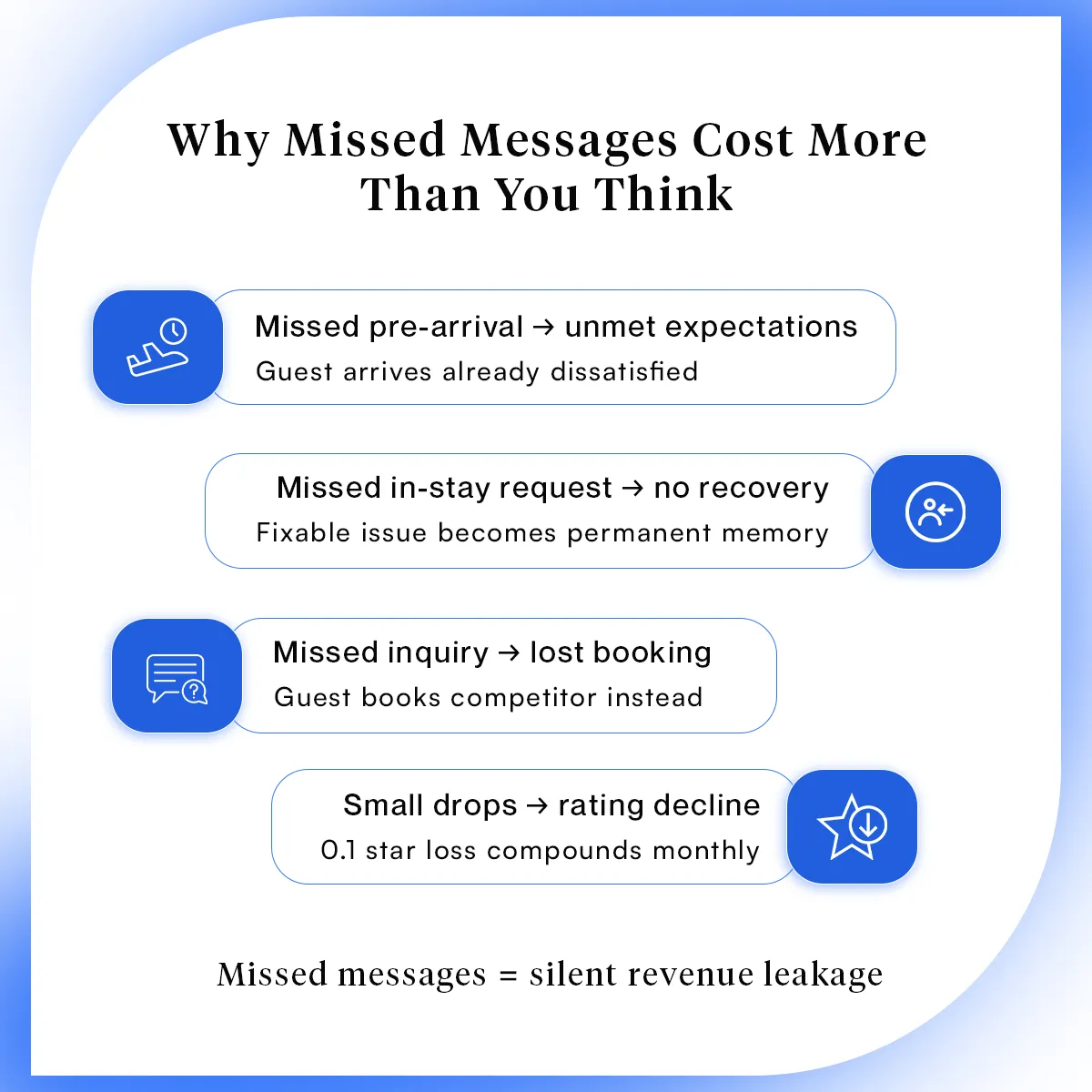
A missed pre-arrival request means a guest arrives with an unmet expectation. A missed in-stay complaint means a resolvable problem becomes a permanent memory. A missed inquiry from a prospective guest is a booking that went to a competitor.
Those are the visible costs. The less visible one is harder to quantify but more damaging long-term.
Research from Gitnux found that it takes 12 positive customer experiences to make up for one negative one, and that 33% of Americans say they will consider switching brands after a single poor service interaction. A missed message is rarely a one-time event. It is one moment in a pattern that determines whether a guest comes back.
The guest who feels ignored during their stay does not escalate. They do not complain at checkout. They write a measured, slightly disappointed review that pulls your average down by 0.1 stars. Multiply that by 15 guests a month and the drift is real enough to affect your OTA ranking, your direct booking conversion, and your ability to hold rate.
The fix does not start with more staff. It starts with knowing exactly where the messages are falling through.
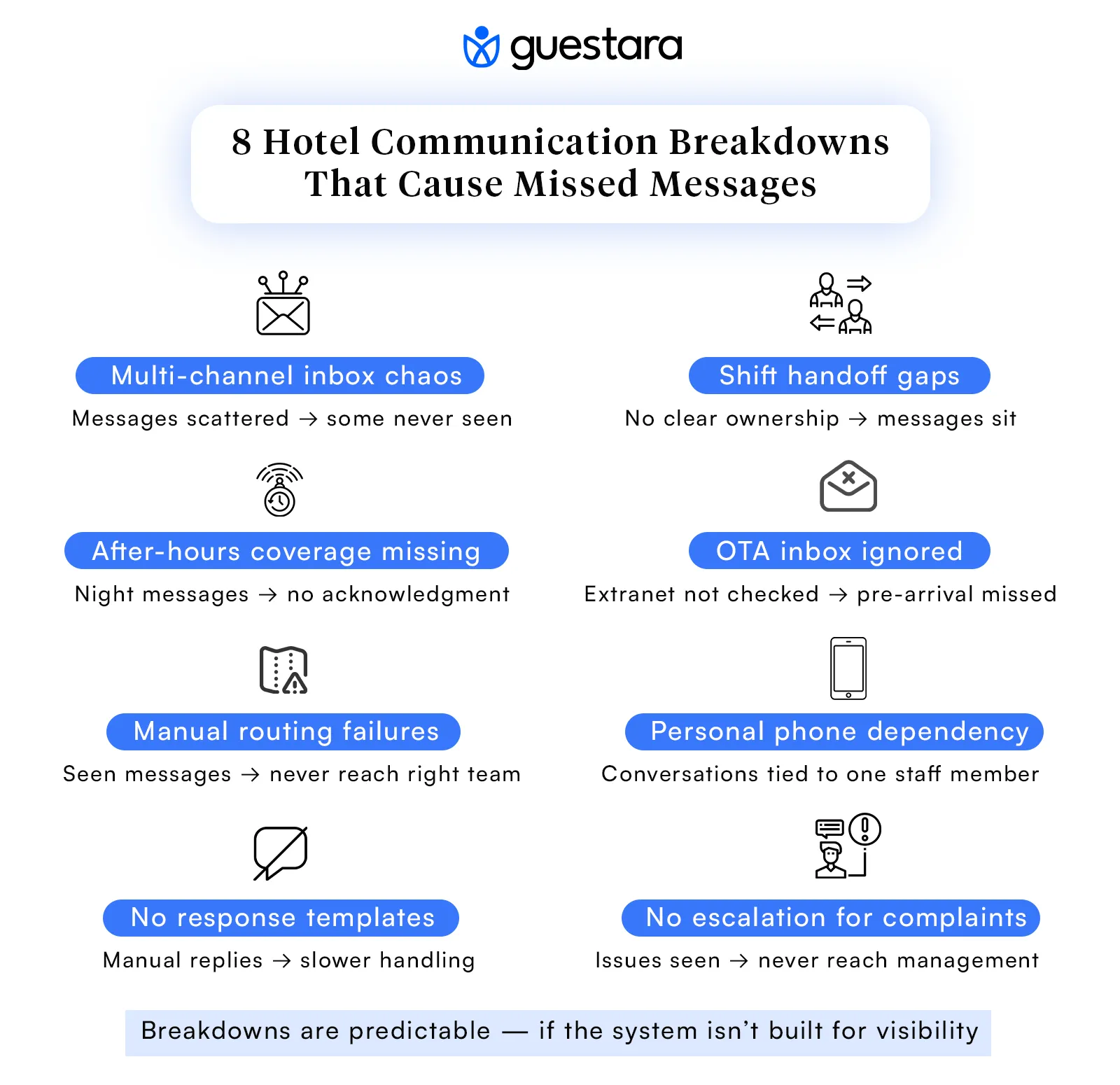
A guest sends a WhatsApp message. Another sends a question through the Booking.com inbox. A third sends an email. All three arrive within the same 20-minute window. The front desk team is handling a check-in. When the moment passes, one message has been seen, one is noticed and left for later, and one is not visible at all because the tab showing the OTA extranet is three clicks away from the screen anyone is looking at.
This is the most common source of missed hotel messages in independent properties. It is not carelessness. It is structural. When guest communication arrives through five different channels and each channel requires a separate login or a separate device, the team can only actively monitor a fraction of the inflow at any given time.
A Skift analysis of hotel guest communication found that guests will not wait when it comes to mobile messaging, and that the patience threshold for a text response is approximately 12 minutes. That window passes before most hotels have even noticed the message arrived.
Channels were added one at a time without ever being brought into a unified view. Each one made sense when it was introduced. Together, they created a system where complete coverage is impossible without a dedicated person watching each platform simultaneously.
Centralize all incoming guest messages into a single inbox. When WhatsApp, OTA messages, email, and SMS all arrive in the same view with the same timestamp and the same priority, the coverage gap closes immediately. Staff do not need to remember to check multiple platforms. Everything is in one place. Understanding what hotel guest messaging means as an operational system is the foundation before solving the channel problem.
The morning team has been managing the inbox. At 2pm, the afternoon shift starts. There is a handoff, but it is verbal and informal: "check the WhatsApp, there were a few messages this morning." The afternoon team acknowledges this and gets absorbed in a busy check-in period. At 2:45pm, a guest message that arrived at 1:55pm still has no reply. Both shifts assumed the other was watching.
The handoff gap is one of the most consistent and least discussed hotel communication problems. It does not appear in any report because there is no report that tracks messages by the minute and flags ownership transitions. It exists in the space between shifts, where responsibility is ambiguous and the inbox is nobody's specific job.
Hotels operate in shifts, but messaging accountability is rarely structured around shift transitions. Most teams have a general understanding that someone monitors the inbox, without a specific named person assigned to each hour of the operating day. When things are busy, monitoring becomes the task that waits.
Assign inbox ownership explicitly by shift. Not "whoever is free." One named person per shift period owns the inbox and is accountable for response times during their window. Write it on the shift schedule the same way room assignments are written. When the handoff happens, that conversation must include: current open conversations, anything awaiting a response, and the next named person taking over. Pair this with SLA alerts that flag any message older than 10 minutes without a reply, so gaps are visible before they become complaints.
A guest messages at 10:30pm about a noise issue in the corridor. The hotel's WhatsApp number belongs to a staff member who finished their shift at 9pm and took the phone home. The night team is handling check-ins and is not monitoring any digital channel. The guest waits. At 11:15pm they call the front desk, explain the situation they already explained in writing, and feel the hotel is disorganized. The review mentions "had to call twice about the same thing."
Or a different version: a guest messages at 7am asking about breakfast hours before heading down. The morning team starts at 8am. The message sits for 45 minutes. The guest goes down without knowing breakfast ends at 10am, arrives at 10:05am, and leaves without eating.
After-hours missed messages follow a predictable pattern. The message arrives. Nobody is watching. The guest either escalates by phone, resolves the problem themselves, or waits in frustration. All three outcomes are worse than a properly handled message would have produced.
Hotels invest in staffing for in-person service but rarely build the same coverage for digital messaging outside of core hours. The assumption is that guests who need something urgently will call. But 64% of US consumers say they would prefer to message a hotel rather than call, and a guest who has already sent a message is unlikely to feel they should have to call as well.
Set up an automated acknowledgment that fires within 30 seconds of any after-hours message. Something short and honest: "We've received your message and our team will reply as soon as we're back on duty at [time]. For urgent issues, please contact the front desk directly at [number]." This does not solve every after-hours need, but it transforms the guest experience from "they ignored me" to "they received my message and I know what to expect." For properties with overnight teams, route after-hours digital messages to the same inbox the night auditor monitors.
A family books through Booking.com and messages through the platform four days before arrival asking whether the hotel can arrange a crib and whether the pool is open to children. The message arrives in the Booking.com extranet. Your front desk team manages the property on your PMS and checks email. The OTA extranet is a separate login that gets opened periodically, not systematically. The family's message is seen two days after they arrive. By then it is academic.
This scenario happens in hundreds of hotels every week. OTA messaging is treated as a secondary communication layer rather than a primary one, even though it is often the only channel a guest has access to before their contact details are shared with the property. A guest who booked through an OTA and needs to communicate before arrival has no choice but to use the OTA inbox. If that inbox is not actively monitored, the guest's only option is unanswered.
The operational consequence extends beyond the individual guest. OTA platforms including Booking.com use response rate and response time as ranking factors. A hotel that consistently misses or delays OTA messages will see its visibility in search results on those platforms decline, which reduces future inbound bookings from those channels.
OTA extranets were designed as booking management tools, not communication tools. They require separate logins, operate outside of the PMS and the hotel's main communication stack, and generate notifications that are easy to miss if you are not actively looking. As a result, most hotel teams check them infrequently rather than continuously.
Connect your OTA inboxes to a unified messaging system so that a Booking.com message and a WhatsApp message arrive in the same view with the same urgency. When OTA messages sit alongside other guest communications in a single dashboard, they receive the same monitoring and the same response priority. This is one of the core functions of a hotel unified inbox, and it is the change that most directly addresses the OTA communication gap without requiring the team to change their behavior significantly.
A guest messages about a maintenance issue. The front desk sees it, types a holding reply, and means to forward it to the maintenance team. They get interrupted by a guest at the desk. The forward never happens. The maintenance team never sees the message. The guest waits. An hour later they message again, now with an edge to their tone. The front desk checks, realizes the first message was never escalated, sends an apology, and calls maintenance directly. The issue gets resolved, but the guest experience has already been defined by the wait and the second message they had to send.
This breakdown is about routing rather than visibility. The message was seen. It just never reached the person who could act on it. In most hotels, this routing happens manually, through a combination of verbal communication, WhatsApp group chats among staff, and the occasional phone call. Manual routing is vulnerable to exactly the kind of interruption described above.
Guest messages arrive in a general inbox and require a human decision to direct them to the right department. When that decision happens under pressure, or when the person making it is pulled in another direction, the routing step fails silently. Nobody knows it failed until the guest messages again.
Build automatic routing rules that send specific message types to the right department without requiring a manual forwarding step. Maintenance requests route to the facilities team. F&B requests route to the restaurant. Housekeeping requests route to housekeeping. The front desk team can see all routing activity in a single view and intervene if needed, but the default path is automatic. This is what a hotel guest engagement and automation platform is designed to do: remove the human routing step from the routine and reserve staff judgment for the exceptions.
The hotel has a "WhatsApp number" for guests. That number belongs to the front desk manager's personal phone. When the front desk manager is on shift, messages are handled well. When they are off, messages go to a phone that is at someone's home. Other staff members do not have access to the conversation history. A guest who messaged three days ago about a dietary requirement for a group dinner gets a blank response from the new person who just picked up the conversation: "Can you remind me what you needed?"
This is one of the most widespread hotel communication problems in independent properties, and one of the most damaging in terms of guest experience. It creates four distinct issues: no coverage during off hours, no shared conversation history, no ability for the team to collaborate on a response, and a guest-facing experience that feels personal until it suddenly and visibly does not.
Personal phones are the path of least resistance when setting up WhatsApp for guest communication. They require no technical setup, no business account, and no cost. The convenience is real until the first time it creates a problem, and by then the pattern is established.
Register a WhatsApp Business API number that is tied to the hotel, not to any individual. All conversations run through a shared team inbox where every staff member with access can see the full conversation history, pick up an open thread, and respond with full context. When someone goes off shift, the conversation does not go with them. This is a single configuration change that eliminates the entire category of breakdown.
A guest sends a message asking about checkout time. The staff member handling the inbox reads it, knows the answer (11am), but is also managing two other conversations and a check-in. Writing a response from scratch takes four minutes instead of forty seconds. By the time the reply is sent, the guest has already called the front desk.
Multiply this across the 20 most common questions a hotel receives daily — WiFi password, parking instructions, pool hours, restaurant reservations, early check-in requests — and the accumulated delay is significant. Not because any individual response is catastrophically slow, but because the team's capacity to handle message volume is constrained by the time each response requires.
Most hotel teams have never built a template library. There is an implicit assumption that every message deserves a personalized response written from scratch, which is true for complex or sensitive conversations and unnecessarily time-consuming for routine informational requests.
Identify the 10 to 15 most common message types your team handles and write a clean, warm template for each one. Store these as quick-reply options in your messaging platform. A staff member responding to a checkout-time question selects the template, personalizes the greeting, and sends. Total time: under 15 seconds instead of four minutes. The guest receives a consistent, correct, friendly response. The team maintains capacity for the conversations that genuinely require judgment. Hotels that implemented text messaging for concierge services reduced front desk phone traffic by 40%, partly because quick, accurate message responses removed the need for guests to escalate to a phone call.
A guest sends a mid-stay message rating their experience as poor and mentioning a specific issue with the room. The staff member who sees it replies with an apology and says they will look into it. They intend to escalate but do not follow a formal process. The message does not reach the duty manager. The duty manager does their rounds and everything appears fine. The guest checks out. Three days later, a detailed negative review appears and the GM reads it for the first time.
This breakdown is particularly costly because the problem was knowable and recoverable. The guest communicated. They gave the hotel a chance. The message was received and acknowledged. But because there was no escalation rule, no alert, and no process for routing negative sentiment to someone with authority to act, the window closed.
Guest feedback during the stay is often treated as a conversation rather than a signal that requires a workflow. The staff member handling it responds as a person, not as part of a system. Without a defined escalation path for low-satisfaction signals, the information stays in the inbox and does not reach decision-makers.
Build an alert that fires when any in-stay message contains language suggesting dissatisfaction, or when a guest rates their experience below a threshold in a mid-stay check-in message. Route that alert directly to the duty manager or GM, not to the general inbox. The window between a guest complaint and a guest checking out is the only window where service recovery is possible. The role of guest communication in shaping the hotel guest journey includes this recovery layer — and it only works if the right person sees the signal in time.
Hotel teams care about guests. These gaps are not attitude problems. They happen because the communication system was never designed to make every message visible to the right person at the right time. Messages arrive through fragmented channels, get routed manually, depend on individual staff members for coverage, and have no safety net when something slips.
Research on hospitality communication consistently shows that guests expect hotels to communicate across their preferred channels, and that being ignored, even briefly, lands harder than any equivalent positive experience. A guest whose message was answered quickly barely registers it. A guest whose message was missed remembers it.
The fix is the same across all eight breakdowns: a unified inbox, defined ownership per shift, after-hours automation, automatic routing rules, and escalation alerts for low-satisfaction signals. None of it requires new headcount. It requires a system built around visibility.
The complete guide to hotel guest communication and journey automation covers how these components fit together. The hotel guest journey framework shows where each communication moment sits and why a breakdown at any one point ripples through what follows.
Guestara is built specifically for the communication challenges described in this blog. All incoming guest messages, regardless of channel, arrive in one unified inbox connected to your PMS. Every message carries booking context so your team always knows who they are talking to and where they are in their stay.
Routing rules send specific request types to the right department automatically. SLA alerts fire when a message has gone too long without a response. After-hours auto-replies acknowledge guest messages the moment they arrive. Mid-stay sentiment signals escalate to the duty manager before the guest has time to decide they are not going to mention it.
Your team focuses on the conversations that need judgment. The system handles the rest.
See how it works for a property like yours. Book a demo with the Guestara team.


Discover the most common hotel communication breakdowns that cause missed guest messages, why they happen, and how to fix the staff workflow gaps behind them.
A guest messages your hotel at 11am asking about early check-in.
Nobody sees it until 3pm. By then, the guest has arrived, waited at the front desk, and mentally written the review they will post when they get home.
A couple messages through Booking.com two days before their anniversary stay asking if the hotel can arrange flowers in the room. The message sits in the OTA extranet. Nobody checks it. They arrive and there are no flowers. They say nothing at checkout. They leave a 3-star review and mention the stay felt impersonal.
A guest on property messages the hotel WhatsApp at 10pm about a noise issue from the room next door. The staff member who handles WhatsApp has finished their shift. The number is a personal phone that went home with them. The guest lies awake for an hour before calling the front desk directly.
None of these are dramatic operational failures. They are the ordinary, daily cost of a hotel communication system that was never designed to catch everything. And the worst part is that most of these breakdowns are invisible to management. No alarm sounds. No report flags it. The messages were simply never seen, and the guests simply never mentioned it.
This blog names the most common hotel communication breakdowns precisely, explains the workflow condition that causes each one, and gives you the fix.
A missed pre-arrival request means a guest arrives with an unmet expectation. A missed in-stay complaint means a resolvable problem becomes a permanent memory. A missed inquiry from a prospective guest is a booking that went to a competitor.
Those are the visible costs. The less visible one is harder to quantify but more damaging long-term.
Research from Gitnux found that it takes 12 positive customer experiences to make up for one negative one, and that 33% of Americans say they will consider switching brands after a single poor service interaction. A missed message is rarely a one-time event. It is one moment in a pattern that determines whether a guest comes back.
The guest who feels ignored during their stay does not escalate. They do not complain at checkout. They write a measured, slightly disappointed review that pulls your average down by 0.1 stars. Multiply that by 15 guests a month and the drift is real enough to affect your OTA ranking, your direct booking conversion, and your ability to hold rate.
The fix does not start with more staff. It starts with knowing exactly where the messages are falling through.
A guest sends a WhatsApp message. Another sends a question through the Booking.com inbox. A third sends an email. All three arrive within the same 20-minute window. The front desk team is handling a check-in. When the moment passes, one message has been seen, one is noticed and left for later, and one is not visible at all because the tab showing the OTA extranet is three clicks away from the screen anyone is looking at.
This is the most common source of missed hotel messages in independent properties. It is not carelessness. It is structural. When guest communication arrives through five different channels and each channel requires a separate login or a separate device, the team can only actively monitor a fraction of the inflow at any given time.
A Skift analysis of hotel guest communication found that guests will not wait when it comes to mobile messaging, and that the patience threshold for a text response is approximately 12 minutes. That window passes before most hotels have even noticed the message arrived.
Channels were added one at a time without ever being brought into a unified view. Each one made sense when it was introduced. Together, they created a system where complete coverage is impossible without a dedicated person watching each platform simultaneously.
Centralize all incoming guest messages into a single inbox. When WhatsApp, OTA messages, email, and SMS all arrive in the same view with the same timestamp and the same priority, the coverage gap closes immediately. Staff do not need to remember to check multiple platforms. Everything is in one place. Understanding what hotel guest messaging means as an operational system is the foundation before solving the channel problem.
The morning team has been managing the inbox. At 2pm, the afternoon shift starts. There is a handoff, but it is verbal and informal: "check the WhatsApp, there were a few messages this morning." The afternoon team acknowledges this and gets absorbed in a busy check-in period. At 2:45pm, a guest message that arrived at 1:55pm still has no reply. Both shifts assumed the other was watching.
The handoff gap is one of the most consistent and least discussed hotel communication problems. It does not appear in any report because there is no report that tracks messages by the minute and flags ownership transitions. It exists in the space between shifts, where responsibility is ambiguous and the inbox is nobody's specific job.
Hotels operate in shifts, but messaging accountability is rarely structured around shift transitions. Most teams have a general understanding that someone monitors the inbox, without a specific named person assigned to each hour of the operating day. When things are busy, monitoring becomes the task that waits.
Assign inbox ownership explicitly by shift. Not "whoever is free." One named person per shift period owns the inbox and is accountable for response times during their window. Write it on the shift schedule the same way room assignments are written. When the handoff happens, that conversation must include: current open conversations, anything awaiting a response, and the next named person taking over. Pair this with SLA alerts that flag any message older than 10 minutes without a reply, so gaps are visible before they become complaints.
A guest messages at 10:30pm about a noise issue in the corridor. The hotel's WhatsApp number belongs to a staff member who finished their shift at 9pm and took the phone home. The night team is handling check-ins and is not monitoring any digital channel. The guest waits. At 11:15pm they call the front desk, explain the situation they already explained in writing, and feel the hotel is disorganized. The review mentions "had to call twice about the same thing."
Or a different version: a guest messages at 7am asking about breakfast hours before heading down. The morning team starts at 8am. The message sits for 45 minutes. The guest goes down without knowing breakfast ends at 10am, arrives at 10:05am, and leaves without eating.
After-hours missed messages follow a predictable pattern. The message arrives. Nobody is watching. The guest either escalates by phone, resolves the problem themselves, or waits in frustration. All three outcomes are worse than a properly handled message would have produced.
Hotels invest in staffing for in-person service but rarely build the same coverage for digital messaging outside of core hours. The assumption is that guests who need something urgently will call. But 64% of US consumers say they would prefer to message a hotel rather than call, and a guest who has already sent a message is unlikely to feel they should have to call as well.
Set up an automated acknowledgment that fires within 30 seconds of any after-hours message. Something short and honest: "We've received your message and our team will reply as soon as we're back on duty at [time]. For urgent issues, please contact the front desk directly at [number]." This does not solve every after-hours need, but it transforms the guest experience from "they ignored me" to "they received my message and I know what to expect." For properties with overnight teams, route after-hours digital messages to the same inbox the night auditor monitors.
A family books through Booking.com and messages through the platform four days before arrival asking whether the hotel can arrange a crib and whether the pool is open to children. The message arrives in the Booking.com extranet. Your front desk team manages the property on your PMS and checks email. The OTA extranet is a separate login that gets opened periodically, not systematically. The family's message is seen two days after they arrive. By then it is academic.
This scenario happens in hundreds of hotels every week. OTA messaging is treated as a secondary communication layer rather than a primary one, even though it is often the only channel a guest has access to before their contact details are shared with the property. A guest who booked through an OTA and needs to communicate before arrival has no choice but to use the OTA inbox. If that inbox is not actively monitored, the guest's only option is unanswered.
The operational consequence extends beyond the individual guest. OTA platforms including Booking.com use response rate and response time as ranking factors. A hotel that consistently misses or delays OTA messages will see its visibility in search results on those platforms decline, which reduces future inbound bookings from those channels.
OTA extranets were designed as booking management tools, not communication tools. They require separate logins, operate outside of the PMS and the hotel's main communication stack, and generate notifications that are easy to miss if you are not actively looking. As a result, most hotel teams check them infrequently rather than continuously.
Connect your OTA inboxes to a unified messaging system so that a Booking.com message and a WhatsApp message arrive in the same view with the same urgency. When OTA messages sit alongside other guest communications in a single dashboard, they receive the same monitoring and the same response priority. This is one of the core functions of a hotel unified inbox, and it is the change that most directly addresses the OTA communication gap without requiring the team to change their behavior significantly.
A guest messages about a maintenance issue. The front desk sees it, types a holding reply, and means to forward it to the maintenance team. They get interrupted by a guest at the desk. The forward never happens. The maintenance team never sees the message. The guest waits. An hour later they message again, now with an edge to their tone. The front desk checks, realizes the first message was never escalated, sends an apology, and calls maintenance directly. The issue gets resolved, but the guest experience has already been defined by the wait and the second message they had to send.
This breakdown is about routing rather than visibility. The message was seen. It just never reached the person who could act on it. In most hotels, this routing happens manually, through a combination of verbal communication, WhatsApp group chats among staff, and the occasional phone call. Manual routing is vulnerable to exactly the kind of interruption described above.
Guest messages arrive in a general inbox and require a human decision to direct them to the right department. When that decision happens under pressure, or when the person making it is pulled in another direction, the routing step fails silently. Nobody knows it failed until the guest messages again.
Build automatic routing rules that send specific message types to the right department without requiring a manual forwarding step. Maintenance requests route to the facilities team. F&B requests route to the restaurant. Housekeeping requests route to housekeeping. The front desk team can see all routing activity in a single view and intervene if needed, but the default path is automatic. This is what a hotel guest engagement and automation platform is designed to do: remove the human routing step from the routine and reserve staff judgment for the exceptions.
The hotel has a "WhatsApp number" for guests. That number belongs to the front desk manager's personal phone. When the front desk manager is on shift, messages are handled well. When they are off, messages go to a phone that is at someone's home. Other staff members do not have access to the conversation history. A guest who messaged three days ago about a dietary requirement for a group dinner gets a blank response from the new person who just picked up the conversation: "Can you remind me what you needed?"
This is one of the most widespread hotel communication problems in independent properties, and one of the most damaging in terms of guest experience. It creates four distinct issues: no coverage during off hours, no shared conversation history, no ability for the team to collaborate on a response, and a guest-facing experience that feels personal until it suddenly and visibly does not.
Personal phones are the path of least resistance when setting up WhatsApp for guest communication. They require no technical setup, no business account, and no cost. The convenience is real until the first time it creates a problem, and by then the pattern is established.
Register a WhatsApp Business API number that is tied to the hotel, not to any individual. All conversations run through a shared team inbox where every staff member with access can see the full conversation history, pick up an open thread, and respond with full context. When someone goes off shift, the conversation does not go with them. This is a single configuration change that eliminates the entire category of breakdown.
A guest sends a message asking about checkout time. The staff member handling the inbox reads it, knows the answer (11am), but is also managing two other conversations and a check-in. Writing a response from scratch takes four minutes instead of forty seconds. By the time the reply is sent, the guest has already called the front desk.
Multiply this across the 20 most common questions a hotel receives daily — WiFi password, parking instructions, pool hours, restaurant reservations, early check-in requests — and the accumulated delay is significant. Not because any individual response is catastrophically slow, but because the team's capacity to handle message volume is constrained by the time each response requires.
Most hotel teams have never built a template library. There is an implicit assumption that every message deserves a personalized response written from scratch, which is true for complex or sensitive conversations and unnecessarily time-consuming for routine informational requests.
Identify the 10 to 15 most common message types your team handles and write a clean, warm template for each one. Store these as quick-reply options in your messaging platform. A staff member responding to a checkout-time question selects the template, personalizes the greeting, and sends. Total time: under 15 seconds instead of four minutes. The guest receives a consistent, correct, friendly response. The team maintains capacity for the conversations that genuinely require judgment. Hotels that implemented text messaging for concierge services reduced front desk phone traffic by 40%, partly because quick, accurate message responses removed the need for guests to escalate to a phone call.
A guest sends a mid-stay message rating their experience as poor and mentioning a specific issue with the room. The staff member who sees it replies with an apology and says they will look into it. They intend to escalate but do not follow a formal process. The message does not reach the duty manager. The duty manager does their rounds and everything appears fine. The guest checks out. Three days later, a detailed negative review appears and the GM reads it for the first time.
This breakdown is particularly costly because the problem was knowable and recoverable. The guest communicated. They gave the hotel a chance. The message was received and acknowledged. But because there was no escalation rule, no alert, and no process for routing negative sentiment to someone with authority to act, the window closed.
Guest feedback during the stay is often treated as a conversation rather than a signal that requires a workflow. The staff member handling it responds as a person, not as part of a system. Without a defined escalation path for low-satisfaction signals, the information stays in the inbox and does not reach decision-makers.
Build an alert that fires when any in-stay message contains language suggesting dissatisfaction, or when a guest rates their experience below a threshold in a mid-stay check-in message. Route that alert directly to the duty manager or GM, not to the general inbox. The window between a guest complaint and a guest checking out is the only window where service recovery is possible. The role of guest communication in shaping the hotel guest journey includes this recovery layer — and it only works if the right person sees the signal in time.
Hotel teams care about guests. These gaps are not attitude problems. They happen because the communication system was never designed to make every message visible to the right person at the right time. Messages arrive through fragmented channels, get routed manually, depend on individual staff members for coverage, and have no safety net when something slips.
Research on hospitality communication consistently shows that guests expect hotels to communicate across their preferred channels, and that being ignored, even briefly, lands harder than any equivalent positive experience. A guest whose message was answered quickly barely registers it. A guest whose message was missed remembers it.
The fix is the same across all eight breakdowns: a unified inbox, defined ownership per shift, after-hours automation, automatic routing rules, and escalation alerts for low-satisfaction signals. None of it requires new headcount. It requires a system built around visibility.
The complete guide to hotel guest communication and journey automation covers how these components fit together. The hotel guest journey framework shows where each communication moment sits and why a breakdown at any one point ripples through what follows.
Guestara is built specifically for the communication challenges described in this blog. All incoming guest messages, regardless of channel, arrive in one unified inbox connected to your PMS. Every message carries booking context so your team always knows who they are talking to and where they are in their stay.
Routing rules send specific request types to the right department automatically. SLA alerts fire when a message has gone too long without a response. After-hours auto-replies acknowledge guest messages the moment they arrive. Mid-stay sentiment signals escalate to the duty manager before the guest has time to decide they are not going to mention it.
Your team focuses on the conversations that need judgment. The system handles the rest.
See how it works for a property like yours. Book a demo with the Guestara team.
Fragmented channels with no unified view is the biggest one — when messages arrive across WhatsApp, OTA inboxes, email, and SMS with no single dashboard, gaps are inevitable. Shift handoff gaps, no after-hours automation, and missing routing rules account for most of the rest.
A guest whose message went unanswered is far more likely to mention it in their review, even when the rest of the stay was fine. Research shows it takes 12 positive experiences to offset one negative one — and a missed in-stay complaint is the worst version because the problem was fixable and the opportunity was not taken.
Five components: a unified inbox for all channels, named ownership for every shift hour, automated after-hours acknowledgment, automatic routing rules for specific message types, and SLA alerts for messages that exceed the response threshold. Missing any one creates a predictable gap.
Connect OTA inboxes to a unified messaging dashboard so Booking.com and Expedia messages appear alongside WhatsApp in one view — that removes the separate-login barrier. Add response templates for common pre-arrival questions so replies are fast once the message is seen.
Short term: missed service recovery turns into negative reviews. Medium term: lower scores hurt OTA ranking. Long term: ignored guests do not return. A missed in-stay complaint is the most costly because it removes the one chance to turn a problem into loyalty.
We work closely with the industry leaders to offer seamless solutions




We’re here to help your whole team stay ahead of the curve as you grow.

Get up and running quickly with a personalized onboarding plan

Connect with real people who really get it, 24/7

Checkout our vast library of free resources, templates and more
There's only so much we can say — so let us show you! Schedule a demo today and reach your business goals.


.png)