Compare WhatsApp Business and Business API for hotels. Learn setup, automation, compliance, and ROI. See which option saves your team time while driving revenue.




You see your front desk juggling calls. Your guest services team manually responding to the same questions all day. Your pre-arrival emails sitting unread in inboxes.
Then you hear about hotel WhatsApp marketing. Open rates above 90%. Instant replies. Guests who actually respond.
But when you search "how to set up WhatsApp for hotels," you find two options. WhatsApp Business. WhatsApp Business API. And no clear answer on which one your property actually needs.
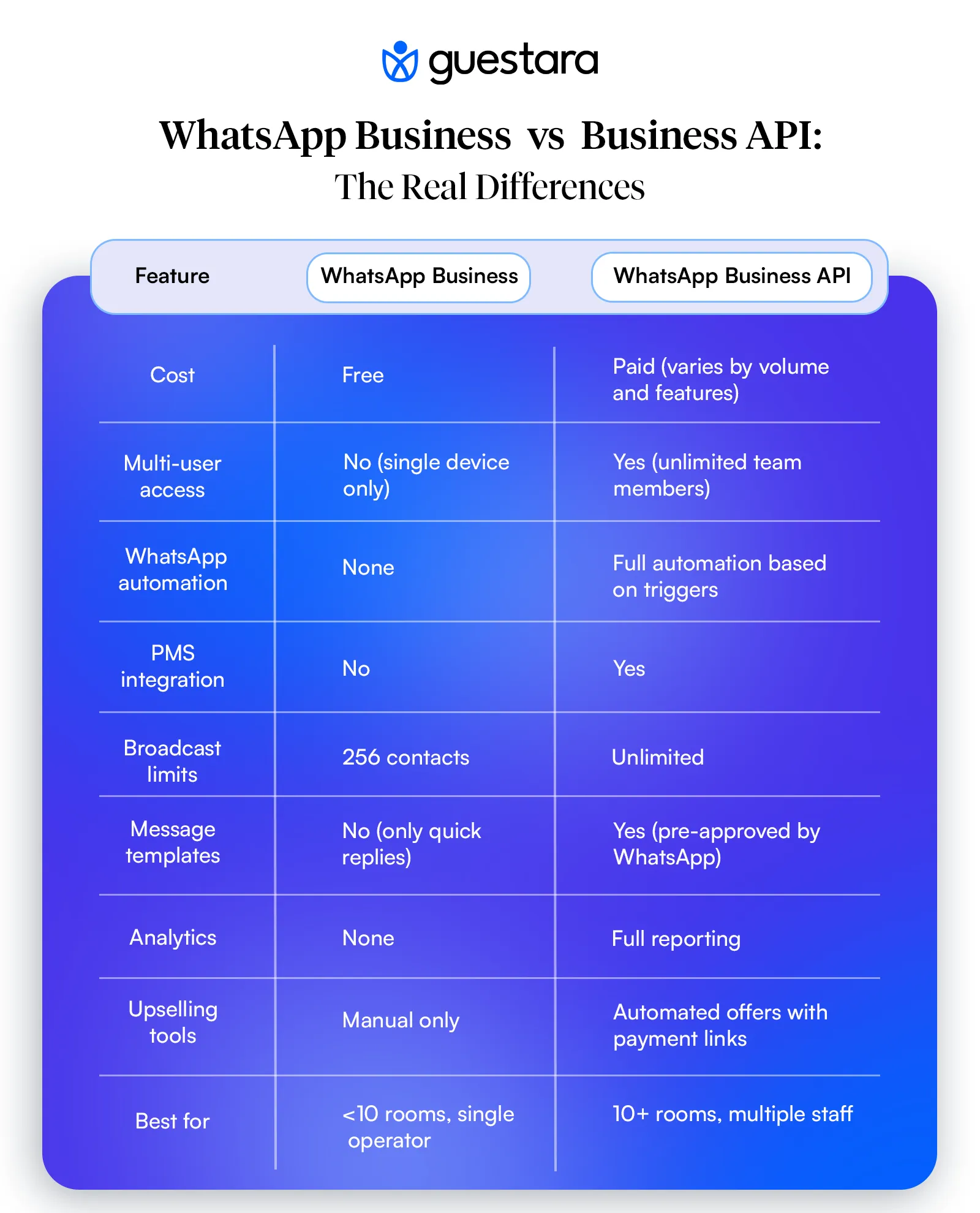
Here's what matters. One is free and works for small operations. The other costs money but handles volume, automation, and multi-user access. Most hotels start with the wrong one. Then they hit limits and have to migrate everything.
This guide shows you exactly which option fits your operation. And how to avoid the mistakes that waste time and frustrate guests.
WhatsApp has 2.8 billion active users worldwide. Your guests are already on it. They check it multiple times per day. They respond faster than email or SMS.
In India alone, WhatsApp dominates with over 535 million active users, making it the country's most-used messaging platform. If your hotel operates in markets like India, Southeast Asia, or Latin America, your guests live on WhatsApp.
Compare these numbers:
Email: 20-25% open rate, response time measured in hours or days
SMS: 50-70% open rate, response time in minutes
WhatsApp: 90-98% open rate, response time in seconds
That difference changes how guest communication works.
But here's what most hotel managers don't realize. WhatsApp marketing for hotels isn't just about open rates. It's about reducing the manual work your team does every single day.
Think about your current workflow.
Your front desk sends pre-arrival emails. Guests don't see them. They show up confused. Staff explain the same directions, parking rules, and check-in process over and over.
Now think about this workflow.
Guest books. Automated pre-arrival WhatsApp messages send confirmation, directions, early check-in options, and upsell offers. Guest responds with questions. Your team sees it in a unified inbox. Guest gets answers before they arrive.
No missed emails. No repeated explanations. No frustrated staff.
That's why properties from 10-room boutiques to 500-room resorts are building hotel WhatsApp marketing strategies. Not because it's trendy. Because it reduces operational load while improving guest satisfaction.
The question isn't whether to use WhatsApp. The question is which version fits your operation.
WhatsApp Business is the free app Meta built for small businesses.
You download it on your phone. Set up a business profile. Add your hotel name, address, hours. Create quick replies for common questions. Start messaging guests.
It works well for:
You get basic features:
The interface is familiar. It looks like regular WhatsApp. Your team already knows how to use it.
Problems show up fast once you scale past 10 rooms or add a second staff member.
Single device limitation. Only one phone can be logged in. If your front desk manager has it on their phone, your guest services team can't access conversations. When that person takes a day off, no one can see message history.
No automation. You manually send every message. Pre-arrival confirmations. Check-in instructions. Upsell offers. Post-stay review requests. All typed by hand, every single time.
No integration. WhatsApp Business doesn't connect to your PMS, booking engine, or CRM. You can't trigger messages based on reservation status. You can't pull guest names or booking details automatically.
No broadcast lists beyond 256 contacts. Want to send a message to all guests checking in tomorrow? You manually add each person to a broadcast list. Max 256 people. For larger properties, that's a problem.
No analytics. You can't track delivery rates, response times, or which messages convert. You're guessing what works.
Most importantly, you can't handle volume.
A 30-room hotel gets 30 check-ins per day. Each guest asks 3-5 questions. That's 90-150 manual messages daily. Plus pre-arrival messages. Plus upsells. Plus post-stay follow-ups.
WhatsApp Business forces your team to manually type every single one.
That's why properties outgrow it within weeks.
WhatsApp Business API is the enterprise version.
It's not an app you download. It's a platform you access through approved Business Solution Providers.
The API lets you:
Think of it this way. WhatsApp Business is like using Gmail for one person. WhatsApp Business API is like Salesforce connected to your entire operation.
For hospitality businesses specifically, WhatsApp Business API has become essential infrastructure because it handles the unique demands of guest communication at scale.
You don't interact with WhatsApp directly.
You use a solution provider's platform. They handle the technical connection to WhatsApp's servers. You build message templates, set automation rules, and manage conversations through their interface.
Example workflow:
The guest sees normal WhatsApp messages on their phone. They don't know it's automated.
The biggest difference isn't features. It's compliance.
WhatsApp has strict rules about who you can message and when. This is where hotels make expensive mistakes.
WhatsApp Business has looser enforcement because it's designed for one-to-one customer relationships. But it still has limits.
WhatsApp Business API enforces the 24-hour rule strictly. Violate it, and your account gets banned. No warning. No appeal.
Let's talk about what that means.
The WhatsApp 24-Hour Rule Every Hotel Needs to Understand
WhatsApp doesn't let businesses spam users. Good policy. But it creates confusion for hotels.
Here's the rule:
You can send free-form messages to a guest for 24 hours after they last messaged you.
After 24 hours, you can only send pre-approved message templates. These templates must be reviewed and approved by WhatsApp before use.
Scenario 1: Guest initiates contact
Guest messages you: "What time is check-in?"
You respond: "Check-in is 3 PM. Need an early check-in?"
Guest replies: "Yes, can I check in at noon?"
You answer: "Yes, $30 early check-in fee. I'll add it to your reservation."
That entire conversation happens in free-form messages. No template needed.
But if the guest doesn't reply, and 25 hours pass, you can't send a free-form follow-up. You need a pre-approved template.
Scenario 2: Hotel initiates contact
Guest books a room. You want to send a pre-arrival message 3 days before check-in.
The guest didn't message you first. So you must use a pre-approved template.
These templates take 2-10 days to get WhatsApp approval. You submit them through your solution provider. WhatsApp reviews content and either approves or rejects.
Most hotels violate these rules without knowing:
Sending promotional content in 24-hour window: You can't send discount offers or upsells in free-form conversation unless the guest specifically asks. Use templates for promotions.
Using templates for back-and-forth conversation: Templates are for one-way notifications only. Once the guest replies, switch to free-form.
Not getting opt-in consent: You must have explicit permission before messaging a guest. Booking a room doesn't automatically give you permission. Include opt-in language in your booking confirmation.
Buying phone number lists: Never. WhatsApp bans accounts that message users without prior relationship.
With WhatsApp Business, enforcement is lighter. With WhatsApp Business API, violations get you shut down fast.
This is why hotel whatsapp message templates matter. You need a library of pre-approved templates for every stage of the guest journey.
Use the free WhatsApp Business app if:
Your property has fewer than 10 rooms. One person can handle the message volume manually.
You have a single operator managing guest communication. No need for multi-user access.
You prefer manual control. You want to personally craft every message and don't mind the repetition.
You're testing WhatsApp marketing for hotels. Start free. See if guests respond. Upgrade later if volume grows.
You don't need automation. You're comfortable manually sending pre-arrival messages, check-in instructions, and follow-ups.
If you're going this route, set it up properly:
Keep your phone charged. Check messages constantly. Reply within minutes.
That's the trade-off. You save money by spending time.
Switch to WhatsApp Business API when:
You have 10+ rooms. Message volume requires automation.
Multiple staff members need access. Front desk, housekeeping, guest services, management.
You want to reduce manual work. Pre-arrival WhatsApp messages, in-stay WhatsApp automation, post-stay review requests should happen automatically.
You're running upsells. Automated offers for room upgrades, spa bookings, early check-in, late checkout with payment collection.
You need reporting. Track what messages convert. Measure staff response times. Calculate hotel WhatsApp ROI.
You're using a PMS or channel manager. API integration eliminates double data entry.
You want WhatsApp broadcast hotels functionality. Send messages to 500+ guests for special offers, policy updates, or event promotions.
Most properties cross this threshold within 3-6 months of starting WhatsApp marketing for hotels.
Real use cases from properties we've seen:
Pre-arrival automation:
In-stay communication:
Post-stay follow-up:
Broadcast campaigns:
All of this runs automatically. Your team only handles replies.
Let's walk through implementation for each.
Step 1: Get a dedicated number
Don't use your personal phone. Get a separate SIM card or VoIP number for the hotel.
Step 2: Download and register
Step 3: Build business profile
Step 4: Create quick replies
Go to Business Tools > Quick Replies. Create shortcuts for:
Step 5: Set greeting and away messages
Auto-reply when you can't respond immediately. Keep it helpful: "Thanks for contacting [Hotel Name]. We typically reply within 15 minutes during business hours (9 AM - 9 PM). For urgent matters, call us at [phone]."
Step 6: Train staff
Show them how to use labels. Set expectations on response times. Create a shared document with approved message templates.
This process is more involved because you need a solution provider.
Step 1: Choose Your WhatsApp Marketing Platform
Look for a provider that specializes in hospitality and understands hotel operations. Guestara offers a white-label WhatsApp Business API solution built specifically for hotels and vacation rentals.
Key features to look for:
Hotels implementing WhatsApp Business API typically see immediate improvements in response times and guest satisfaction once their team adapts to the unified inbox system.
Step 2: Apply for WhatsApp Business API Access
Your provider handles the technical setup. You'll need:
Step 3: Create Message Templates
Draft templates for each guest journey stage:
Submit for WhatsApp approval (2-10 days).
Step 4: Connect Your PMS
Most providers offer direct integrations with major property management systems:
This pulls guest data, booking dates, room details automatically.
Step 5: Build Automation Workflows
Set trigger rules:
Step 6: Train Team on Unified Inbox
Show staff how to:
Implementation takes 2-4 weeks total. But you save 5-15 hours per week in manual work.
Want to see how this works in practice? Check out our complete guide on hotel WhatsApp marketing implementation and best practices.
Automation makes or breaks your hotel WhatsApp marketing strategy.
Done right, it saves your team hours daily. Done wrong, it makes guests feel like they're talking to a robot.
Rule 1: Trigger on reservation status, not arbitrary timing
Bad: "Send message every Friday at 10 AM"
Good: "Send message 7 days before guest arrival"
Guest journey stages matter more than calendar dates.
Rule 2: Personalize with merge fields
Every template should include:
"Hi {{first_name}}, your reservation for a {{room_type}} is confirmed for {{arrival_date}}."
Feels personal even though it's automated.
Rule 3: Space messages appropriately
Don't send 5 messages in one day. Spread across the journey:
Rule 4: Always include a human fallback
End every automated message with: "Have questions? Reply here and our team will respond within 30 minutes."
Guests need to know there's a real person available.
Pre-arrival is your biggest ROI opportunity. This is where you reduce front desk questions and drive upsells.
7 Days Before Arrival:
"Hi {{first_name}}! Your stay at [Hotel Name] is just a week away. Here's what you need to know:
📍 Directions: [Google Maps link]
🚗 Parking: Complimentary self-parking available
⏰ Check-in: 3 PM | Checkout: 11 AM
Want to arrive early? Add early check-in (from 12 PM) for just $20. Reply YES if interested.
Questions? We're here to help."
Conversion rate on early check-in offers: 15-25%.
1 Day Before Arrival:
"Hi {{first_name}}! You're checking in tomorrow. Get ready:
🔑 Digital check-in is available now: [link]
📱 Skip the front desk and go straight to your room
🍳 Breakfast upgrade available: $15/person [link]
Your confirmation code: {{booking_ref}}
See you tomorrow!"
Breakfast upsell conversion: 10-18%.
Don't over-automate during the stay. Guests are experiencing your property. Too many messages feel intrusive.
Send one welcome message on arrival:
"Welcome to [Hotel Name], {{first_name}}! We're thrilled you're here.
Need anything during your stay? Reply here:
WiFi: {{network_name}} | Password: {{wifi_password}}
Enjoy your stay!"
Then wait for guests to initiate. Use the 24-hour conversation window for back-and-forth support.
One exception: Offer late checkout on departure day morning if you have availability.
"Good morning {{first_name}}! Checking out today?
We have late checkout available until 2 PM for $25. Interested? Reply YES and we'll add it to your reservation."
Conversion rate: 20-30% when availability exists.
Most hotels ask for reviews too late. Strike while the experience is fresh.
Day of Checkout (2 hours after guest leaves):
"Thanks for staying with us, {{first_name}}! We hope you enjoyed your time at [Hotel Name].
How was everything? We'd love your feedback: [review link]
It takes 60 seconds and means the world to our team.
Hope to see you again soon!"
Review completion rate: 25-35% when sent same day.
Wait 3-5 days, and completion drops to 8-12%.
For more examples of effective WhatsApp messaging strategies, see our guide on what is hotel WhatsApp marketing with real use cases and examples.
Broadcasting to past guests drives repeat bookings and fills slow periods.
But WhatsApp has rules. Follow them or get banned.
With WhatsApp Business API, you can send one message to unlimited contacts. Each recipient sees it as a one-to-one message, not a group chat.
Requirements:
Flash Sale (Midweek Availability):
"Hi {{first_name}}! Planning a quick getaway?
We have special midweek rates starting at $99/night this week only:
Check availability: [booking link]"
Conversion: 3-7% of recipients book.
Seasonal Return Guest Offer:
"Hi {{first_name}}! It's been a while since your last visit to [Hotel Name].
We'd love to host you again. Here's 20% off your next stay:
Questions? Reply here."
Conversion: 8-12% for past guests who stayed within last year.
Local Event Promotion:
"Hi {{first_name}}! Big news in [city name]:
[Event name] is coming [dates]. Rooms are booking fast.
We're offering:
Reserve now: [link]"
Works well for concerts, sports events, festivals.
Don't overdo it. Send broadcast messages monthly at most. Quarterly is safer.
Too many promotional messages = opt-outs and complaints.
Let's talk results.
WhatsApp Business API requires investment. But the return makes it worthwhile for properties ready to scale.
Upsell conversion:
Example: 50-room hotel, 80% occupancy.
Properties typically see upsell revenue increase by 15-30% after implementing WhatsApp automation.
Harder to measure but just as valuable.
Time saved per day:
Total: 5 hours daily of staff time recovered
Properties using WhatsApp automation for hotels report:
According to whatsapp marketing statistics from hospitality providers:
Highest ROI activities:
Lowest value activities:
Focus automation on high-value, repetitive tasks. Keep complex questions for human staff.
For detailed pricing and features tailored to your property size, visit our hotel WhatsApp marketing solutions page.
WhatsApp Compliance for Hotels: Staying Out of Trouble
WhatsApp takes violations seriously. Here's how to stay compliant.
You need explicit permission before messaging guests on WhatsApp.
Where to collect opt-in:
Save consent records. WhatsApp may ask for proof.
Allowed:
Not allowed:
WhatsApp monitors your account quality based on:
Low quality rating = sending limits or account suspension.
How to maintain high quality:
If your account gets flagged:
First warning: Sending limits reduced
Second violation: Temporary suspension (7 days)
Third violation: Permanent ban
Appeals rarely work. Prevention matters more.
Common violations:
Use WhatsApp for relationship communication with existing guests only. Never for cold marketing.
Here's how to decide right now.
Cost: $0
Time investment: 2-3 hours daily for manual messaging
Time investment: 2-4 weeks setup, then 1-2 hours weekly management
Most hotels start with WhatsApp Business. Then upgrade within 3-6 months.
That's fine. You learn what works before investing in automation.
Just don't stay on the free version so long that your team burns out on manual work.
WhatsApp marketing for hotels isn't about sending messages. It's about reducing the operational burden on your team while keeping guests informed and happy.
The technology matters. But the strategy matters more.
Here's what actually moves the needle:
Be responsive. Guests message you because they want fast answers. If you take hours to respond, they'll call instead. Aim for replies within 30 minutes during business hours.
Personalize everything. Use guest names. Reference their booking. Acknowledge their preferences if you know them. Generic messages feel like spam.
Provide value in every message. Don't send updates just because you can. Each message should solve a problem or make their stay easier.
Use automation for repetition, humans for complexity. Automate confirmations, directions, and review requests. Keep real people available for questions, complaints, and special requests.
Track what works. Test different message timing. Try various upsell offers. Measure response rates and conversion. Double down on what drives results.
Stay compliant. Get opt-in consent. Space messages appropriately. Never spam.
Want to handle all of this without adding more work to your team?
Guestara's hotel WhatsApp marketing platform connects WhatsApp Business API to your PMS and automates the entire guest journey. Pre-arrival messages send automatically. Upsell offers trigger based on room type and booking details. Staff handle all replies from one unified inbox. Analytics show exactly what drives revenue.
The system runs in the background. Your guests get instant, personalized communication. Your team focuses on in-person service.
That's hotel WhatsApp marketing that actually scales.


Compare WhatsApp Business and Business API for hotels. Learn setup, automation, compliance, and ROI. See which option saves your team time while driving revenue.
You see your front desk juggling calls. Your guest services team manually responding to the same questions all day. Your pre-arrival emails sitting unread in inboxes.
Then you hear about hotel WhatsApp marketing. Open rates above 90%. Instant replies. Guests who actually respond.
But when you search "how to set up WhatsApp for hotels," you find two options. WhatsApp Business. WhatsApp Business API. And no clear answer on which one your property actually needs.
Here's what matters. One is free and works for small operations. The other costs money but handles volume, automation, and multi-user access. Most hotels start with the wrong one. Then they hit limits and have to migrate everything.
This guide shows you exactly which option fits your operation. And how to avoid the mistakes that waste time and frustrate guests.
WhatsApp has 2.8 billion active users worldwide. Your guests are already on it. They check it multiple times per day. They respond faster than email or SMS.
In India alone, WhatsApp dominates with over 535 million active users, making it the country's most-used messaging platform. If your hotel operates in markets like India, Southeast Asia, or Latin America, your guests live on WhatsApp.
Compare these numbers:
Email: 20-25% open rate, response time measured in hours or days
SMS: 50-70% open rate, response time in minutes
WhatsApp: 90-98% open rate, response time in seconds
That difference changes how guest communication works.
But here's what most hotel managers don't realize. WhatsApp marketing for hotels isn't just about open rates. It's about reducing the manual work your team does every single day.
Think about your current workflow.
Your front desk sends pre-arrival emails. Guests don't see them. They show up confused. Staff explain the same directions, parking rules, and check-in process over and over.
Now think about this workflow.
Guest books. Automated pre-arrival WhatsApp messages send confirmation, directions, early check-in options, and upsell offers. Guest responds with questions. Your team sees it in a unified inbox. Guest gets answers before they arrive.
No missed emails. No repeated explanations. No frustrated staff.
That's why properties from 10-room boutiques to 500-room resorts are building hotel WhatsApp marketing strategies. Not because it's trendy. Because it reduces operational load while improving guest satisfaction.
The question isn't whether to use WhatsApp. The question is which version fits your operation.
WhatsApp Business is the free app Meta built for small businesses.
You download it on your phone. Set up a business profile. Add your hotel name, address, hours. Create quick replies for common questions. Start messaging guests.
It works well for:
You get basic features:
The interface is familiar. It looks like regular WhatsApp. Your team already knows how to use it.
Problems show up fast once you scale past 10 rooms or add a second staff member.
Single device limitation. Only one phone can be logged in. If your front desk manager has it on their phone, your guest services team can't access conversations. When that person takes a day off, no one can see message history.
No automation. You manually send every message. Pre-arrival confirmations. Check-in instructions. Upsell offers. Post-stay review requests. All typed by hand, every single time.
No integration. WhatsApp Business doesn't connect to your PMS, booking engine, or CRM. You can't trigger messages based on reservation status. You can't pull guest names or booking details automatically.
No broadcast lists beyond 256 contacts. Want to send a message to all guests checking in tomorrow? You manually add each person to a broadcast list. Max 256 people. For larger properties, that's a problem.
No analytics. You can't track delivery rates, response times, or which messages convert. You're guessing what works.
Most importantly, you can't handle volume.
A 30-room hotel gets 30 check-ins per day. Each guest asks 3-5 questions. That's 90-150 manual messages daily. Plus pre-arrival messages. Plus upsells. Plus post-stay follow-ups.
WhatsApp Business forces your team to manually type every single one.
That's why properties outgrow it within weeks.
WhatsApp Business API is the enterprise version.
It's not an app you download. It's a platform you access through approved Business Solution Providers.
The API lets you:
Think of it this way. WhatsApp Business is like using Gmail for one person. WhatsApp Business API is like Salesforce connected to your entire operation.
For hospitality businesses specifically, WhatsApp Business API has become essential infrastructure because it handles the unique demands of guest communication at scale.
You don't interact with WhatsApp directly.
You use a solution provider's platform. They handle the technical connection to WhatsApp's servers. You build message templates, set automation rules, and manage conversations through their interface.
Example workflow:
The guest sees normal WhatsApp messages on their phone. They don't know it's automated.
The biggest difference isn't features. It's compliance.
WhatsApp has strict rules about who you can message and when. This is where hotels make expensive mistakes.
WhatsApp Business has looser enforcement because it's designed for one-to-one customer relationships. But it still has limits.
WhatsApp Business API enforces the 24-hour rule strictly. Violate it, and your account gets banned. No warning. No appeal.
Let's talk about what that means.
The WhatsApp 24-Hour Rule Every Hotel Needs to Understand
WhatsApp doesn't let businesses spam users. Good policy. But it creates confusion for hotels.
Here's the rule:
You can send free-form messages to a guest for 24 hours after they last messaged you.
After 24 hours, you can only send pre-approved message templates. These templates must be reviewed and approved by WhatsApp before use.
Scenario 1: Guest initiates contact
Guest messages you: "What time is check-in?"
You respond: "Check-in is 3 PM. Need an early check-in?"
Guest replies: "Yes, can I check in at noon?"
You answer: "Yes, $30 early check-in fee. I'll add it to your reservation."
That entire conversation happens in free-form messages. No template needed.
But if the guest doesn't reply, and 25 hours pass, you can't send a free-form follow-up. You need a pre-approved template.
Scenario 2: Hotel initiates contact
Guest books a room. You want to send a pre-arrival message 3 days before check-in.
The guest didn't message you first. So you must use a pre-approved template.
These templates take 2-10 days to get WhatsApp approval. You submit them through your solution provider. WhatsApp reviews content and either approves or rejects.
Most hotels violate these rules without knowing:
Sending promotional content in 24-hour window: You can't send discount offers or upsells in free-form conversation unless the guest specifically asks. Use templates for promotions.
Using templates for back-and-forth conversation: Templates are for one-way notifications only. Once the guest replies, switch to free-form.
Not getting opt-in consent: You must have explicit permission before messaging a guest. Booking a room doesn't automatically give you permission. Include opt-in language in your booking confirmation.
Buying phone number lists: Never. WhatsApp bans accounts that message users without prior relationship.
With WhatsApp Business, enforcement is lighter. With WhatsApp Business API, violations get you shut down fast.
This is why hotel whatsapp message templates matter. You need a library of pre-approved templates for every stage of the guest journey.
Use the free WhatsApp Business app if:
Your property has fewer than 10 rooms. One person can handle the message volume manually.
You have a single operator managing guest communication. No need for multi-user access.
You prefer manual control. You want to personally craft every message and don't mind the repetition.
You're testing WhatsApp marketing for hotels. Start free. See if guests respond. Upgrade later if volume grows.
You don't need automation. You're comfortable manually sending pre-arrival messages, check-in instructions, and follow-ups.
If you're going this route, set it up properly:
Keep your phone charged. Check messages constantly. Reply within minutes.
That's the trade-off. You save money by spending time.
Switch to WhatsApp Business API when:
You have 10+ rooms. Message volume requires automation.
Multiple staff members need access. Front desk, housekeeping, guest services, management.
You want to reduce manual work. Pre-arrival WhatsApp messages, in-stay WhatsApp automation, post-stay review requests should happen automatically.
You're running upsells. Automated offers for room upgrades, spa bookings, early check-in, late checkout with payment collection.
You need reporting. Track what messages convert. Measure staff response times. Calculate hotel WhatsApp ROI.
You're using a PMS or channel manager. API integration eliminates double data entry.
You want WhatsApp broadcast hotels functionality. Send messages to 500+ guests for special offers, policy updates, or event promotions.
Most properties cross this threshold within 3-6 months of starting WhatsApp marketing for hotels.
Real use cases from properties we've seen:
Pre-arrival automation:
In-stay communication:
Post-stay follow-up:
Broadcast campaigns:
All of this runs automatically. Your team only handles replies.
Let's walk through implementation for each.
Step 1: Get a dedicated number
Don't use your personal phone. Get a separate SIM card or VoIP number for the hotel.
Step 2: Download and register
Step 3: Build business profile
Step 4: Create quick replies
Go to Business Tools > Quick Replies. Create shortcuts for:
Step 5: Set greeting and away messages
Auto-reply when you can't respond immediately. Keep it helpful: "Thanks for contacting [Hotel Name]. We typically reply within 15 minutes during business hours (9 AM - 9 PM). For urgent matters, call us at [phone]."
Step 6: Train staff
Show them how to use labels. Set expectations on response times. Create a shared document with approved message templates.
This process is more involved because you need a solution provider.
Step 1: Choose Your WhatsApp Marketing Platform
Look for a provider that specializes in hospitality and understands hotel operations. Guestara offers a white-label WhatsApp Business API solution built specifically for hotels and vacation rentals.
Key features to look for:
Hotels implementing WhatsApp Business API typically see immediate improvements in response times and guest satisfaction once their team adapts to the unified inbox system.
Step 2: Apply for WhatsApp Business API Access
Your provider handles the technical setup. You'll need:
Step 3: Create Message Templates
Draft templates for each guest journey stage:
Submit for WhatsApp approval (2-10 days).
Step 4: Connect Your PMS
Most providers offer direct integrations with major property management systems:
This pulls guest data, booking dates, room details automatically.
Step 5: Build Automation Workflows
Set trigger rules:
Step 6: Train Team on Unified Inbox
Show staff how to:
Implementation takes 2-4 weeks total. But you save 5-15 hours per week in manual work.
Want to see how this works in practice? Check out our complete guide on hotel WhatsApp marketing implementation and best practices.
Automation makes or breaks your hotel WhatsApp marketing strategy.
Done right, it saves your team hours daily. Done wrong, it makes guests feel like they're talking to a robot.
Rule 1: Trigger on reservation status, not arbitrary timing
Bad: "Send message every Friday at 10 AM"
Good: "Send message 7 days before guest arrival"
Guest journey stages matter more than calendar dates.
Rule 2: Personalize with merge fields
Every template should include:
"Hi {{first_name}}, your reservation for a {{room_type}} is confirmed for {{arrival_date}}."
Feels personal even though it's automated.
Rule 3: Space messages appropriately
Don't send 5 messages in one day. Spread across the journey:
Rule 4: Always include a human fallback
End every automated message with: "Have questions? Reply here and our team will respond within 30 minutes."
Guests need to know there's a real person available.
Pre-arrival is your biggest ROI opportunity. This is where you reduce front desk questions and drive upsells.
7 Days Before Arrival:
"Hi {{first_name}}! Your stay at [Hotel Name] is just a week away. Here's what you need to know:
📍 Directions: [Google Maps link]
🚗 Parking: Complimentary self-parking available
⏰ Check-in: 3 PM | Checkout: 11 AM
Want to arrive early? Add early check-in (from 12 PM) for just $20. Reply YES if interested.
Questions? We're here to help."
Conversion rate on early check-in offers: 15-25%.
1 Day Before Arrival:
"Hi {{first_name}}! You're checking in tomorrow. Get ready:
🔑 Digital check-in is available now: [link]
📱 Skip the front desk and go straight to your room
🍳 Breakfast upgrade available: $15/person [link]
Your confirmation code: {{booking_ref}}
See you tomorrow!"
Breakfast upsell conversion: 10-18%.
Don't over-automate during the stay. Guests are experiencing your property. Too many messages feel intrusive.
Send one welcome message on arrival:
"Welcome to [Hotel Name], {{first_name}}! We're thrilled you're here.
Need anything during your stay? Reply here:
WiFi: {{network_name}} | Password: {{wifi_password}}
Enjoy your stay!"
Then wait for guests to initiate. Use the 24-hour conversation window for back-and-forth support.
One exception: Offer late checkout on departure day morning if you have availability.
"Good morning {{first_name}}! Checking out today?
We have late checkout available until 2 PM for $25. Interested? Reply YES and we'll add it to your reservation."
Conversion rate: 20-30% when availability exists.
Most hotels ask for reviews too late. Strike while the experience is fresh.
Day of Checkout (2 hours after guest leaves):
"Thanks for staying with us, {{first_name}}! We hope you enjoyed your time at [Hotel Name].
How was everything? We'd love your feedback: [review link]
It takes 60 seconds and means the world to our team.
Hope to see you again soon!"
Review completion rate: 25-35% when sent same day.
Wait 3-5 days, and completion drops to 8-12%.
For more examples of effective WhatsApp messaging strategies, see our guide on what is hotel WhatsApp marketing with real use cases and examples.
Broadcasting to past guests drives repeat bookings and fills slow periods.
But WhatsApp has rules. Follow them or get banned.
With WhatsApp Business API, you can send one message to unlimited contacts. Each recipient sees it as a one-to-one message, not a group chat.
Requirements:
Flash Sale (Midweek Availability):
"Hi {{first_name}}! Planning a quick getaway?
We have special midweek rates starting at $99/night this week only:
Check availability: [booking link]"
Conversion: 3-7% of recipients book.
Seasonal Return Guest Offer:
"Hi {{first_name}}! It's been a while since your last visit to [Hotel Name].
We'd love to host you again. Here's 20% off your next stay:
Questions? Reply here."
Conversion: 8-12% for past guests who stayed within last year.
Local Event Promotion:
"Hi {{first_name}}! Big news in [city name]:
[Event name] is coming [dates]. Rooms are booking fast.
We're offering:
Reserve now: [link]"
Works well for concerts, sports events, festivals.
Don't overdo it. Send broadcast messages monthly at most. Quarterly is safer.
Too many promotional messages = opt-outs and complaints.
Let's talk results.
WhatsApp Business API requires investment. But the return makes it worthwhile for properties ready to scale.
Upsell conversion:
Example: 50-room hotel, 80% occupancy.
Properties typically see upsell revenue increase by 15-30% after implementing WhatsApp automation.
Harder to measure but just as valuable.
Time saved per day:
Total: 5 hours daily of staff time recovered
Properties using WhatsApp automation for hotels report:
According to whatsapp marketing statistics from hospitality providers:
Highest ROI activities:
Lowest value activities:
Focus automation on high-value, repetitive tasks. Keep complex questions for human staff.
For detailed pricing and features tailored to your property size, visit our hotel WhatsApp marketing solutions page.
WhatsApp Compliance for Hotels: Staying Out of Trouble
WhatsApp takes violations seriously. Here's how to stay compliant.
You need explicit permission before messaging guests on WhatsApp.
Where to collect opt-in:
Save consent records. WhatsApp may ask for proof.
Allowed:
Not allowed:
WhatsApp monitors your account quality based on:
Low quality rating = sending limits or account suspension.
How to maintain high quality:
If your account gets flagged:
First warning: Sending limits reduced
Second violation: Temporary suspension (7 days)
Third violation: Permanent ban
Appeals rarely work. Prevention matters more.
Common violations:
Use WhatsApp for relationship communication with existing guests only. Never for cold marketing.
Here's how to decide right now.
Cost: $0
Time investment: 2-3 hours daily for manual messaging
Time investment: 2-4 weeks setup, then 1-2 hours weekly management
Most hotels start with WhatsApp Business. Then upgrade within 3-6 months.
That's fine. You learn what works before investing in automation.
Just don't stay on the free version so long that your team burns out on manual work.
WhatsApp marketing for hotels isn't about sending messages. It's about reducing the operational burden on your team while keeping guests informed and happy.
The technology matters. But the strategy matters more.
Here's what actually moves the needle:
Be responsive. Guests message you because they want fast answers. If you take hours to respond, they'll call instead. Aim for replies within 30 minutes during business hours.
Personalize everything. Use guest names. Reference their booking. Acknowledge their preferences if you know them. Generic messages feel like spam.
Provide value in every message. Don't send updates just because you can. Each message should solve a problem or make their stay easier.
Use automation for repetition, humans for complexity. Automate confirmations, directions, and review requests. Keep real people available for questions, complaints, and special requests.
Track what works. Test different message timing. Try various upsell offers. Measure response rates and conversion. Double down on what drives results.
Stay compliant. Get opt-in consent. Space messages appropriately. Never spam.
Want to handle all of this without adding more work to your team?
Guestara's hotel WhatsApp marketing platform connects WhatsApp Business API to your PMS and automates the entire guest journey. Pre-arrival messages send automatically. Upsell offers trigger based on room type and booking details. Staff handle all replies from one unified inbox. Analytics show exactly what drives revenue.
The system runs in the background. Your guests get instant, personalized communication. Your team focuses on in-person service.
That's hotel WhatsApp marketing that actually scales.
No. WhatsApp's Terms of Service prohibit using personal accounts for business purposes. You need WhatsApp Business or WhatsApp Business API. Using a personal account risks getting your number permanently banned.
Add an opt-in form to your booking confirmation page and post-stay emails. Include a line like: "Want faster service? Get updates via WhatsApp: [phone field] [checkbox] I agree to receive messages." You can also ask during check-in: "Would you like instant updates via WhatsApp during your stay?"
After a guest's last message to you, you have 24 hours to send free-form replies. After that window closes, you can only send pre-approved message templates. This affects hotels because you can't send promotional offers or follow-ups to guests who haven't replied recently unless you use approved templates.
Yes, but only if they opted in to receive messages and only using pre-approved message templates through WhatsApp Business API. You cannot use WhatsApp Business (free version) for broadcast marketing at scale. Promotional broadcasts should be limited to monthly at most to avoid high opt-out rates.
Calculate your potential upsell revenue and time savings. If you have 10+ rooms and can automate upsells for early check-in, room upgrades, and late checkout while reducing 3-5 hours of daily manual work, the ROI typically justifies the investment. Visit our hotel WhatsApp marketing page to see how the platform fits your specific property size and needs.
We work closely with the industry leaders to offer seamless solutions




We’re here to help your whole team stay ahead of the curve as you grow.

Get up and running quickly with a personalized onboarding plan

Connect with real people who really get it, 24/7

Checkout our vast library of free resources, templates and more
There's only so much we can say — so let us show you! Schedule a demo today and reach your business goals.


.png)